Take a look at our
ThinkPads.com HOME PAGE
For those who might want to contribute to the blog, start here: Editors Alley Topic
Then contact Bill with a Private Message

My ,,new,, T61p - future upgrades ?

T60/T61 Series
Post Reply
Message
Author
Vojta91
Posts: 7
Joined: Mon Jan 24, 2022 11:48 am
Location: Prague, CZ

My ,,new,, T61p - future upgrades ?

#1 Post by Vojta91 » Mon Jan 24, 2022 12:04 pm

Hello everybody ! Today I receive this great piece :banana: T61p with 15.4'', Penryn T9300, 3GB RAM, 250HDD and NVIDIA Quadro FX 570.

After cleaning and new thermal paste, my plan is new SSD, probably WD Blue (Sata III) and maybe RAM (2x4GB). But in first I must install new BIOS by Middleton - and this is my first question. Now I have XP 32bits, and it's better to install it from Desktop or by CD ? I never do this, and in readme is note about run WINUPTP.exe like Admin and thats should be all ? I never do this.. in future maybe I will buy new CPU (X9000 or T9900 ?) Which is easier to install it ?

Thank you very much ! :)

Edit: I also will buy docking station 2504, have this station same power connector like T61p ? Or I must buy new charger for this station ? https://www.thinkwiki.org/wiki/ThinkPad ... _Mini-Dock

dr_st
Admin
Admin
Posts: 10032
Joined: Sat Oct 29, 2005 6:20 am
Location: Israel

Re: My ,,new,, T61p - future upgrades ?

#2 Post by dr_st » Mon Jan 24, 2022 2:12 pm

Welcome to the forum and congratulations on your new laptop. :D

It is always better (safer) to perform BIOS updates from a bootable CD/USB stick in a single-threaded (DOS) environment. In a multi-threaded environment, there is a bigger chance (even if still small) of something crashing / freezing mid-process, bricking your PC.

Of course, make sure you have a charged battery and the power adapter is securely plugged as well.

The docking station 2504 is a good buy. It uses the same power connector. I hope your charger is 90W; I would not recommend a 65W charger for a Quadro GPU T61p + dock.
Thinkpad 25 (20K7), T16 Gen 3 (21MQ), Yoga 14 (20FY), T430s (IPS FHD + Classic Keyboard), X220 4291-4BG
X61 7673-V2V, T60 2007-QPG, T42 2373-F7G, X32 (IPS Screen), A31p w/ Ultrabay Numpad

Vojta91
Posts: 7
Joined: Mon Jan 24, 2022 11:48 am
Location: Prague, CZ

Re: My ,,new,, T61p - future upgrades ?

#3 Post by Vojta91 » Mon Jan 24, 2022 2:20 pm

I said new but it's of course not new.. but also great machine. My friend IT technic told me this T61p is from age Lenovo-IBM (this laptop could use IBM parts with logo of Lenovo) but I dont know if it's true of course

I must agree, it's better idea.. so I must found instructions how to upgrade via DOS and bootable CD with this new BIOS. :|

Yes I have 90W (solid piece of plastic and metal :lol: ) same connector is perfect.. nice different from my HP where I must have 2 chargers for PC and for Docking :screwy:

devinfriday
Freshman Member
Posts: 109
Joined: Tue Jun 09, 2020 5:35 am
Location: Rome, Italy

Re: My ,,new,, T61p - future upgrades ?

#4 Post by devinfriday » Mon Jan 24, 2022 2:53 pm

I have updated the bios with a freedos usb stick. Just create one and add the bios files and execute it. Be sure to pick the dos version from lenovo legacy site.

Vojta91
Posts: 7
Joined: Mon Jan 24, 2022 11:48 am
Location: Prague, CZ

Re: My ,,new,, T61p - future upgrades ?

#5 Post by Vojta91 » Mon Jan 24, 2022 3:11 pm

I maybe found solution - I will download Rufus and make bootable DOS USB flash, and copy the files of Middleton's BIOS to root of USB. Reboot PC, boot DOS from Flash and execute
afudos /i <WINUPTP.exe> ? I hope this is good procedure with good command :?: I worked with DOS more than 15 years ago..

kfzhu1229
Senior ThinkPadder
Senior ThinkPadder
Posts: 2659
Joined: Tue Sep 22, 2015 10:59 pm
Location: Toronto, Canada

Re: My ,,new,, T61p - future upgrades ?

#6 Post by kfzhu1229 » Mon Jan 24, 2022 5:47 pm

Vojta91 wrote:
Mon Jan 24, 2022 12:04 pm
Hello everybody ! Today I receive this great piece :banana: T61p with 15.4'', Penryn T9300, 3GB RAM, 250HDD and NVIDIA Quadro FX 570.

After cleaning and new thermal paste, my plan is new SSD, probably WD Blue (Sata III) and maybe RAM (2x4GB). But in first I must install new BIOS by Middleton - and this is my first question. Now I have XP 32bits, and it's better to install it from Desktop or by CD ? I never do this, and in readme is note about run WINUPTP.exe like Admin and thats should be all ? I never do this.. in future maybe I will buy new CPU (X9000 or T9900 ?) Which is easier to install it ?
Since you already have the T9300, it makes no sense in my opinion to upgrade it further. Both the X9000 and T9900 are incredibly expensive nowadays and extremely easy for you to stumble across a fake.
X9000 is going to present you with more extra heat and worse battery life (especially since I can't get the X9000 to go under 1V under idle), and comparing my X9000 to T9300, there is just something with running throttlestop to overclock the X9000 that's making it pretty clumsy - often times it gets a bit more sketchy when running on battery, sometimes getting stuck at the lowest multiplier until throttlestop starts running, and also throttlestop quits when docking/undocking.
The T9900 is going to require you to perform the FSB mod, which I strongly advice against Santa Rosa/Montevina newcomers to do, and especially on such a rare motherboard.
But yeah the RAM you can upgrade further, up to 8GB. I offer those sticks on this forum if interested.
Dell Lat CP MMX-233 64mb 40gb W2k
600 PII-266 416mb 40gb WXP
T23 PIII 1.13ghz 1gb W7
Precision M4300 X9000 8gb 160gb WUXGA Ultrasharp fp W10
T530i 15.6" i7 16gb fp W10
UXGA:
A30p PIII 1.2 1gb W7 (IDTech)
T43p 2.26 2gb fp W10 (Sharp)
Lat C840 P4-2.5 2gb 60gb W7 (Ultrasharp)

unixed
Junior Member
Junior Member
Posts: 336
Joined: Fri Sep 04, 2015 7:41 pm
Location: Oxford, UK

Re: My ,,new,, T61p - future upgrades ?

#7 Post by unixed » Mon Jan 24, 2022 6:30 pm

I use freedos when flashing the BIOS but I don't recommend it for someone inexperienced. Simply download the iso for Middletons BIOS and burn it to CD making sure you are burning the iso image correctly and NOT as data. When you boot that CD it actually runs DOS to perform the flash.

Vojta91
Posts: 7
Joined: Mon Jan 24, 2022 11:48 am
Location: Prague, CZ

Re: My ,,new,, T61p - future upgrades ?

#8 Post by Vojta91 » Tue Jan 25, 2022 1:44 am

unixed wrote:
Mon Jan 24, 2022 6:30 pm
I use freedos when flashing the BIOS but I don't recommend it for someone inexperienced. Simply download the iso for Middletons BIOS and burn it to CD making sure you are burning the iso image correctly and NOT as data. When you boot that CD it actually runs DOS to perform the flash.
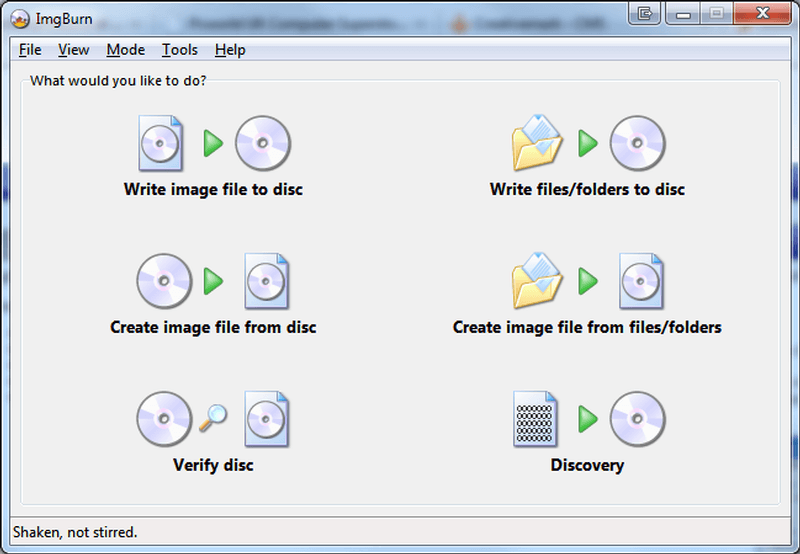
So I just burn the *iso which I download, without some DOS or anything more to CD ? I will use ImgBurn to burn it ,,Write image file to disc,, and after this simply get CD to mechanics, reboot computer and boot system from CD ?
Image
It´s maybe stupid questions from me, but I never flashed BIOS from CD, I always flash it from Desktop (which is more comfortable for me..), I also read I must have BIOS version 2.29/1.08 and nothing else, so I must double-check it.

Vojta91
Posts: 7
Joined: Mon Jan 24, 2022 11:48 am
Location: Prague, CZ

Re: My ,,new,, T61p - future upgrades ?

#9 Post by Vojta91 » Tue Jan 25, 2022 1:55 am

kfzhu1229 wrote:
Mon Jan 24, 2022 5:47 pm
Vojta91 wrote:
Mon Jan 24, 2022 12:04 pm
Hello everybody ! Today I receive this great piece :banana: T61p with 15.4'', Penryn T9300, 3GB RAM, 250HDD and NVIDIA Quadro FX 570.

After cleaning and new thermal paste, my plan is new SSD, probably WD Blue (Sata III) and maybe RAM (2x4GB). But in first I must install new BIOS by Middleton - and this is my first question. Now I have XP 32bits, and it's better to install it from Desktop or by CD ? I never do this, and in readme is note about run WINUPTP.exe like Admin and thats should be all ? I never do this.. in future maybe I will buy new CPU (X9000 or T9900 ?) Which is easier to install it ?
Since you already have the T9300, it makes no sense in my opinion to upgrade it further. Both the X9000 and T9900 are incredibly expensive nowadays and extremely easy for you to stumble across a fake.
X9000 is going to present you with more extra heat and worse battery life (especially since I can't get the X9000 to go under 1V under idle), and comparing my X9000 to T9300, there is just something with running throttlestop to overclock the X9000 that's making it pretty clumsy - often times it gets a bit more sketchy when running on battery, sometimes getting stuck at the lowest multiplier until throttlestop starts running, and also throttlestop quits when docking/undocking.
The T9900 is going to require you to perform the FSB mod, which I strongly advice against Santa Rosa/Montevina newcomers to do, and especially on such a rare motherboard.
But yeah the RAM you can upgrade further, up to 8GB. I offer those sticks on this forum if interested.
You are right.. from this MB I don´t expect more ,,power,, when I have T9300.. and original state is maybe better than experiments with X9000.. about RAM - in my country I find only one shop which offered DDR2 4GBs, and pack 8GB (2*4GB) is for 156USD :roll: and from brand, which I never hear about it - Mushkin Essentials .

kfzhu1229
Senior ThinkPadder
Senior ThinkPadder
Posts: 2659
Joined: Tue Sep 22, 2015 10:59 pm
Location: Toronto, Canada

Re: My ,,new,, T61p - future upgrades ?

#10 Post by kfzhu1229 » Tue Jan 25, 2022 2:12 am

Vojta91 wrote:
Tue Jan 25, 2022 1:44 am
It´s maybe stupid questions from me, but I never flashed BIOS from CD, I always flash it from Desktop (which is more comfortable for me..), I also read I must have BIOS version 2.29/1.08 and nothing else, so I must double-check it.
Well if you need to burn the iso file to a CD, since you are in Windows 7 anyway, you can just use the built in Windows image burner if this software is a bit too advanced for you. Right click the iso file, select the burn option, insert a blank disc (or erase an rewritable disc), and proceed and hope your DVD burner is actually reliable.
That said, I have updated my T61 BIOS within Windows 10 and it was fine. I see why people don't recommend this as I had an E420 that gave me BSOD when I did that BIOS flash in Windows 10 (fortunately the BSOD is before the erasing begins, so rebooting solved the issue)
Vojta91 wrote:
Tue Jan 25, 2022 1:55 am
You are right.. from this MB I don´t expect more ,,power,, when I have T9300.. and original state is maybe better than experiments with X9000.. about RAM - in my country I find only one shop which offered DDR2 4GBs, and pack 8GB (2*4GB) is for 156USD :roll: and from brand, which I never hear about it - Mushkin Essentials .
US$156 is outrageous. Don't pay anything near that - that's already more than what the rest of the laptop is worth!
A more reasonable price typically would be around US$70, though I typically sell my pairs for $55 Canadian on this forum.
AFAIK Mushkin essentials is like adata, a small step below the big name brands like Micron Crucial Kingston Hynix, but certainly above the lesser known brands.
However, since 4GB DDR2 sticks are pushing the technology to their limits, the typical failure rate for 4GB sticks is a lot higher than 2GB, so I don't know if I can recommend Mushkin or Adata.
Dell Lat CP MMX-233 64mb 40gb W2k
600 PII-266 416mb 40gb WXP
T23 PIII 1.13ghz 1gb W7
Precision M4300 X9000 8gb 160gb WUXGA Ultrasharp fp W10
T530i 15.6" i7 16gb fp W10
UXGA:
A30p PIII 1.2 1gb W7 (IDTech)
T43p 2.26 2gb fp W10 (Sharp)
Lat C840 P4-2.5 2gb 60gb W7 (Ultrasharp)

Vojta91
Posts: 7
Joined: Mon Jan 24, 2022 11:48 am
Location: Prague, CZ

Re: My ,,new,, T61p - future upgrades ?

#11 Post by Vojta91 » Tue Jan 25, 2022 2:57 am

kfzhu1229 wrote:
Tue Jan 25, 2022 2:12 am
Vojta91 wrote:
Tue Jan 25, 2022 1:44 am
It´s maybe stupid questions from me, but I never flashed BIOS from CD, I always flash it from Desktop (which is more comfortable for me..), I also read I must have BIOS version 2.29/1.08 and nothing else, so I must double-check it.
Well if you need to burn the iso file to a CD, since you are in Windows 7 anyway, you can just use the built in Windows image burner if this software is a bit too advanced for you. Right click the iso file, select the burn option, insert a blank disc (or erase an rewritable disc), and proceed and hope your DVD burner is actually reliable.
That said, I have updated my T61 BIOS within Windows 10 and it was fine. I see why people don't recommend this as I had an E420 that gave me BSOD when I did that BIOS flash in Windows 10 (fortunately the BSOD is before the erasing begins, so rebooting solved the issue)
Vojta91 wrote:
Tue Jan 25, 2022 1:55 am
You are right.. from this MB I don´t expect more ,,power,, when I have T9300.. and original state is maybe better than experiments with X9000.. about RAM - in my country I find only one shop which offered DDR2 4GBs, and pack 8GB (2*4GB) is for 156USD :roll: and from brand, which I never hear about it - Mushkin Essentials .
US$156 is outrageous. Don't pay anything near that - that's already more than what the rest of the laptop is worth!
A more reasonable price typically would be around US$70, though I typically sell my pairs for $55 Canadian on this forum.
AFAIK Mushkin essentials is like adata, a small step below the big name brands like Micron Crucial Kingston Hynix, but certainly above the lesser known brands.
However, since 4GB DDR2 sticks are pushing the technology to their limits, the typical failure rate for 4GB sticks is a lot higher than 2GB, so I don't know if I can recommend Mushkin or Adata.

I should burn it by my oldscholl HP :) because in this laptop my writer work reliable (well, there is speed limit of burn 16x max for CD) but should work fine.. in worst case, I will update BIOS inside XP from desktop - system on T61p is empty without some software, only system and Lenovo features.

The best RAM will be Crucial but now in this time is hard to get them :-/ 55CanUSD is very good price !
If you have 2 pieces of 4GB DDR2 6400/800MHz for sale, I´am interested !

kfzhu1229
Senior ThinkPadder
Senior ThinkPadder
Posts: 2659
Joined: Tue Sep 22, 2015 10:59 pm
Location: Toronto, Canada

Re: My ,,new,, T61p - future upgrades ?

#12 Post by kfzhu1229 » Tue Jan 25, 2022 3:23 pm

Vojta91 wrote:
Tue Jan 25, 2022 2:57 am
I should burn it by my oldscholl HP :) because in this laptop my writer work reliable (well, there is speed limit of burn 16x max for CD) but should work fine.. in worst case, I will update BIOS inside XP from desktop - system on T61p is empty without some software, only system and Lenovo features.

The best RAM will be Crucial but now in this time is hard to get them :-/ 55CanUSD is very good price !
If you have 2 pieces of 4GB DDR2 6400/800MHz for sale, I´am interested !
Well speed isn't going to be a problem for a BIOS iso image since those are usually very small anyway.
In my experience flashing BIOS under Windows XP or 7 should be fine too, and keep your wifi disabled just in case some other updater starts running in the background.
Also, PM sent
Dell Lat CP MMX-233 64mb 40gb W2k
600 PII-266 416mb 40gb WXP
T23 PIII 1.13ghz 1gb W7
Precision M4300 X9000 8gb 160gb WUXGA Ultrasharp fp W10
T530i 15.6" i7 16gb fp W10
UXGA:
A30p PIII 1.2 1gb W7 (IDTech)
T43p 2.26 2gb fp W10 (Sharp)
Lat C840 P4-2.5 2gb 60gb W7 (Ultrasharp)

unixed
Junior Member
Junior Member
Posts: 336
Joined: Fri Sep 04, 2015 7:41 pm
Location: Oxford, UK

Re: My ,,new,, T61p - future upgrades ?

#13 Post by unixed » Tue Jan 25, 2022 6:02 pm

Vojta91 wrote:
Tue Jan 25, 2022 1:44 am
So I just burn the *iso which I download, without some DOS or anything more to CD ? I will use ImgBurn to burn it ,,Write image file to disc,, and after this simply get CD to mechanics, reboot computer and boot system from CD ?
Correct,
If you are unsure that the iso image has been accurately burnt, you can calculate a checksum (eg. MD5, SHA1 or SHA256) of the iso before and after from the CD.
Someone who uses Windows can explain how if necessary (probably ImgBurn will have options to do this), or else research it.

Finally you probably don't need to flash (so no risk) a modified BIOS anyway since your motherboard can already run a Penryn CPU natively (or the previous owner flashed Middletons BIOS), the other benefits are more marginal or require more expertise to exploit.

RealBlackStuff
Admin Emeritus
Admin Emeritus
Posts: 24727
Joined: Mon Sep 18, 2006 5:17 am
Location: Loch Garman, Éire

Re: My ,,new,, T61p - future upgrades ?

#14 Post by RealBlackStuff » Wed Jan 26, 2022 2:56 am

I have used (and still use) ImgBurn for donkeys years, never a problem.
For BIOS updates (or important backups) I recommend a low burning speed of 4x or 6x.
I still have about 50 new CDs and DVDs (all TDK brand) for just such cases.

A Penryn mobo with unmodded BIOS still only runs at SATA I (1.5Gp/s).
But after Middleton's BIOS it will run at SATA II (3.0Gbs) speed, so install it!
Lovely day for a Guinness! (The Real Black Stuff)
But I actually prefer Murphy's from Cork!

Vojta91
Posts: 7
Joined: Mon Jan 24, 2022 11:48 am
Location: Prague, CZ

Re: My ,,new,, T61p - future upgrades ?

#15 Post by Vojta91 » Wed Jan 26, 2022 9:42 am

RealBlackStuff wrote:
Wed Jan 26, 2022 2:56 am
I have used (and still use) ImgBurn for donkeys years, never a problem.
For BIOS updates (or important backups) I recommend a low burning speed of 4x or 6x.
I still have about 50 new CDs and DVDs (all TDK brand) for just such cases.

A Penryn mobo with unmodded BIOS still only runs at SATA I (1.5Gp/s).
But after Middleton's BIOS it will run at SATA II (3.0Gbs) speed, so install it!
I also use ImgBurn for some playing with old software, it's maybe the best solution, my SSD WD resting on my table :)

I will install it, firstly I must solve problems with hinges which are..like in almost all T61.. weaked and woobly/loose.. in opening state I feel mechanical gap almost 10cm which is pretty much :cry: maybe could be possible to repair them, I found tutorial with glue for metal :??:

Post Reply
  • Similar Topics
    Replies
    Views
    Last post

Return to “ThinkPad T60/T61 Series”

Who is online

Users browsing this forum: No registered users and 79 guests