


 Homepage
 Forum
Forum Drivers
 HMM-Manuals
 MTM
MTM Feed
Feed
As said in the title, I purchased a while back a T61 with the famous failing/dead GPU (I didn't know at the time). I spent some time googling and decided to purchase a replacement board 44C3933. But, from the wiki, I know I'm safe if the it was manufactured after august 2008. And, so far, the only board I found either had blurry picture (which make the date on the gpu unreadable) or the only readable one I found had a date of 0824A2 on the GPU marking (24th week of 2008 -> June).
So my question is for that last one : Is a 44C3933 board from june 2008 safe enough to not risk the GPU failing ?
Take a look at our
ThinkPads.com HOME PAGE
For those who might want to contribute to the blog, start here: Editors Alley Topic
Then contact Bill with a Private Message
ThinkPads.com HOME PAGE
For those who might want to contribute to the blog, start here: Editors Alley Topic
Then contact Bill with a Private Message
Unsurprisingly dead GPU inside T61 - Replacement ?
-
RealBlackStuff
- Admin Emeritus

- Posts: 24727
- Joined: Mon Sep 18, 2006 5:17 am
- Location: Loch Garman, Éire
Re: Unsurprisingly dead GPU inside T61 - Replacement ?
That's a 14.1" widescreen Penryn-mobo with NVS140.
The GPU-date is debatable, however, if it has lasted this long, it may continue to survive.
No guarantee, but fingers crossed.
Just make sure the CPU is cooled properly at all times and undervolt it if possible.
The GPU-date is debatable, however, if it has lasted this long, it may continue to survive.
No guarantee, but fingers crossed.
Just make sure the CPU is cooled properly at all times and undervolt it if possible.
Lovely day for a Guinness! (The Real Black Stuff)
But I actually prefer Murphy's from Cork!
But I actually prefer Murphy's from Cork!
Re: Unsurprisingly dead GPU inside T61 - Replacement ?
If it's undervold, wouldn't I loose some performances ? And I think you meant the GPU, not the CPU?
The board I'm talking about is on aliexpress (because on ebay it's sooooo overpriced).
The board I'm talking about is on aliexpress (because on ebay it's sooooo overpriced).
-
RealBlackStuff
- Admin Emeritus
- Posts: 24727
- Joined: Mon Sep 18, 2006 5:17 am
- Location: Loch Garman, Éire
Re: Unsurprisingly dead GPU inside T61 - Replacement ?
Yes, I'm talking about GPU (not CPU).
Undervolting a 15-year-old machine hardly makes any performance difference.
Undervolting a 15-year-old machine hardly makes any performance difference.
Lovely day for a Guinness! (The Real Black Stuff)
But I actually prefer Murphy's from Cork!
But I actually prefer Murphy's from Cork!
Re: Unsurprisingly dead GPU inside T61 - Replacement ?
Ok, I'll try my luck then...
-
kfzhu1229
- Senior ThinkPadder

- Posts: 2659
- Joined: Tue Sep 22, 2015 10:59 pm
- Location: Toronto, Canada
Re: Unsurprisingly dead GPU inside T61 - Replacement ?
One more thing to add for 14.1" widescreen NVS140M T61's is please make sure the copper pipes are not bent after you are removing the heatsink. If it is bent, bend it back. I've made the costly mistake of an unsafe 14.1 NVS140M T61 mobo having its GPU dead because the weak pressure brackets for GPU coldplate simply couldn't push the coldplate down enough to create mounting pressure and spread the paste properly after deforming the copper pipes a bit.RealBlackStuff wrote: ↑Tue Apr 18, 2023 11:40 amThat's a 14.1" widescreen Penryn-mobo with NVS140.
The GPU-date is debatable, however, if it has lasted this long, it may continue to survive.
No guarantee, but fingers crossed.
Just make sure the CPU is cooled properly at all times and undervolt it if possible.
Dell Lat CP MMX-233 64mb 40gb W2k
600 PII-266 416mb 40gb WXP
T23 PIII 1.13ghz 1gb W7
Precision M4300 X9000 8gb 160gb WUXGA Ultrasharp fp W10
T530i 15.6" i7 16gb fp W10
UXGA:
A30p PIII 1.2 1gb W7 (IDTech)
T43p 2.26 2gb fp W10 (Sharp)
Lat C840 P4-2.5 2gb 60gb W7 (Ultrasharp)
600 PII-266 416mb 40gb WXP
T23 PIII 1.13ghz 1gb W7
Precision M4300 X9000 8gb 160gb WUXGA Ultrasharp fp W10
T530i 15.6" i7 16gb fp W10
UXGA:
A30p PIII 1.2 1gb W7 (IDTech)
T43p 2.26 2gb fp W10 (Sharp)
Lat C840 P4-2.5 2gb 60gb W7 (Ultrasharp)

Re: Unsurprisingly dead GPU inside T61 - Replacement ?
I recently dug out my 'bad date' T61 widescreen -- it still works! Ran it for a few hours and it seems to be fine. I have a feeling it'll probably fail for another reason before the GPU ever does, if it does.
Yeah that's why I just use a T500 heatsink instead in conjunction with eliminating the thermal pillow (which is probably one of the worst aspects of it). I have to imagine any engineers implementing thermal pillows in a design probably laughing to themselves.kfzhu1229 wrote: ↑Tue Apr 18, 2023 7:26 pmOne more thing to add for 14.1" widescreen NVS140M T61's is please make sure the copper pipes are not bent after you are removing the heatsink. If it is bent, bend it back. I've made the costly mistake of an unsafe 14.1 NVS140M T61 mobo having its GPU dead because the weak pressure brackets for GPU coldplate simply couldn't push the coldplate down enough to create mounting pressure and spread the paste properly after deforming the copper pipes a bit.
-
kfzhu1229
- Senior ThinkPadder
- Posts: 2659
- Joined: Tue Sep 22, 2015 10:59 pm
- Location: Toronto, Canada
Re: Unsurprisingly dead GPU inside T61 - Replacement ?
Well I mean ThinkPads always took GPU cooling as a total afterthought until like maybe the W series coming along. A3x series had zero GPU cooling while Dell counterparts have its mini heatsink + cooling fan. T4x series also had zero GPU cooling on the 7500 and 9000 graphics while Dell had active cooling again, T43's cooling is decently okay although northbridge and southbridge are the issues, then T6x/R6x has these soft copper pipes holding the GPU coldplate down while all the competitors used metal reinforcement so it's nearly impossible to lose mounting pressure.micrex22 wrote: ↑Fri May 26, 2023 3:18 amYeah that's why I just use a T500 heatsink instead in conjunction with eliminating the thermal pillow (which is probably one of the worst aspects of it). I have to imagine any engineers implementing thermal pillows in a design probably laughing to themselves.
Dell Lat CP MMX-233 64mb 40gb W2k
600 PII-266 416mb 40gb WXP
T23 PIII 1.13ghz 1gb W7
Precision M4300 X9000 8gb 160gb WUXGA Ultrasharp fp W10
T530i 15.6" i7 16gb fp W10
UXGA:
A30p PIII 1.2 1gb W7 (IDTech)
T43p 2.26 2gb fp W10 (Sharp)
Lat C840 P4-2.5 2gb 60gb W7 (Ultrasharp)
600 PII-266 416mb 40gb WXP
T23 PIII 1.13ghz 1gb W7
Precision M4300 X9000 8gb 160gb WUXGA Ultrasharp fp W10
T530i 15.6" i7 16gb fp W10
UXGA:
A30p PIII 1.2 1gb W7 (IDTech)
T43p 2.26 2gb fp W10 (Sharp)
Lat C840 P4-2.5 2gb 60gb W7 (Ultrasharp)

Re: Unsurprisingly dead GPU inside T61 - Replacement ?
Allegedly the 9000 models also had a "long" fan assembly - FRU 13N5442, which is different from the M10 fan (FRU 13R2657) used on 9600 / FireGL T2 equipped models. I don't think I realized that until now. Do you know how the two fans differ?
I wonder if how much this contributes to GPU running consistently hotter than CPU in ATI T60s.
Thinkpad 25 (20K7), T16 Gen 3 (21MQ), Yoga 14 (20FY), T430s (IPS FHD + Classic Keyboard), X220 4291-4BG
X61 7673-V2V, T60 2007-QPG, T42 2373-F7G, X32 (IPS Screen), A31p w/ Ultrabay Numpad
X61 7673-V2V, T60 2007-QPG, T42 2373-F7G, X32 (IPS Screen), A31p w/ Ultrabay Numpad
Re: Unsurprisingly dead GPU inside T61 - Replacement ?
kfzhu1229 T60 and R60 have the metal dGPU/Northbridge bracket. 26R9633 is the T60p part number, comes with the 42W2196 Miscellaneous Parts Kit.
https://download.lenovo.com/Images/Parts/42W2196/3.jpg
Mirror: https://i.imgur.com/rzeKRRL.jpeg
Here's a picture of one modified to fit a T61p heatsink, I think it'll work with a T500 heatsink as well.
http://www.e30tuner.com/assist/frankenp ... _hs010.jpg
Mirror: https://i.imgur.com/1Ri4zBQ.jpeg
Source: https://forum.thinkpads.com/viewtopic.php?t=105114
My R61 15" get this weird looking thing. 42W3986
https://i.imgur.com/jV0OnN7.jpeg
Looks like some R60 alternatively use a passive cooler for dGPU/Northbridge. 42W2401
https://download.lenovo.com/Images/Parts/42W2401/3.jpg
Mirror: https://i.imgur.com/YpUusq4.jpg
(Reminds me of R50p's passive cooler solution, even for the OnFireGL T2)
https://download.lenovo.com/Images/Parts/42W2196/3.jpg

Mirror: https://i.imgur.com/rzeKRRL.jpeg

Here's a picture of one modified to fit a T61p heatsink, I think it'll work with a T500 heatsink as well.
http://www.e30tuner.com/assist/frankenp ... _hs010.jpg
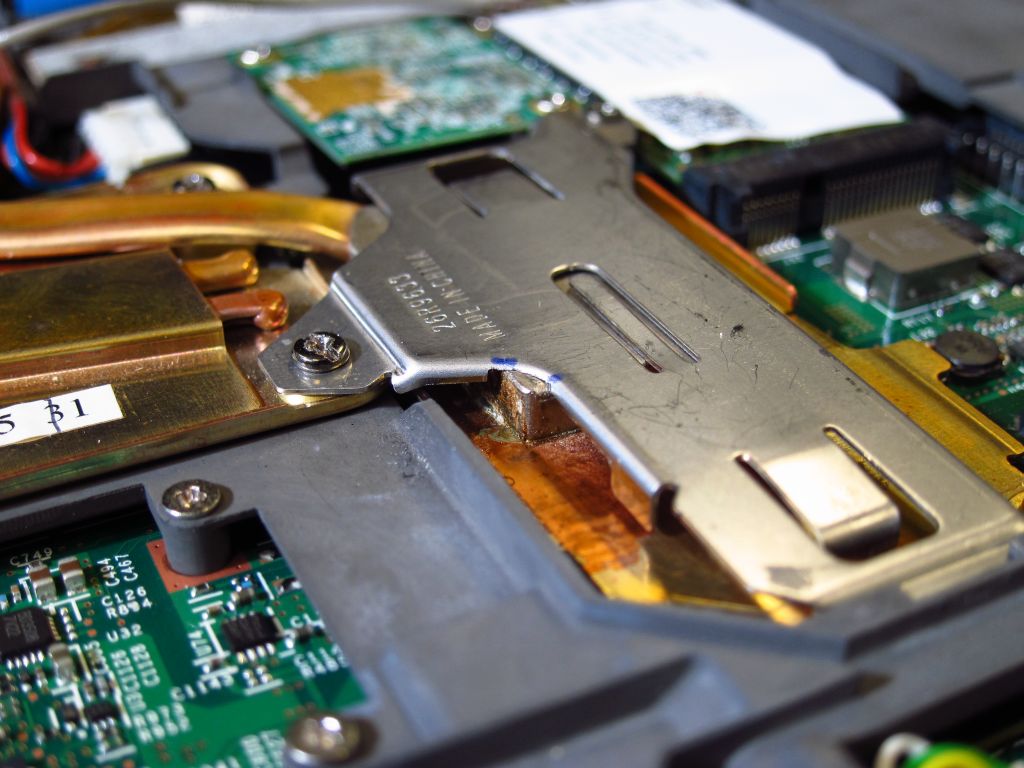
Mirror: https://i.imgur.com/1Ri4zBQ.jpeg

Source: https://forum.thinkpads.com/viewtopic.php?t=105114
My R61 15" get this weird looking thing. 42W3986
https://i.imgur.com/jV0OnN7.jpeg

Looks like some R60 alternatively use a passive cooler for dGPU/Northbridge. 42W2401
https://download.lenovo.com/Images/Parts/42W2401/3.jpg

Mirror: https://i.imgur.com/YpUusq4.jpg

(Reminds me of R50p's passive cooler solution, even for the OnFireGL T2)
sent from my iPhone
Registry Tweak To Enable 2 Finger Scroll On Old Synaptics Touchpads
Registry Tweak To Enable 2 Finger Scroll On Old Synaptics Touchpads
Re: Unsurprisingly dead GPU inside T61 - Replacement ?
One of the four "cushions" on the top of the heatsink has come off and is lying next to the fan-planar connector. It's function is to use the keyboard as a heat sink. If you just let it roll around it can short the planar. Use some thermal paste to keep it in place. Some kind of metallic glue would be better, but I can't remember the name of something I've used in the past.TPFanatic wrote: ↑Sat May 27, 2023 2:48 pmMy R61 15" get this weird looking thing. 42W3986
https://i.imgur.com/jV0OnN7.jpeg
Your heatsink (JCI) has a very good fan (M a t s u s h i t a).
The keyboard screw and the centre-left palmrest screw play an integral part in the cooling system. The latter is what maintains the pressure on the chipset.
The two black things that look like foam on the left on top of the heatsink and the fan connector probably hurt the cooling system (I can't judge their height from the photo) -- the keyboard is supposed to press onto the thermal cushions.
What wifi card is that?
-
- Similar Topics
- Replies
- Views
- Last post
-
-
What's inside a ThinkPad 700, et. al., FDD module?
by branpurn » Wed Mar 04, 2026 3:33 pm » in ThinkPad Legacy Hardware - 6 Replies
- 2152 Views
-
Last post by solidpro
Thu Mar 05, 2026 1:09 pm
-
-
-
GPU upgrade in a P71
by lyricalvanity » Wed Mar 25, 2026 10:50 pm » in ThinkPad P1/P14/P15/P16/P40/P50/P70 and later Series - 0 Replies
- 790 Views
-
Last post by lyricalvanity
Wed Mar 25, 2026 10:50 pm
-
-
-
WANT TO BUY Lenovo Specific P5000 MXM GPU
by Section13.us » Sat Apr 11, 2026 12:06 am » in Marketplace - Forum Members only - 1 Replies
- 424 Views
-
Last post by Saucey
Tue Apr 14, 2026 12:39 pm
-
-
-
accidentally flipped a DOM module - now IDE is dead
by my03 » Sat Feb 21, 2026 8:37 pm » in ThinkPad Legacy Hardware - 3 Replies
- 2384 Views
-
Last post by kishy
Wed Feb 25, 2026 10:58 am
-
Who is online
Users browsing this forum: No registered users and 106 guests