Page 1 of 1
Thinkpad t60 vga output garbled and nothing on the lcd
Posted: Thu Aug 03, 2023 9:37 am
by rvbd
Hello, I have a thinkpad t60 that I'm trying to fix. The inbuild monitor showed nothing when booted up, but when plugged into the external monitor it showed garbled image. Almost as if the signal is out of range. I have tried unplugging the cmos battery to reset the bios as well as reseating the ram.
The image looks like this:
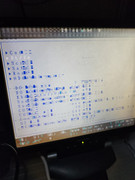
Hopefully someone can shed some light

thanks all
Re: Thinkpad t60 vga output garbled and nothing on the lcd
Posted: Thu Aug 03, 2023 9:53 am
by TPFanatic
Looks like GPU failure. I can't tell the model TYPE from the photo but I believe ATI death is common on T60. You could try a reflow on the ATI GPU if equipped. If it's an Intel GMA 950 model I'm curious if known-good RAM would have an effect but I don't think this is repairable by parts changing.
Re: Thinkpad t60 vga output garbled and nothing on the lcd
Posted: Thu Aug 03, 2023 10:50 am
by rvbd
Hmm the model says type 2008-bp1. This particular model is equipped with intel centrino. Probably I would have to take this apart further to find out about the gpu.
Is there any way to know a bit more if relow is going to fix this? All new to me, I don't even have a heat gun
Re: Thinkpad t60 vga output garbled and nothing on the lcd
Posted: Thu Aug 03, 2023 10:55 am
by TPFanatic
https://tp.krelay.de/index.php?type=2008-BP1
It's got a ATI X1300. I've never personally tried a reflow.
Re: Thinkpad t60 vga output garbled and nothing on the lcd
Posted: Thu Aug 03, 2023 11:24 am
by axur-delmeria
Possibly VRAM failure.
Re: Thinkpad t60 vga output garbled and nothing on the lcd
Posted: Thu Aug 03, 2023 9:43 pm
by rvbd
Hmm probably best bet is to get a new motherboard for this machine? Is there a way to find out exactly where it might fail?
Hmm to be honest, not sure if changing the vram is even possible.
In had a look at reflow techniques and looks like between buying the equipments, may actually cheaper to source a working mobo.
Re: Thinkpad t60 vga output garbled and nothing on the lcd
Posted: Sun Aug 06, 2023 2:31 pm
by kfzhu1229
rvbd wrote: ↑Thu Aug 03, 2023 9:43 pm
Hmm probably best bet is to get a new motherboard for this machine? Is there a way to find out exactly where it might fail?
Hmm to be honest, not sure if changing the vram is even possible.
In had a look at reflow techniques and looks like between buying the equipments, may actually cheaper to source a working mobo.
Usually from my experience if there is nothing on the internal LCD but there is video on VGA it is the GPU chip underfill itself rather than VRAM. You can also test this theory by blocking the heat exhaust and then run memtest86 for 3 hours and let the chip kinda "reflow itself" (don't use a CPU that you care about though). If it starts working normally again it's underfill problem for sure
Re: Thinkpad t60 vga output garbled and nothing on the lcd
Posted: Tue Aug 08, 2023 12:30 am
by rvbd
Hmm okay, so I'm gonna have to get a heatgun and try to reflow the GPU. Kinda curious to try it, nothing to lose I guess since the GPU isn't working well anyway. Although, I think the t60 mobo might be the same price as the heatgun from ali express

Re: Thinkpad t60 vga output garbled and nothing on the lcd
Posted: Tue Aug 08, 2023 11:41 am
by kfzhu1229
rvbd wrote: ↑Tue Aug 08, 2023 12:30 am
Hmm okay, so I'm gonna have to get a heatgun and try to reflow the GPU. Kinda curious to try it, nothing to lose I guess since the GPU isn't working well anyway. Although, I think the t60 mobo might be the same price as the heatgun from ali express
The other approach (and that's the one I usually use) is to bake the motherboard in the oven at about 360F/180C for about 5-6 minutes. Since this is an underfill problem I am not using a temperature intending for the solder balls to completely melt or anything. I prefer oven method myself because I get much more precise temperature control and also a slow decrease in temperature by very slowly opening the oven door to reduce temperature shock to the motherboard.
Re: Thinkpad t60 vga output garbled and nothing on the lcd
Posted: Thu Aug 24, 2023 8:52 pm
by rvbd
Wouldn't this burn the other components in the motherboard? Obviously I can take out all the cables, sticky tapes and everything. But for the other chips and all wouldn't putting it in oven damage it?
Re: Thinkpad t60 vga output garbled and nothing on the lcd
Posted: Fri Aug 25, 2023 1:26 am
by kfzhu1229
rvbd wrote: ↑Thu Aug 24, 2023 8:52 pm
Wouldn't this burn the other components in the motherboard? Obviously I can take out all the cables, sticky tapes and everything. But for the other chips and all wouldn't putting it in oven damage it?
Since in this case it is underfill problem, I specifically used a temperature not hot enough to melt solder so soldering is safe, and also for the plastic components on the motherboard (excluding tape etc), they are all of plastic materials resilient enough to survive through the reflow oven during the manufacturing process, so in turn they will be just fine through this, although they may turn ever so slightly more brownish than before.
Re: Thinkpad t60 vga output garbled and nothing on the lcd
Posted: Sat Aug 26, 2023 8:34 am
by rvbd
Just to be sure, there are some black plastics on the motherboard, are these heat resistant too? Not sure if they are similar material to kapton tapes.
Re: Thinkpad t60 vga output garbled and nothing on the lcd
Posted: Sat Aug 26, 2023 8:35 am
by rvbd
rvbd wrote: ↑Sat Aug 26, 2023 8:34 am
Just to be sure, there are some black plastics on the motherboard, are these heat resistant too? Not sure if they are similar material to kapton tapes.
Talking about the thin plastics covering the some of the components. I'd probably peel them off first anyway to be safe.
Re: Thinkpad t60 vga output garbled and nothing on the lcd
Posted: Sat Aug 26, 2023 3:59 pm
by kfzhu1229
rvbd wrote: ↑Sat Aug 26, 2023 8:34 am
Just to be sure, there are some black plastics on the motherboard, are these heat resistant too? Not sure if they are similar material to kapton tapes.
I would peel those black plastics off. They may actually be just fine but you do run a risk of those things giving some very foul smell inside your kitchen after the baking is done