Homepage
 Forum
Forum Drivers
 HMM-Manuals
 MTM
MTM Feed
Feed
My T520 is a model 4243CU6, 99% stock. Original i5-2520, 1600x900, NVS 4200M, etc. My only changes are putting an mSATA SSD in the 3G/4G radio slot, adding a usb 3 expresscard, and replacing the ultrabay after it failed a year ago. It has been my daily laptop for the last 7 years, mostly for VS, office, miscellany, and some games.
After many years of smooth sailing, something appears to have gone wrong with the NVS 4200M. About 6 or so months ago, it developed a behavior of partially quitting after running it under load for 15 or minutes. The symptoms are very strange. I think this is all best described with a chronology of events.
Observations
Scenario 1:
1. Fresh boot.
2. Run something which will consistently load the 4200M at a high level. For this scenario, my testing go-to is a particular game which keeps the gpu utilization in the 70-76% range. 4200M temp is at a stable 180-183°F. (yeah, that's really hot, but pretty typical for laptops of this era)
3. Everything is fine for the first 15-ish minutes, game runs fine (for a 4200M) at a stable 30 fps, until eventually...
4. Some unknown switch is flipped and the 4200M craps out. The gpu utilization skyrockets to 97-100% and the game is now struggling to run at about 0.66 fps. 4200M temp is now at a stable 151-154°F.
Scenario 2:
1. Fresh boot.
2. Run something which will consistently load the 4200M at a low level. For this scenario, my testing go-to is watching an mpeg-dash video stream in a chromium-based browser that decodes it with nvdec, which keeps the gpu utilization in the 12-14% range. 4200M temp is at stable 145-149°F.
3. Everything is fine for the first 4-6 or so hours, gpu video decoding is fine, until eventually...
4. That unknown event happens and the 4200M craps out. Exact same symptoms as in Scenario 1. Only a reboot solves the problem.
Once the crap-out event hits, all applications using the 4200M for anything non-negligible (i.e. everything except dwm) are now slowed to a crawl - this includes currently running applications as well as any applications launched after the crap-out event. It doesn't matter if the application is intensive (like a game) or basic (like video decoding). Closing the applications and waiting for a while doesn't help. I've waited up to 5 hours to no dice. The only solution is to reboot the machine.
Here's how things look from the perspective of my addgadgets GPU meter:
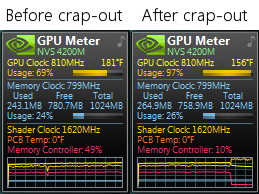
Again, even though the gpu utilization is inexplicably maxed, all gpu-using applications are actually running at arthritic snail speed. It's the opposite of what you'd expect.
Background
This issue spontaneously started happening about half a year ago. It never happened before then. I've had the same nvidia driver for the last 4 years; but for good measure, I tested with every single previous nvidia driver I've had installed (and also the ancient R320 driver that the lenovo website recommends) and the crap-out occurs is now occurring with all of them, so the cause of the problem is elsewhere. It's also not related to the applications I use for testing in Scenario 1 and 2. The game I use in Scenario 1 is one that hasn't changed since 2009 and I've run it flawlessly on the T520 for many years before this problem started happening. Same blistering 180°F temps, too. As for Scenario 2, well Google has made a mockery of software versioning but I can't imagine that Chromium's gpu h264 decoder pipeline substantially changed right at the exact moment this issue started happening on my T520.
Other potentially relevant details:
- Optimus is enabled, and the NVS 4200M is in "Optimal Power" mode with the basic desktop perf level keeping it at 33% max frequency. It will go to max frequency (810 MHz) correctly for demanding applications.
- I've only had the 376.33, 385.41, 385.90, 392.56, and 392.58 nvidia drivers installed. The 392.58 driver has been installed for the last 4 years (long before the 4200M started crapping out). Never had this issue before with any of them.
- The 4200M's idle temp is 120°F when the T520 is on its dock.
- Applications that intermittently load the gpu (e.g. typical WPF things like VS) do not cause the crap-out. Or perhaps they might, but only if I left them running and redrawing for something like 3 weeks, which is not something I have tested.
- I've used the same genuine 90W AC adapter(s), genuine 55++ batteries, and series 3 thinkpad mini-dock for the last 7 years.
- This problem occurs both when my T520 is on its dock and when off-dock & plugged directly into the AC adapter.
- I use Windows 7 Professional x64, which has all its shots and is currently updated to 6.1.7601.26561 (June 2023).
- BIOS is the latest official unmodified one with the spectre mitigation.
The two 100% reliable methods of inducing the crap-out event suggest to me that the cause of the problem is related to GPU throughput, which doesn't say much directly but in turn could be related to a number of things. At first, I thought the 4200M was simply overheating and entering some kind of emergency cooling mode that isn't smart enough to automatically end, but Scenario 2 seems to disprove that. My next guess would be some kind of permanent heat damage (not sure how or what kind) to the NVS 4200M that came from those 180°F temps after many years, but in the last 7 years I have I only put about 50 hours @ 180°F into the 4200M. Also, it will hold itself just fine in the 180-183°F range for those 15 minutes before the crap-out actually occurs. The temp does not sharply increase right before the crap-out. My last guess is some kind of transfer threshold between the cpu and gpu that, when exceeded, causes the crap-out - which itself would just be indicative of some more specific cause, like some failing PCB component, since there is no virtual pcie bandwidth police in Windows or the nvidia driver. I wouldn't even know where to start if the problem is with the circuits.
At any rate, thank you for reading this post which turned out to be essay (oops), and I hope somebody out there knows what is going on with my T520. I know the quickest answer is simply "4200M go bad, buy new mobo", but I am hoping for a more exacting diagnosis and potentially a cheaper fix.
Thanks much in advance to anyone with advice.


 On the dGPU, workstation, and any other infamously hot-headed models this is a slow and hot path to death. I personally love the Arctic brand paste, I did well in the past with AS-5 and my current favorite is MX-6.