Page 1 of 1
Setting custom display brightness levels in Windows 10
Posted: Fri Apr 18, 2025 3:44 pm
by arpeas
This is an issue on both my T400 and the new-to-me T510. There are 16 available brightness levels on both panels, which are gracefully switched through in order when pressing Fn+Home/Fn+End in the BIOS or Windows 7 . In Windows 10, however, i'm only getting 11 brightness options in total, shown on the built in OSD, and switching to some of them doesn't even do anything. This wasn't as much of an issue on the T400 as it is on the T510 because on the latter the lowest level is too low to be usable but the next step up is too high when working in a dark area. Is there perhaps a way to set custom brightness levels or, better yet, completely disable Windows 10's handling of brightness events and let the EC handle them?
I swear Windows 10 has been nothing but madness on the vast majority of machines I've installed it on. Can't imagine what a pain 11 is to deal with...
Re: Setting custom display brightness levels in Windows 10
Posted: Fri Apr 18, 2025 3:52 pm
by TPFanatic
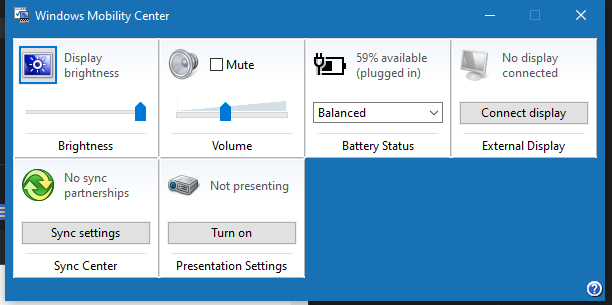
The Mobility Center gives you an alternate slider to control the brightness.
key combo Win+X, then key B, opens Mobility Center on Win 10. It looks like this on my P71. Display brightness slider is in the upper left corner. Press key Tab to put focus on the slider then you can adjust it 0-100 with the arrow keys, alternatively use the cursor to drag the slider.
Re: Setting custom display brightness levels in Windows 10
Posted: Sat Apr 19, 2025 6:22 am
by dr_st
You're not supposed to install Win10 on T400/T510 any more than you are supposed to install Win7 on T470/T580.
I mean, you can, of course, but as these OSes have never been tested with these systems, expected a variety of issues. Most of which can be resolved, but maybe not all.
For example, the Mobility Center trick TPFanatic just shared is a cool one. Works just as well on my T430s.
Re: Setting custom display brightness levels in Windows 10
Posted: Sat Apr 19, 2025 10:15 am
by arpeas
dr_st wrote: ↑Sat Apr 19, 2025 6:22 am
You're not supposed to install Win10 on T400/T510 any more than you are supposed to install Win7 on T470/T580.
I mean, you can, of course, but as these OSes have never been tested with these systems, expected a variety of issues. Most of which can be resolved, but maybe not all.
The hardware is fully supported, even the graphics driver works perfectly fine with Windows 10. All (software) quirks I've ever had with ThinkPads have been related to having Windows 10 installed on them, the brightness is only one example. I can't disable the built in OSD without having to use 3rd party software, sound options can be finnicky on all systems, not just old ThinkPads, and of course let's not forget the absolutely idiotic block on Power Manager's installation. The software is fully functional under 10 Micro$oft, what's the point of blocking its installation without giving users an easy way around it? If I screw up my system it's my own fault. They're treating their users as kindergarteners.
Literally every problem I've had with Windows 10 could've been solved, nay, wouldn't even have been a problem in the first place had M$ given the end users a bloody on/off slider or a checkbox. The only reason i'm using it is because Syncthing doesn't support 7 anymore, and I need it to have the latest KeePass 2 database on all of my devices. I'm thinking of switching to Linux again, but the buttery smooth TrackPoint movement with the official Windows Synaptics driver isn't something I can easily part with.
Also thanks TPFanatic.
Re: Setting custom display brightness levels in Windows 10
Posted: Sat Apr 19, 2025 4:11 pm
by TPFanatic
i also install 10 for compatibility purposes. aside from paywalled customization it works even without a license. whereas classical windows throws hissy fits if not licensed, 7 is at worst annoying, XP just stops working if not licensed. i cba with linux
Re: Setting custom display brightness levels in Windows 10
Posted: Sun Apr 20, 2025 7:22 am
by arpeas
TPFanatic wrote: ↑Sat Apr 19, 2025 4:11 pm
i also install 10 for compatibility purposes. aside from paywalled customization it works even without a license. whereas classical windows throws hissy fits if not licensed, 7 is at worst annoying, XP just stops working if not licensed. i cba with linux
XP is really easy to activate, Micro$oft's phone activation system still works. Or you can use xp_activate32.exe, a nifty little program that magically activates the system by pressing 2 buttons. Vista and 7 get a bit tougher but there's no-fuss software around for it as well. For 10 just use massgrave.dev. BTW I'm not sure if the Vista and 7 activation servers are still up.
But yeah Linux can be a pain to get started with and I got bored with it some time ago.
Re: Setting custom display brightness levels in Windows 10
Posted: Sun Apr 20, 2025 11:24 am
by TPFanatic
im in america, i drive the speed limit

Re: Setting custom display brightness levels in Windows 10
Posted: Sun Apr 20, 2025 1:49 pm
by arpeas
Rules
are meant to be broken

Kidding ofc lol, but I doubt M$ cares for people activating their software without buying it. The majority of their revenue comes from, and always will come from OEM preinstalls, but let's not forget the many advertisements, telemetry and overall rubbish that comes pre-baked into every non LTSC Windows 11 installation ever.
There's tonnes of software I will happily pay a given price for, but Microsoft's doesn't fall under that category.