Take a look at our
ThinkPads.com HOME PAGE
For those who might want to contribute to the blog, start here: Editors Alley Topic
Then contact Bill with a Private Message

Wondering about the expressCard slot.

W500/W510/W520 and W700/W701 Series
Post Reply
Message
Author
cultOfThinkpad
Freshman Member
Posts: 65
Joined: Sat May 14, 2022 3:37 am
Location: Sacramento, CA

Wondering about the expressCard slot.

#1 Post by cultOfThinkpad » Wed Aug 10, 2022 1:12 am

I'm rather interested in the expressCard slot which I removed from my W500.
I took it off to harden my system, so that attackers can't somehow compromise it through this slot
but, lately, I was interested in buying a USB extension card for it and simply epoxying it to the slot
so nobody can remove it.

Who knows if I need more USB ports?

So I just have a couple of questions.
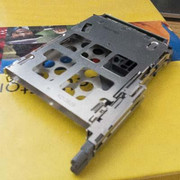
Image Image Image

I know there are two types of expressCard slots which are expressCard/54 and /34.
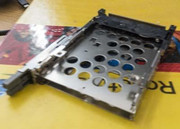
Well, mine seems to have two very slim slots. The top one has a wedge whereas the bottom one doesn't.

What can anyone tell me about this?

Thanks.

dr_st
Admin
Admin
Posts: 10032
Joined: Sat Oct 29, 2005 6:20 am
Location: Israel

Re: Wondering about the expressCard slot.

#2 Post by dr_st » Wed Aug 10, 2022 8:03 am

One of them (I believe it is the top one when installed in laptop) is ExpressCard (PCI-Express x1), the other one is CardBus/PC Card (PCI 32-bit).
Thinkpad 25 (20K7), T16 Gen 3 (21MQ), Yoga 14 (20FY), T430s (IPS FHD + Classic Keyboard), X220 4291-4BG
X61 7673-V2V, T60 2007-QPG, T42 2373-F7G, X32 (IPS Screen), A31p w/ Ultrabay Numpad

cultOfThinkpad
Freshman Member
Posts: 65
Joined: Sat May 14, 2022 3:37 am
Location: Sacramento, CA

Re: Wondering about the expressCard slot.

#3 Post by cultOfThinkpad » Thu Aug 11, 2022 1:58 am

I see. Well, I'm looking to use OpenBSD as my daily driver.
I took a look at a good USB 3.0 extension card but learned that BSD doesn't support it.

Any other ideas for what kinda devices to use in these slots or is expressCard just bust?

axur-delmeria
Senior ThinkPadder
Senior ThinkPadder
Posts: 4413
Joined: Mon May 28, 2012 5:49 am
Location: Metro Manila, Philippines

Re: Wondering about the expressCard slot.

#4 Post by axur-delmeria » Thu Aug 11, 2022 3:12 am

Planned Purchase: T480s i5-8350 FHD Touch
Impulse Buy: Thinkpad not named for safety reasons :lol:
RIP: X220 4291-C91 X61 7676-A24 760XD-U9E :cry:

unixed
Junior Member
Junior Member
Posts: 336
Joined: Fri Sep 04, 2015 7:41 pm
Location: Oxford, UK

Re: Wondering about the expressCard slot.

#5 Post by unixed » Fri Aug 12, 2022 5:48 pm

You can put a USB 2.0 expresscard adapter in it. It will work with BSD. The USB ports on your W500 are flaky and liable to break just with regular usage.

cultOfThinkpad
Freshman Member
Posts: 65
Joined: Sat May 14, 2022 3:37 am
Location: Sacramento, CA

Re: Wondering about the expressCard slot.

#6 Post by cultOfThinkpad » Tue Apr 02, 2024 8:27 am

Hi. It's been a long time since I started this thread.
So I've been looking up Cardbus devices and, if anyone's correct that I can only fit an ExpressCard and CardBus device (not two ExpressCard ones), I'm thinking of using a USB 2.0 CardBus card and a ThinkMods ExpressCard-to-NVMe adapter.

But I realize the devices for either slots tend to have these huge bulging ends that stick out of the slots where you can plug your peripherals in. Would my proposed set up be feasible? Anyone ever tried?

cultOfThinkpad
Freshman Member
Posts: 65
Joined: Sat May 14, 2022 3:37 am
Location: Sacramento, CA

Re: Wondering about the expressCard slot.

#7 Post by cultOfThinkpad » Tue Apr 02, 2024 8:29 am

Actually, while we're at it, I also notice that some ExpressCard and CardBus devices come with driver CDs for Windows.
Will they work with Linux straight out of the box without the need to install any drivers?

axur-delmeria
Senior ThinkPadder
Senior ThinkPadder
Posts: 4413
Joined: Mon May 28, 2012 5:49 am
Location: Metro Manila, Philippines

Re: Wondering about the expressCard slot.

#8 Post by axur-delmeria » Tue Apr 02, 2024 9:43 am

cultOfThinkpad wrote:
Tue Apr 02, 2024 8:29 am
Actually, while we're at it, I also notice that some ExpressCard and CardBus devices come with driver CDs for Windows.
Will they work with Linux straight out of the box without the need to install any drivers?
With regards to Linux support in general (not restricted to Cardbus and/or Expresscard):

If you're lucky, the device is supported by the Linux kernel without needing to do anything.

Some have drivers in the kernel, but require firmware files to be loaded. Most mainstream Linux distributions include them in the default install, so it's becoming less of an issue.

If luck isn't on your side, you'll have to compile the driver yourself. Sometimes, it's just a matter of installing a package (the package manager does the heavy lifting). Worse case if you have to actually search for it all over the net. :(

The absolute worst case is that some devices don't have Linux drivers at all. :cry:

For Expresscard USB 3.0 adapters, the AFAIK the kernel has them.
Cardbus WiFi esp. the older ones are hit-or-miss.
Planned Purchase: T480s i5-8350 FHD Touch
Impulse Buy: Thinkpad not named for safety reasons :lol:
RIP: X220 4291-C91 X61 7676-A24 760XD-U9E :cry:

Tinstaafl
Posts: 2
Joined: Wed Dec 14, 2016 12:18 am
Location: Orlando, FL

Re: Wondering about the expressCard slot.

#9 Post by Tinstaafl » Fri Jun 21, 2024 5:07 am

I have a W500 and run Kanotix Linux (a Debian derived distro) on it. I put a USB3 adapter in the ExpressCard slot. The adapter sits flush with the case & seems to work just fine. Haven't done any testing for speed but I like having the extra USB ports. Parked in its dock I have 9(!) USB ports available (although I think one of the laptop's built in ports is getting flaky).

Love having available all the various other built in ports, card reader, DVD writer, matte WUXGA, touchpad buttons etc. instead of needing external dongles. I maxed out its RAM and installed an SSD. Made a huge difference. But it's starting to struggle on websites. If only there was a motherboard upgrade available. Even as a Frankenpad. I've had this one for 14 years and am having trouble finding a modern day equivalent.

rumbero
Senior Member
Senior Member
Posts: 501
Joined: Fri Mar 04, 2011 7:02 pm
Location: Barcelona, Spain

Re: Wondering about the expressCard slot.

#10 Post by rumbero » Fri Jun 21, 2024 8:10 am

cultOfThinkpad wrote:
Tue Apr 02, 2024 8:27 am
[...] I'm thinking of using a USB 2.0 CardBus card and a ThinkMods ExpressCard-to-NVMe adapter.
[...]
Unless the developer behind that famous ThinkMods store has (at long last) finally reappeared, than better forget about that ExpressCard-to-NVMe adapter.

It looked like a great and potentially successful product but it wasn't destined to ever become reality. The last updates on https://thinkmods.store/blogs/news are from 2021 and the associated discord channel was full of complaints by disappointed people last i looked a year ago. This guy was all promises for delivery of the goods but unfortunately simply disappeared after a long history of excuses and unfulfilled promises.

A pity though, this had all characteristics of something well done. At least there are some cheap NVMe expresscard adapters to be had from elsewhere (aliexpress et al) which are reported (by others) to work sufficiently well.

While we are at it:
Still occasionally use my good old T60/61 Frankenpads with an Adaptec SlimSCSI 1480B Cardbus adapter to access old UltraSCSI periphery of mine (HP Scanjet 4C, some MO drives and also rescuing hard disk contents using a BlueSCSI-v2).
That old Frankenpad still serves its purpose.
A few 14.1" and 15" T61+ Frankenpads and one T480 || https://fosstodon.org/@wmlive

TPFanatic
Senior ThinkPadder
Senior ThinkPadder
Posts: 2824
Joined: Thu Jul 30, 2015 11:29 pm

Re: Wondering about the expressCard slot.

#11 Post by TPFanatic » Fri Jun 21, 2024 8:37 am

for $25 or so you can get on aliexpress or ebay an expresscard to internal m-key NVME adapter, I own one myself, it works well. 2230 and 2242 fit inside it, there's a hole so longer cards can plug in but will stick out.

for example: https://www.aliexpress.us/item/3256805422248267.html

unixed
Junior Member
Junior Member
Posts: 336
Joined: Fri Sep 04, 2015 7:41 pm
Location: Oxford, UK

Re: Wondering about the expressCard slot.

#12 Post by unixed » Mon Jul 01, 2024 1:27 pm

You can effectively do the same thing as the thinkmods adapter. Use either a USB2 mPCIe adapter or a cardbus USB adapter then run a bootloader on there that will boot from something in the expresscard slot, whether it be an NVMe or USB3 drive via an adapter.
I usually use a flush dual USB2 expresscard adapter since the thinkpad USB ports are notoriously prone to breaking on this generation. You can boot from it.

TPFanatic
Senior ThinkPadder
Senior ThinkPadder
Posts: 2824
Joined: Thu Jul 30, 2015 11:29 pm

Re: Wondering about the expressCard slot.

#13 Post by TPFanatic » Mon Jul 01, 2024 4:29 pm

Make sure your bootloader will see the nvme device. I couldn’t get clover to recognize the nvme plugged into to wwan slot on my t500, no clue what i missed… a windows installer booted from the clover would see the nvme tho, but clover couldn’t restart to that nvme.

Post Reply
  • Similar Topics
    Replies
    Views
    Last post

Return to “ThinkPad W500/W510/W520 and W700/W701 Series”

Who is online

Users browsing this forum: No registered users and 39 guests