


 Homepage
 Forum
Forum Drivers
 HMM-Manuals
 MTM
MTM Feed
Feed

HI Everyone
I have had 3 of these on the shelf and 1 full size dock. When I say dock, it's not like your usual dock - it's more like a full blown 486 desktop machine, with a slot in the front for the 700c.
The biggest issue seemed to be displays. After taking each of them apart, I noticed that they have a board on each side - one an inverter (3 caps) and one for display and contrast (5 caps). Nearly all of these were leaking. One had managed to rust through all the pads and I had to run trace wires to new caps to get it working.
I have ended up with 3 working lids though - massive surprise. I expected at least some of the CCFL lamps to be bad.
I now have 2 working bases as well, so all that's left is one base that does not power up at all. I will be dissecting this tomorrow and suspect it'll be a blown cap on the power supply.
I will be storing the lids intacts but not hinge-connected to the bases as the bases are all starting to be destroyed by the weakness in the mounts and brittle plastic. It's a shame they can't be stored intact but the hinges are so so tight and I have no way of loosening them up. I also haven't learned how to make better mounts. I hope some day, someone will simply 3D print or mould an entire replacement base.
Anyone else 'enjoying' preserving these 'original' thinkpads?
Take a look at our
ThinkPads.com HOME PAGE
For those who might want to contribute to the blog, start here: Editors Alley Topic
Then contact Bill with a Private Message
ThinkPads.com HOME PAGE
For those who might want to contribute to the blog, start here: Editors Alley Topic
Then contact Bill with a Private Message
IBM Thinkpad 700C
-
Psyberducky
- Posts: 21
- Joined: Tue Jul 31, 2012 10:13 pm
- Location: Janesville, WI
Re: IBM Thinkpad 700C
Hi solidpro,
I have three 720C machines that I've been wanting to fix the screen on for a long time. Two of them show a completely white picture, and one shows a very washed-out picture. (The backlights are fine).
Do you remember the value of the capacitors you used to fix your contrast board? I have 5 caps on mine as well, but while the two smaller ones are marked "22 35V", the three larger ones are completely unmarked, and are corroding so bad they've "burnt out" the VCOM voltage regulator near them.
Thanks in advance!
I have three 720C machines that I've been wanting to fix the screen on for a long time. Two of them show a completely white picture, and one shows a very washed-out picture. (The backlights are fine).
Do you remember the value of the capacitors you used to fix your contrast board? I have 5 caps on mine as well, but while the two smaller ones are marked "22 35V", the three larger ones are completely unmarked, and are corroding so bad they've "burnt out" the VCOM voltage regulator near them.
Thanks in advance!

Re: IBM Thinkpad 700C
22 35v are 22uf 35v caps. Type that into mouser and you’ll find replacements. Post photos of the other unlabeled caps, never heard of such a thing.
Operator of www.macdat.net - documenting your vintage laptops before they all crumble to dust!
Owns: X210Ai, T480, W541, Yoga S1, E545, W530, "T430p", X201, R60e, T43, G40, T30, T23, A22p, T21, i1482, i1260, 600X, 770ED, 385XD, 760XL, 560, 701C, 755C, 500, PS/Note 425
Owns: X210Ai, T480, W541, Yoga S1, E545, W530, "T430p", X201, R60e, T43, G40, T30, T23, A22p, T21, i1482, i1260, 600X, 770ED, 385XD, 760XL, 560, 701C, 755C, 500, PS/Note 425
-
RealBlackStuff
- Admin Emeritus

- Posts: 24727
- Joined: Mon Sep 18, 2006 5:17 am
- Location: Loch Garman, Éire
Re: IBM Thinkpad 700C
In this thread: viewtopic.php?p=870363#p870363 they 3D-printed a 701c bottom.
Maybe you can use/redo similar for the 700c?
Maybe you can use/redo similar for the 700c?
Lovely day for a Guinness! (The Real Black Stuff)
But I actually prefer Murphy's from Cork!
But I actually prefer Murphy's from Cork!
-
Psyberducky
- Posts: 21
- Joined: Tue Jul 31, 2012 10:13 pm
- Location: Janesville, WI
Re: IBM Thinkpad 700C
I have 22uf 35V caps and figured that's what the labeled ones were, but was asking solidpro directly about the other three since he's successfully recapped these boards (700c and 720c use the same board).
Here are some downsized pictures:


Here are some downsized pictures:
Re: IBM Thinkpad 700C
Any labeling on the sides of the caps? Some nichicons did that
Operator of www.macdat.net - documenting your vintage laptops before they all crumble to dust!
Owns: X210Ai, T480, W541, Yoga S1, E545, W530, "T430p", X201, R60e, T43, G40, T30, T23, A22p, T21, i1482, i1260, 600X, 770ED, 385XD, 760XL, 560, 701C, 755C, 500, PS/Note 425
Owns: X210Ai, T480, W541, Yoga S1, E545, W530, "T430p", X201, R60e, T43, G40, T30, T23, A22p, T21, i1482, i1260, 600X, 770ED, 385XD, 760XL, 560, 701C, 755C, 500, PS/Note 425
-
Psyberducky
- Posts: 21
- Joined: Tue Jul 31, 2012 10:13 pm
- Location: Janesville, WI
Re: IBM Thinkpad 700C
Unfortunately, no, just the stripe for polarity. There's something that looks like it could be writing, but isn't.
I also made sure there weren't any markings hidden under a layer of electrolyte or dust.

I also made sure there weren't any markings hidden under a layer of electrolyte or dust.
Re: IBM Thinkpad 700C
Those are nichicon caps, yellow label and the style says so. You sure there are no markings hidden by the other caps or on the other side? There really should be.
Operator of www.macdat.net - documenting your vintage laptops before they all crumble to dust!
Owns: X210Ai, T480, W541, Yoga S1, E545, W530, "T430p", X201, R60e, T43, G40, T30, T23, A22p, T21, i1482, i1260, 600X, 770ED, 385XD, 760XL, 560, 701C, 755C, 500, PS/Note 425
Owns: X210Ai, T480, W541, Yoga S1, E545, W530, "T430p", X201, R60e, T43, G40, T30, T23, A22p, T21, i1482, i1260, 600X, 770ED, 385XD, 760XL, 560, 701C, 755C, 500, PS/Note 425
-
RealBlackStuff
- Admin Emeritus
- Posts: 24727
- Joined: Mon Sep 18, 2006 5:17 am
- Location: Loch Garman, Éire
Re: IBM Thinkpad 700C
Lovely day for a Guinness! (The Real Black Stuff)
But I actually prefer Murphy's from Cork!
But I actually prefer Murphy's from Cork!
Re: IBM Thinkpad 700C
Hi
Your image isn't working, so I can't tell what caps you're referring to...?
Your image isn't working, so I can't tell what caps you're referring to...?
-
Psyberducky
- Posts: 21
- Joined: Tue Jul 31, 2012 10:13 pm
- Location: Janesville, WI
Re: IBM Thinkpad 700C
solidpro: I sent you a direct link to the pictures in a private message. Please let me know if those work.
RealBlackStuff: Thank you for the links. Unfortunately, those are for the 701 (butterfly) model and this is concerning the 700/720 (bento box model).
RealBlackStuff: Thank you for the links. Unfortunately, those are for the 701 (butterfly) model and this is concerning the 700/720 (bento box model).
Re: IBM Thinkpad 700C
Just for everyone else on here in the future....
Here is a high res pic of the original caps. All the negatives are the same direction as the two marked surface mount caps (- negative is on the side where the board is marked VCOM)
https://i.ibb.co/XW6FZ5w/IMG-7517.jpg
Here is a pic of my fix. Couple of notes, my caps just fell off to the touch. The board wasn't terrifically damaged but IPA would not clean off the corrosion on the pads, I needed to use a very gentle knife or those glass fibre pencils would do it.
You have to be very clever with positioning as the original caps are very very shallow. I've used electrolytic but tantalums would likely be best.
Not pretty, but it works:
https://i.ibb.co/SnF3TzB/IMG-7521.jpg
I'll probably do another pass to clean up the solder and make it look more pretty....
Here is a high res pic of the original caps. All the negatives are the same direction as the two marked surface mount caps (- negative is on the side where the board is marked VCOM)
https://i.ibb.co/XW6FZ5w/IMG-7517.jpg

Here is a pic of my fix. Couple of notes, my caps just fell off to the touch. The board wasn't terrifically damaged but IPA would not clean off the corrosion on the pads, I needed to use a very gentle knife or those glass fibre pencils would do it.
You have to be very clever with positioning as the original caps are very very shallow. I've used electrolytic but tantalums would likely be best.
Not pretty, but it works:
https://i.ibb.co/SnF3TzB/IMG-7521.jpg

I'll probably do another pass to clean up the solder and make it look more pretty....
-
Psyberducky
- Posts: 21
- Joined: Tue Jul 31, 2012 10:13 pm
- Location: Janesville, WI
Re: IBM Thinkpad 700C
Thanks solidpro!
Regarding the hinge repairs, until someone comes up with 3D-printable parts, here's a forum post I saw a long time ago describing 700/720 hinge repair: https://forums.lenovo.com/t5/ThinkPad-T ... m-p/865427
Regarding the hinge repairs, until someone comes up with 3D-printable parts, here's a forum post I saw a long time ago describing 700/720 hinge repair: https://forums.lenovo.com/t5/ThinkPad-T ... m-p/865427
Re: IBM Thinkpad 700C
This has inspired me to take a look at all the 700/720 era lids I can find in my garage and have another pass!
-
goldeneagle
- Sophomore Member
- Posts: 208
- Joined: Sat May 31, 2014 8:06 pm
- Location: Bandera, TX
Re: IBM Thinkpad 700C
Thanks for this thread and the fix. Looks like I have the same problems, with two of the polymer caps bulging. I think I might have the values I need from a previous mouser order, but I'm not sure on the 22uf caps. I have a controller board from a cracked LCD (but otherwise almost new - bought it for $60 at VCF Southwest, complete with original box and documentation. So I might try that first, but I need to make a mouser order anyways, so I'll order the proper organic polymer caps, but get them as through hole and mount the way the OP did. I have no desire to screw around with SMD soldering honestly.
As for my symptoms - noise on the screen, that gets progressively worse. This is exhibited on all three LCDs (cracked and two otherwise good ones), across a 700C and two 720Cs.
I took a 720C apart thinking maybe it was the DC-DC board or the video board, but it worked out, because I was going to take it apart anyways. Turns out that system has the upgraded PLCC BIOS and 240MB hard drive, which has an IDE to ESDI bridge inside. Looking forward to sticking in a 2GB SSD and then rebuilding the battery pack.
As for my symptoms - noise on the screen, that gets progressively worse. This is exhibited on all three LCDs (cracked and two otherwise good ones), across a 700C and two 720Cs.
I took a 720C apart thinking maybe it was the DC-DC board or the video board, but it worked out, because I was going to take it apart anyways. Turns out that system has the upgraded PLCC BIOS and 240MB hard drive, which has an IDE to ESDI bridge inside. Looking forward to sticking in a 2GB SSD and then rebuilding the battery pack.
Historic ThinkPads owned:
300, 360C/CE/PE, 510CS, 560/E/Z, 600/E/X, 700C, 701C/CS, 720C, 730TE, 750C, 750P, 755C/CE/CX/CDV/CD, 760L, 760EL/XD, 765L
Newer ThinkPads owned:
P50, T480
300, 360C/CE/PE, 510CS, 560/E/Z, 600/E/X, 700C, 701C/CS, 720C, 730TE, 750C, 750P, 755C/CE/CX/CDV/CD, 760L, 760EL/XD, 765L
Newer ThinkPads owned:
P50, T480
Re: IBM Thinkpad 700C
Hi
I saw your matching response on Reddit. I think what happened is this conversation about the issues with the display issues and caps were continued on another thread on here, because I remember at one point me and someone else on here were tackling a pile of 720/720C machines at the same time and I was posting photos and descriptions of the journey to replace all the capacitors and how it affected (and resolved) the issues with the flickery displays.
I *think* the conclusion was that the 700 + 720 and the 700C and 720C lids and LCDs are the same (and have the same terrible plastic hinge foundations) and that if you don't replace the capacitors in the lid soon, it will gradually eat itself and stop working! I don't remember it being that difficult apart from the fact that for the caps on the LCD you either had to desoder a ribbon connector (which is very fragile, burns easily and can cause to parts of the screen not working at all) or unfold the thing at a funny angle to get to the caps.
Good luck and post some pics!
I saw your matching response on Reddit. I think what happened is this conversation about the issues with the display issues and caps were continued on another thread on here, because I remember at one point me and someone else on here were tackling a pile of 720/720C machines at the same time and I was posting photos and descriptions of the journey to replace all the capacitors and how it affected (and resolved) the issues with the flickery displays.
I *think* the conclusion was that the 700 + 720 and the 700C and 720C lids and LCDs are the same (and have the same terrible plastic hinge foundations) and that if you don't replace the capacitors in the lid soon, it will gradually eat itself and stop working! I don't remember it being that difficult apart from the fact that for the caps on the LCD you either had to desoder a ribbon connector (which is very fragile, burns easily and can cause to parts of the screen not working at all) or unfold the thing at a funny angle to get to the caps.
Good luck and post some pics!
-
goldeneagle
- Sophomore Member
- Posts: 208
- Joined: Sat May 31, 2014 8:06 pm
- Location: Bandera, TX
Re: IBM Thinkpad 700C
Will do. I did a rough board like you did. I got most issues resolved, but it didn't work optimally. I found yet ANOTHER 700C in storage with bad hinges. Not surprisingly, some electrolyte leaked onto the board. I'm going to remove the caps by snipping them again (worked great last time), and see about putting new ones on, after figuring things out first (if my soldering iron tip is fine enough).solidpro wrote: ↑Fri Aug 11, 2023 4:46 amHi
I saw your matching response on Reddit. I think what happened is this conversation about the issues with the display issues and caps were continued on another thread on here, because I remember at one point me and someone else on here were tackling a pile of 720/720C machines at the same time and I was posting photos and descriptions of the journey to replace all the capacitors and how it affected (and resolved) the issues with the flickery displays.
I *think* the conclusion was that the 700 + 720 and the 700C and 720C lids and LCDs are the same (and have the same terrible plastic hinge foundations) and that if you don't replace the capacitors in the lid soon, it will gradually eat itself and stop working! I don't remember it being that difficult apart from the fact that for the caps on the LCD you either had to desoder a ribbon connector (which is very fragile, burns easily and can cause to parts of the screen not working at all) or unfold the thing at a funny angle to get to the caps.
Good luck and post some pics!
I picked up low ESR polymer caps from mouser just for this job, so I'm hoping that'll work nicely for this project.
Once I get the display fixed, I'll next see if a 2GB CF card works with one of my drive caddies (it has the ESDI to IDE bridge option).
I also suspect the same capacitor issue affects other machines. I have some ThinkPad 300s (made by Zenith) with otherwise good LCDs, but similar problems. If I can get at least one working machine of each series, I'll be happy.
On the note of the 700/720, I'm almost wondering if they're the exact same machine, save for a difference in CPU modules (which is just another board that pops in and out). Taking apart the 700/720 is A LOT more daunting than the 360/750 series. Doable, but lots of different screws and honestly, a pain in the butt.
Historic ThinkPads owned:
300, 360C/CE/PE, 510CS, 560/E/Z, 600/E/X, 700C, 701C/CS, 720C, 730TE, 750C, 750P, 755C/CE/CX/CDV/CD, 760L, 760EL/XD, 765L
Newer ThinkPads owned:
P50, T480
300, 360C/CE/PE, 510CS, 560/E/Z, 600/E/X, 700C, 701C/CS, 720C, 730TE, 750C, 750P, 755C/CE/CX/CDV/CD, 760L, 760EL/XD, 765L
Newer ThinkPads owned:
P50, T480
-
goldeneagle
- Sophomore Member
- Posts: 208
- Joined: Sat May 31, 2014 8:06 pm
- Location: Bandera, TX
Re: IBM Thinkpad 700C
So for updates...
This board was partially successful. It also had a lot of leakage, where the screw closest to the top of the LCD (that holds in this controller board) was fairly corroded.
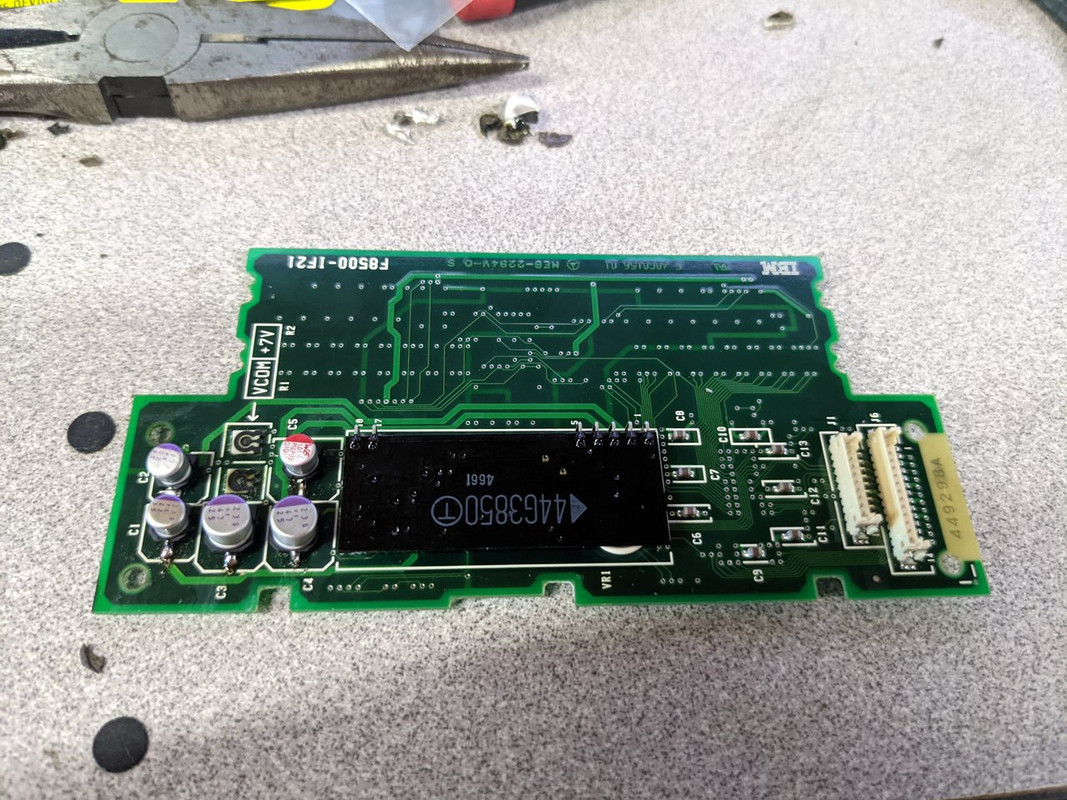
This one was A LOT more successful. The TFT isn't nearly as clear as a 750's, but I'm presuming that's because the 700/720 is an older machine, and more in line with the first (or close to it) generation of TFTs. Some vertical lines, but I feel like I've seen that before on a 700C. Nothing like the black matrix screens on the 755CE, which have a dark rich black color in DOS (or other areas it's called for).
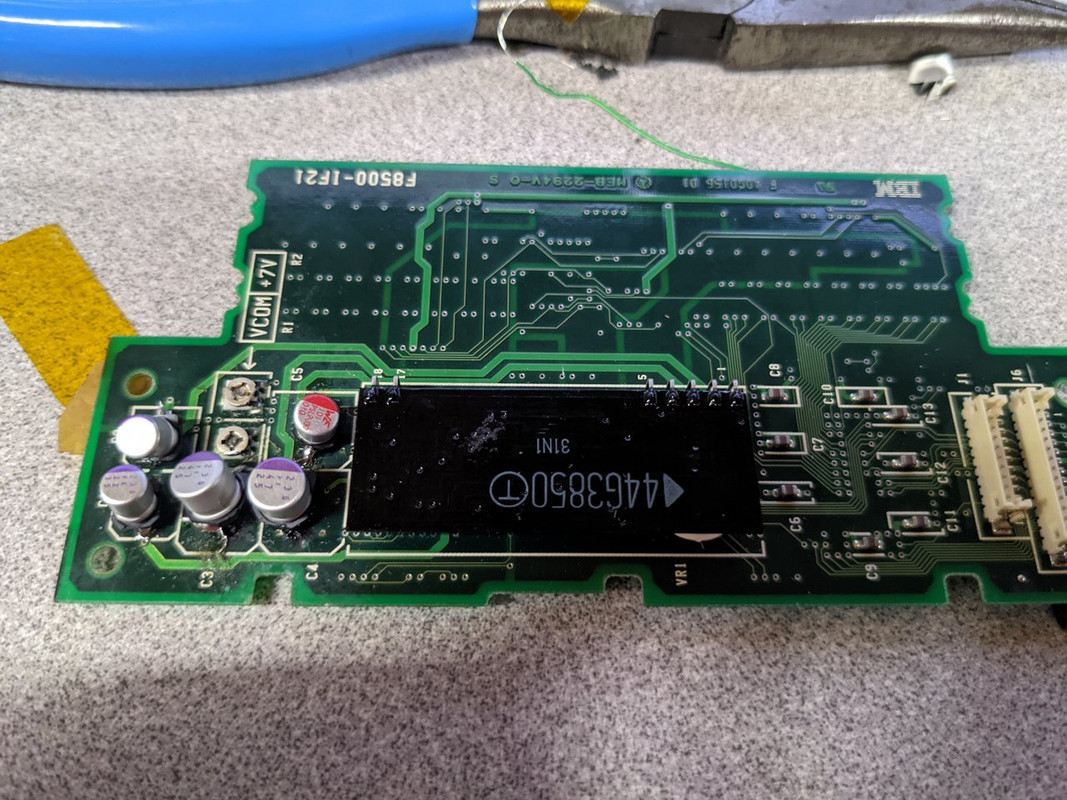
Now I get to reassemble the lid/LCD portion of my 720C and work on other areas in the future (battery, hard drive replacement, etc).
More edits... I clearly wasn't paying attention to size when I ordered replacements, but these still worked:
100uF 10v: https://www.mouser.com/ProductDetail/710-875105242010
47uF 25v: https://www.mouser.com/ProductDetail/667-25SVPF47M
22uF 35v: https://www.mouser.com/ProductDetail/667-35SVPK22M
This board was partially successful. It also had a lot of leakage, where the screw closest to the top of the LCD (that holds in this controller board) was fairly corroded.
This one was A LOT more successful. The TFT isn't nearly as clear as a 750's, but I'm presuming that's because the 700/720 is an older machine, and more in line with the first (or close to it) generation of TFTs. Some vertical lines, but I feel like I've seen that before on a 700C. Nothing like the black matrix screens on the 755CE, which have a dark rich black color in DOS (or other areas it's called for).
Now I get to reassemble the lid/LCD portion of my 720C and work on other areas in the future (battery, hard drive replacement, etc).
More edits... I clearly wasn't paying attention to size when I ordered replacements, but these still worked:
100uF 10v: https://www.mouser.com/ProductDetail/710-875105242010
47uF 25v: https://www.mouser.com/ProductDetail/667-25SVPF47M
22uF 35v: https://www.mouser.com/ProductDetail/667-35SVPK22M
Historic ThinkPads owned:
300, 360C/CE/PE, 510CS, 560/E/Z, 600/E/X, 700C, 701C/CS, 720C, 730TE, 750C, 750P, 755C/CE/CX/CDV/CD, 760L, 760EL/XD, 765L
Newer ThinkPads owned:
P50, T480
300, 360C/CE/PE, 510CS, 560/E/Z, 600/E/X, 700C, 701C/CS, 720C, 730TE, 750C, 750P, 755C/CE/CX/CDV/CD, 760L, 760EL/XD, 765L
Newer ThinkPads owned:
P50, T480
-
goldeneagle
- Sophomore Member
- Posts: 208
- Joined: Sat May 31, 2014 8:06 pm
- Location: Bandera, TX
Re: IBM Thinkpad 700C
I don't suppose you had to replace caps on the backlight board? I found I have different versions of the LCD - one version actually has electrolytic caps it looks like on the backlight board, and the other does not. I noticed now that the top part of the screen isn't as dim, and then something happened with all my colors. The contrast slider did help, so I'm thinking it's time to recap that backlight board.solidpro wrote: ↑Fri Aug 11, 2023 4:46 amHi
I saw your matching response on Reddit. I think what happened is this conversation about the issues with the display issues and caps were continued on another thread on here, because I remember at one point me and someone else on here were tackling a pile of 720/720C machines at the same time and I was posting photos and descriptions of the journey to replace all the capacitors and how it affected (and resolved) the issues with the flickery displays.
I *think* the conclusion was that the 700 + 720 and the 700C and 720C lids and LCDs are the same (and have the same terrible plastic hinge foundations) and that if you don't replace the capacitors in the lid soon, it will gradually eat itself and stop working! I don't remember it being that difficult apart from the fact that for the caps on the LCD you either had to desoder a ribbon connector (which is very fragile, burns easily and can cause to parts of the screen not working at all) or unfold the thing at a funny angle to get to the caps.
Good luck and post some pics!
And to make matters more interesting, I have a flaky connection on the video board. I'm thinking cold solder joint where the display signal cable meets the board (I've seen it before in other models - cold solder joints, that is).
Historic ThinkPads owned:
300, 360C/CE/PE, 510CS, 560/E/Z, 600/E/X, 700C, 701C/CS, 720C, 730TE, 750C, 750P, 755C/CE/CX/CDV/CD, 760L, 760EL/XD, 765L
Newer ThinkPads owned:
P50, T480
300, 360C/CE/PE, 510CS, 560/E/Z, 600/E/X, 700C, 701C/CS, 720C, 730TE, 750C, 750P, 755C/CE/CX/CDV/CD, 760L, 760EL/XD, 765L
Newer ThinkPads owned:
P50, T480
Re: IBM Thinkpad 700C
I bagged a half-decent (as half decent as they ever are, these days) 700C and am midway through restoring it. In tackling it, I knew the display needed attention but disassembling it wasn't ringing any bells, and then I find this thread where I've done the whole thing before.
Anyway, I've detached the lid from the base for safe preservation - if you leave the lid attached to the base on a 700,700C, 720 or 720C (along with a couple of the earlier PS/Notes of the which used the same hinge/base design), they *will* destroy themselves. The display was 'screaming' and white which has been perfectly fixed with some ceramic capacitors. Now the base is also screaming so there must be a few dead caps buried somewhere inside. Hopefully tackling that today or tomorrow! Will post some pics.
Anyway, I've detached the lid from the base for safe preservation - if you leave the lid attached to the base on a 700,700C, 720 or 720C (along with a couple of the earlier PS/Notes of the which used the same hinge/base design), they *will* destroy themselves. The display was 'screaming' and white which has been perfectly fixed with some ceramic capacitors. Now the base is also screaming so there must be a few dead caps buried somewhere inside. Hopefully tackling that today or tomorrow! Will post some pics.
Re: IBM Thinkpad 700C
Well. I deconstructed a 700c, which wasn't too bad, but you have to keep tabs on exactly what screw came from where, and lay out what you remove in order so you can work back in reverse.
The only elecrolytic capacitors on the main system were 3 on the DC/DC board:

I've replaced 1 with a tantalum and the other two with new electrolytic. The only one which was leaking was a surface mount 47u one.
Now I'm in the final furlong but I can't get back the boot up screen:

I've replaced the CMOS clock battery, which should mean I can get past the 173 and 163 messages but I can't get past this screen. Anyone have any ideas what I9990303 and 01048300 mean?
I've tried booting from floppy, but it refuses. The HDD is spinning but could be dead. It's not IDE, is it?
Thanks!
The only elecrolytic capacitors on the main system were 3 on the DC/DC board:
I've replaced 1 with a tantalum and the other two with new electrolytic. The only one which was leaking was a surface mount 47u one.
Now I'm in the final furlong but I can't get back the boot up screen:
I've replaced the CMOS clock battery, which should mean I can get past the 173 and 163 messages but I can't get past this screen. Anyone have any ideas what I9990303 and 01048300 mean?
I've tried booting from floppy, but it refuses. The HDD is spinning but could be dead. It's not IDE, is it?
Thanks!
-
Psyberducky
- Posts: 21
- Joined: Tue Jul 31, 2012 10:13 pm
- Location: Janesville, WI
Re: IBM Thinkpad 700C
The Hardware Maintenance Manual shows "0104XXXX" as a "Hard Disk Drive fault", and "I9990303" as "Can't Boot from the Hard Disk Drive".
Unfortunately, these machines use DBA ESDI hard drives (where the controller is on the drive itself), not IDE!
Regarding the floppy drive, have you tried booting specifically from a copy of the official Reference Diskette (available at https://www.ardent-tool.com/9552/700C.html )?
Unfortunately, these machines use DBA ESDI hard drives (where the controller is on the drive itself), not IDE!
Regarding the floppy drive, have you tried booting specifically from a copy of the official Reference Diskette (available at https://www.ardent-tool.com/9552/700C.html )?
-
RealBlackStuff
- Admin Emeritus
- Posts: 24727
- Joined: Mon Sep 18, 2006 5:17 am
- Location: Loch Garman, Éire
Re: IBM Thinkpad 700C
As per 600 and X20 HMM, "I9990303 errors can be caused by exposure to strong magnetic fields."
As per TPF in 2004 (!): I9990303: HDD error
No idea about 01048300.
As per TPF in 2004 (!): I9990303: HDD error
No idea about 01048300.
Lovely day for a Guinness! (The Real Black Stuff)
But I actually prefer Murphy's from Cork!
But I actually prefer Murphy's from Cork!
Re: IBM Thinkpad 700C
Well, strong magnetic fields will wipe a hard drive, so that does add up. It would be nice if someone cooked up a solid-state replacement for these ESDI drives but they're just so darn uncommon that the demand likely isn't there.
What brand is the hard disk? Is it an IBM drive or from some other vendor?
What brand is the hard disk? Is it an IBM drive or from some other vendor?
Operator of www.macdat.net - documenting your vintage laptops before they all crumble to dust!
Owns: X210Ai, T480, W541, Yoga S1, E545, W530, "T430p", X201, R60e, T43, G40, T30, T23, A22p, T21, i1482, i1260, 600X, 770ED, 385XD, 760XL, 560, 701C, 755C, 500, PS/Note 425
Owns: X210Ai, T480, W541, Yoga S1, E545, W530, "T430p", X201, R60e, T43, G40, T30, T23, A22p, T21, i1482, i1260, 600X, 770ED, 385XD, 760XL, 560, 701C, 755C, 500, PS/Note 425
Re: IBM Thinkpad 700C
Didn't I see some goss somewhere online recently that someone had come up with a ESDI hard drive emulator or adaptor?
I've seen that 'strong magnetic fields' before and I seem to remember someone suggesting something had been fried. I can't remember though if I accidentally came up with the solution or I gave up.... I think it was the same error but on a 755 era machine.
I've seen that 'strong magnetic fields' before and I seem to remember someone suggesting something had been fried. I can't remember though if I accidentally came up with the solution or I gave up.... I think it was the same error but on a 755 era machine.
Good call - I'll download and make a floppy right now!Regarding the floppy drive, have you tried booting specifically from a copy of the official Reference Diskette (available at https://www.ardent-tool.com/9552/700C.html )?
Re: IBM Thinkpad 700C

Ok, we're in business. Set the clock, ran all the tests, the ESDI drive is fritzed..... ideas?!


I read that PS/2 ESDI isn't what everyone else called ESDI, so I guess until some really fanatatic nerdy person decides to either emulate or adapt specifically PS/2 ESDI, this machine is stuck with floppies!
Re: IBM Thinkpad 700C
Someone has suggested booting from a CF card in the PC Card bay..... I have a vague possible distant suspicion that it might be possible in a 700C.... anyone ever tried?
Re: IBM Thinkpad 700C
I think you'll struggle with that, as PCMCIA slots were only introduced with the 720, weren't they?

The ESDI drives are made by IBM, of course, in a removable cradle that was only used in the 700 & 720. The N33sx, N51sx/slc, and CL57sx would probably have used the same basic ESDI drives, albeit permanently mounted rather than in removable cradles. Both the N51 and CL57 were also MicroChannel machines.
I've just googled 01048300 and it indicates EDSI controller failure. Clean the drive connector and try reseating it. Can you hear/feel the platters spinning in the drive when inserted? I've had old ThinkPad drives fail due to stiction, and just needed the 'discus throw' a few times to free the parked heads from the platters and get them spinning again.
I9990303 is a famous 'System Partition boot failure' POST error code.
On most MicroChannel machines, the BIOS code was stored in a dedicated hidden System Partition on the first hard disk (and so could be readily updated in the field before flashable ROMs were common). A ROM system loader booted software from this partition in order to start the machine up, so a functioning but wiped hard disk would produce 'no system partition' errors. One function of the Reference Diskette was to re-instate this partition if not present (Restore System Partition), another major function was software configuration of any installed adapters - plug'n'play back when everyone else was setting ISA card jumpers to select interrupts, I/O ports, and high memory areas. MCA adapters were supplied with Option Diskettes, containing .ADF files which described the configuration options and needed to be added into the System Partition so that the machine could auto-configure added adapters at boot. This page at Ardent Tool of Capitalism gives a good overview and quick-start (although it is taken from some of the later server documentation where flash BIOS and RAID controllers were options).
There's a nice copy of the 700/700C brochure here at the Ardent Tool of Capitalism site, which shows the rare expansion cartridge (additional half-length MCA slots) and the expansion unit (docking station) you teased with at the start of the thread.
Last edited by ThinkDan on Sat Feb 03, 2024 3:31 am, edited 1 time in total.
235, 240, 350, 360, 370, 380, 500, 535, 560, 570, 600, 700, 701, 720, 750, 750P, 755, 760, 770, N33sx, PC110, PS/55 note, T2x, T30, T4x, T6x, T420, W520, X2x, X3x, X4x, X6x, X200, X300
Classic ThinkPad Device Drivers
Dan's IBM PalmTop PC110 pages
Re: IBM Thinkpad 700C
pp98-99 of the ThinkPad 700 HMM deals with replacing hard disks, restoring system partition, and setting startup sequence using the Reference Diskette with instructions that will be more specific than the link I gave earlier.
Also pp82-88 list the POST error codes as pictured. I'm sure you've guessed that some of them relate to failed CMOS battery, as usual for old ThinkPads: 00016300 and 00017300 equate to the later 161, 163, 173 POST errors.
Also pp82-88 list the POST error codes as pictured. I'm sure you've guessed that some of them relate to failed CMOS battery, as usual for old ThinkPads: 00016300 and 00017300 equate to the later 161, 163, 173 POST errors.
235, 240, 350, 360, 370, 380, 500, 535, 560, 570, 600, 700, 701, 720, 750, 750P, 755, 760, 770, N33sx, PC110, PS/55 note, T2x, T30, T4x, T6x, T420, W520, X2x, X3x, X4x, X6x, X200, X300
Classic ThinkPad Device Drivers
Dan's IBM PalmTop PC110 pages
Re: IBM Thinkpad 700C
Yes, I did realise, last week.I think you'll struggle with that, as PCMCIA slots were only introduced with the 720, weren't they?
Thats a good call. I have loads of those, in pieces on the shelf! Maybe there is a drive!N33sx, N51sx/slc, and CL57sx would probably have used the same basic ESDI drives, albeit permanently mounted rather than in removable cradles. Both the N51 and CL57 were also MicroChannel machines.
I'd also found the restore system partition part of the reference/diag disks and have tried it but the drive is more FUBAR'd than just what's on it.... I am going down now to do some shaking and wobbling and will let you know how it goes...
-
- Similar Topics
- Replies
- Views
- Last post
-
- 16 Replies
- 5603 Views
-
Last post by solidpro
Fri Mar 20, 2026 3:10 am
-
-
IBM Thinkpad 600x Schematics and Boardview
by hcooll3 » Thu Nov 20, 2025 1:11 pm » in ThinkPad Legacy Hardware - 2 Replies
- 5669 Views
-
Last post by astral
Fri Nov 21, 2025 5:52 pm
-
-
- 2 Replies
- 3606 Views
-
Last post by panips
Fri Feb 06, 2026 3:36 pm
-
-
IBM ThinkPad z61m 4 cycles of 4 beeps.
by Vasyu_06 » Mon Jan 19, 2026 2:07 am » in ThinkPad R, A, G and Z Series - 4 Replies
- 4164 Views
-
Last post by Vasyu_06
Thu Jan 29, 2026 5:28 am
-
Who is online
Users browsing this forum: No registered users and 46 guests