


 Homepage
 Forum
Forum Drivers
 HMM-Manuals
 MTM
MTM Feed
Feed
I have a Thinkpad Edge 15, model 0301-J6G. Last month I tried to update the BIOS using the files from the Lenovo Legacy Hardware site, using the Windows-based updater. After a bit the screen went black and the laptop became unresponsive; not knowing what to do, I waited a couple of hours and then powered it off.
From that moment on the laptop will not boot to bios, it just stays there with a black screen and full speed fans.
I already tried the CMOS battery thingy, to no effect. Does anyone know if there is a recovery mode of some sort, that lets me try to flash the BIOS through USB? The USB port gets power, so maybe all is not lost?
EDIT: on a side note, does anybody know the name pf the BIOS they put inside the Thinkpad Edge 15?
Take a look at our
ThinkPads.com HOME PAGE
For those who might want to contribute to the blog, start here: Editors Alley Topic
Then contact Bill with a Private Message
ThinkPads.com HOME PAGE
For those who might want to contribute to the blog, start here: Editors Alley Topic
Then contact Bill with a Private Message
Thinkpad Edge 15 - Bricked during BIOS update
-
Thinkpad4by3
- Senior ThinkPadder

- Posts: 2670
- Joined: Sun Aug 09, 2015 9:25 am
- Location: N. Bellmore, ny
Re: Thinkpad Edge 15 - Bricked during BIOS update
Likely, your board is fried unless you know how to flash the BIOS using wires directly soldered to the BIOS chip.
Thinkpad4by3's Law of the Universe.
The efficiency of two screens equally sized with equal numbers if pixels are equal. The time spent by a 4:3 user complaining about 16:9 is proportional to the inefficiency working with a 16:9 display, therefore the amount of useful work extracted is equal.
The efficiency of two screens equally sized with equal numbers if pixels are equal. The time spent by a 4:3 user complaining about 16:9 is proportional to the inefficiency working with a 16:9 display, therefore the amount of useful work extracted is equal.
-
RealBlackStuff
- Admin Emeritus

- Posts: 24727
- Joined: Mon Sep 18, 2006 5:17 am
- Location: Loch Garman, Éire
Re: Thinkpad Edge 15 - Bricked during BIOS update
See if this helps: https://forums.lenovo.com/t5/Lenovo-Ide ... -p/2210834
Lovely day for a Guinness! (The Real Black Stuff)
But I actually prefer Murphy's from Cork!
But I actually prefer Murphy's from Cork!
Re: Thinkpad Edge 15 - Bricked during BIOS update
It doesn't seem to be the same modelRealBlackStuff wrote: ↑Fri Oct 13, 2017 9:52 amSee if this helps: https://forums.lenovo.com/t5/Lenovo-Ide ... -p/2210834

I cannot seem to find the "novo" button anywhere.
Does anybody know if there is a recovery mode for this specific laptop, or how to search for it?
-
RealBlackStuff
- Admin Emeritus
- Posts: 24727
- Joined: Mon Sep 18, 2006 5:17 am
- Location: Loch Garman, Éire
Re: Thinkpad Edge 15 - Bricked during BIOS update
AFAIK it's a tiny opening on the left side, near the front, in which you push a paperclip or similar, to reset the laptop.
Re: Thinkpad Edge 15 - Bricked during BIOS update
Ok so, it seems the Novo button is present in the "Lenovo Edge 15" laptop, not the "Lenovo Thinkpad Edge 15": they are totally different laptopsRealBlackStuff wrote: ↑Fri Oct 13, 2017 11:49 amAFAIK it's a tiny opening on the left side, near the front, in which you push a paperclip or similar, to reset the laptop.
 , the second one is from 2009 I think, while the Edge 15 should be from 2014.
Here's the Lenovo Thinkpad Edge 15's side (it's not my laptop, but it's identical)
https://www.notebookcheck.it/fileadmin/ ... eb2b1f.jpg
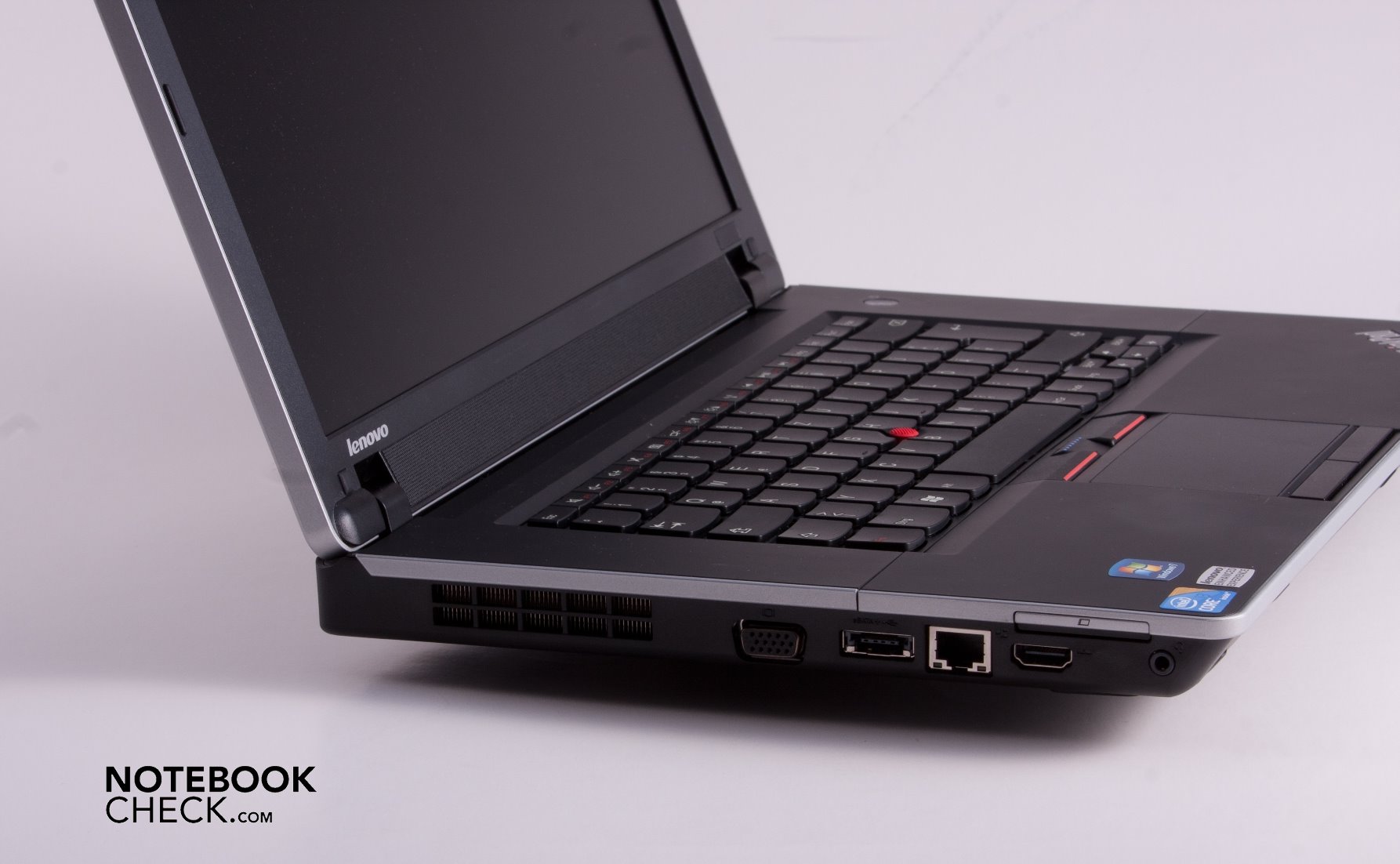
And here's my laptop's left side, for posterity
https://i.imgur.com/Vnrz2zS.jpg

Please read the Forum Rules, especially Section 5: viewtopic.php?f=16&t=14339
Re: Thinkpad Edge 15 - Bricked during BIOS update
Hi,
I'm new to this forum, but come to think of it, I should have enlisted earlier, I had so many questions about my own Lenovo laptop. I'm sorry I can help with the topic at hand, because last time I upgraded the BIOS on my machine, it went without a hitch.
I have a question regarding the difference between Edge 15 and ThinkPad Edge 15, because I think I have the former (CPU is Intel Pentium P6100, came with 2GB of RAM, now up to 6GB, and a 500-GB rotating HDD that I replaced with a same-capacity Samsung SSD a few months ago), and I have a few issues with the fan behavior using TP Fan Control.
Can someone point me to a topic or thread that deals with that? I've searched the forum before posting, but as I said, I'm new here, so...
I'm new to this forum, but come to think of it, I should have enlisted earlier, I had so many questions about my own Lenovo laptop. I'm sorry I can help with the topic at hand, because last time I upgraded the BIOS on my machine, it went without a hitch.
I have a question regarding the difference between Edge 15 and ThinkPad Edge 15, because I think I have the former (CPU is Intel Pentium P6100, came with 2GB of RAM, now up to 6GB, and a 500-GB rotating HDD that I replaced with a same-capacity Samsung SSD a few months ago), and I have a few issues with the fan behavior using TP Fan Control.
Can someone point me to a topic or thread that deals with that? I've searched the forum before posting, but as I said, I'm new here, so...
Re: Thinkpad Edge 15 - Bricked during BIOS update
Well that explains why it's so confusing searching for info on the one I got. I have the "Lenovo Thinkpad Edge 15" and I couldn't make sense of why they would release a laptop with the exact same name twice. I just assumed this thing was so bad lenovo wanted to act like it never existed or something.novevite wrote: ↑Sat Oct 14, 2017 2:24 amOk so, it seems the Novo button is present in the "Lenovo Edge 15" laptop, not the "Lenovo Thinkpad Edge 15": they are totally different laptopsRealBlackStuff wrote: ↑Fri Oct 13, 2017 11:49 amAFAIK it's a tiny opening on the left side, near the front, in which you push a paperclip or similar, to reset the laptop.
Here's the Lenovo Thinkpad Edge 15's side (it's not my laptop, but it's identical)
https://www.notebookcheck.it/fileadmin/ ... eb2b1f.jpg
And here's my laptop's left side, for posterity
https://i.imgur.com/Vnrz2zS.jpg
Please read the Forum Rules, especially Section 5: viewtopic.php?f=16&t=14339
-
- Similar Topics
- Replies
- Views
- Last post
-
-
X220T Bios Update. USB listed after F12 but will not update.
by ThinkCat » Thu Nov 27, 2025 9:56 am » in ThinkPad X200/X201/X220 and X300/X301 Series - 2 Replies
- 10048 Views
-
Last post by ThinkCat
Fri Nov 28, 2025 6:45 am
-
-
- 2 Replies
- 8293 Views
-
Last post by LayaVulpes
Tue Oct 21, 2025 12:12 pm
-
-
Thinkpad Helix 2 - Old Bios (1.77) Update (2.16-2020) done ...
by friedrich-eugen » Sun Oct 26, 2025 9:31 am » in ThinkPad/Ideapad Tablets & Convertibles - 0 Replies
- 10514 Views
-
Last post by friedrich-eugen
Sun Oct 26, 2025 9:31 am
-
-
-
Should I update my T440p BIOS?
by CicadaCool » Wed Nov 26, 2025 8:11 am » in ThinkPad T430-T495 / T530-T590 Series - 2 Replies
- 9006 Views
-
Last post by ZaZ
Fri Nov 28, 2025 1:51 am
-
Who is online
Users browsing this forum: No registered users and 35 guests