


 Homepage
 Forum
Forum Drivers
 HMM-Manuals
 MTM
MTM Feed
Feed

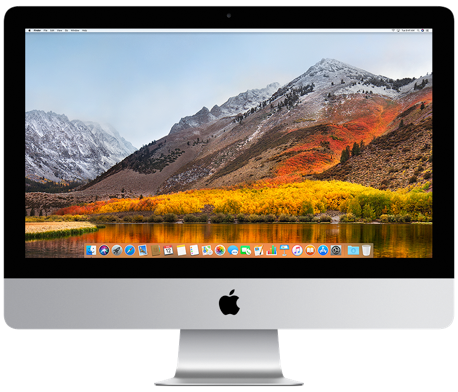
This iMac came from the factory with a 2.5" SATA HDD.
These HDDs apparently are often the part that conks out first and needs to be replaced.
He brought it to a local "repair" shop called www.iphixx.com, (notice the name IPHIXX)...
They charged him a small fortune and replaced the HDD with an SSD, but apparently did not properly phixx fix it.
After only a short time, it conked out again.
He brought it back, they "phixxed" it again and then claimed it worked, and this was the best they could do.
When the problem repeated, he gave up and put the machine away, got a laptop and went on with his life.
Then a few weeks ago, this neighbour asked me if I wanted to have a look at that iMac.
Being an IBM/Lenovo person most of my computer life, I didn't have the foggiest about iMacs or macOS.
But having over 30 years experience of taking computers and laptops apart, I thought I'll give it a try.
So I had to learn the basics about those Fruit machines, and the only way was to do something on my own laptop, a T480.
I installed Oracle Virtualbox for a VM with macOS 'Catalina', using these very helpful instructions.
Played around with it, until I understood the basics, then got on to the real iMac.
One of the first things I did was finding out the specs of this machine.
This iMac has a so-called Fusion drive, which is a combination of a small NVMe SSD for the basic macOS and a
large 2.5" SATA drive (originally HDD, now SSD) for all other functions, 'fusioned' together to work as ONE disk.
It also has only 8GB RAM, just asking for an upgrade!
When I first tried this iMac, after a few false boots, reboots, restarts, whatever, it still would not boot properly,
or if it did, it stopped after a few minutes, or gave some rubbish on the screen.
My first conclusions were: dying hard disk and/or dying motherboard.
So this machine needed to be opened to check things out.
Easy-peasy I thought, because as far as I knew iMacs had their screens held in place with magnets.
Unfortunately for me that is NOT the case on 'newer', speak 2017, iMacs, where the screen is GLUED to the case!
Lucky for me (and all iMac users) there is this fantastic www.ifixit.com website.
Notice the name IFIXIT, remember the IPHIXX from before? Guess where they stole their name from...
Anyhoo, IFIXIT has THE most complete instructions for how to take these machines apart.
Lenovo could learn a few things from them!
On there I found the perfect instructions to replace the drive and the RAM for this model. Have a look!
To open the (glued) screen, you need what they call a “pizza-cutter”, fair bit of work.

After that it was easy enough to get at the 2.5” drive.
Turned out that IPHIXX had replaced the factory HDD with a cheapest-of-the-cheap KingFast F10 SSD.
Read about that piece of sh!t here.
No wonder the SSD was conking out! So another SSD needed to be organised.
BUT, these internal 2.5” drives are only SATA, which is slow by today's standards.
Luckily these iMacs have not only 4 USB3.0 ports but also 2 USB-C/Thunderbolt ports (which are a lot faster than SATA).
This meant an external SSD+case, I chose a Crucial P310 1TB SSD in a Sabrent USB-C case.
(I actually ordered 2 of each, one set for myself).
Waiting for the new drives+cases to come in in a few days, I went on to get to the RAM.
Bit more technical details: since the large Fusion drive was going external, the small Fusion drive was now superfluous
and the Fusion idea became redundant.
So the small Fusion SSD could come out, it happened to sit on the same side of the motherboard as the RAM.
What I absolutely DISlike, is that you have to take out almost two-thirds of the innards, including the power supply and
the motherboard, to get to RAM and Fusion SSD!
And you need Torx-5, Torx-8, Torx-10 and Phillips PH00 screwdrivers to get dozens of screws out.
It took 64 (that is SIXTY FOUR) steps on the instructions to get to that RAM!
Once I got there, luckily I had 2 spare 8GB DDR4-2400 modules, which made a perfect upgrade to 16GB.
The small Fusion drive also came out easily.
Reassemble motherboard and power-supply and try to get the external drive sorted.
I made a bootable USB-stick with macOS Ventura on it, to install that on an old 2.5” 80GB SATA SSD,
connected via adapter to an iMac USB-port.
Messed with it for nearly 2 days, could not get it installed, no matter what I did.
So I played around some more with the VM on my T480, but it was not "real" enough for me.
And then I thought about Hackintosh, which is basically a Windows/Linux machine hacked into a Macintosh.
And what better machine to hack than my T480!
Reading up on a whole load of more new stuff, I settled on OpenCore Legacy Patcher on External HD Boot Drive.
Which is based on Dortania’s OpenCore.
It didn’t take long before I had a small 2.5” SSD via an USB3.0 adapter (attached to the T480 USB-port) ready to get macOS Ventura installed on it.
For that it needed an ethernet cable, since wifi would not work OOTB.
It took quite a while before it finally got there.
But I now had my personal Hackintosh!
Some of it worked, some of it didn’t, but it looked real enough .
MacOS is a bit unusual when compared to Windows.
Using a mouse, you scroll the wheel UP (towards you) if you want the page to go DOWN, and vice-versa.
When the new SSD+case arrived, I connected it to the T480 docking port, installed a fresh macOS Ventura on it,
downloaded some more (T480-specific) macOS/OpenCore stuff and got it fully working!
Playing a few days on macOS has taught me a lot and I was able to work more on that iMac and its problems.
I already established that the 2.5” SSD was borked, but after all these days of experimenting
I was also able to establish that the motherboard was faulty!
So, disassemble another #50 steps to take the faulty board out (and another ~50 steps to put the new one in).
I managed to find a brand new motherboard from a shop in Ireland, located in the aptly named town of Macroom in co. Cork.
Ordered last Thursday, delivered last Friday around noon, installed in the afternoon, already up and running by 4:00pm.
The new drive+case had also arrived and I could install the latest macOS Sequoia on it without any problems.
Neighbour is coming to have a look tomorrow and if he is happy,
I’ll glue the screen back on and after that he can take the machine home.
And if that iMac ever conks out again, he can just remove the external drive and use that somewhere else.
No need to open it again!
Leaving me with an interesting W10/macOS Hackintosh T480, you never know...