


 Homepage
 Forum
Forum Drivers
 HMM-Manuals
 MTM
MTM Feed
Feed
I am a bit new to Thinkpad upgrading so apologies if this sounds uneducated, but have to start somewhere lol.
I recently bought a for parts Thinkpad w540 and fixed it up with an upgraded CPU, new FHD LCD panel, 32gb RAM, 1tb SSD, 9 cell battery, new charger, good trackpad from the w541, new backlit keyboard, and new palmrest with the CS and FR. I am waiting on an SPI programmer to arrive to libreboot it, and so far I am very happy with how it is turning out.
I saw there are hot-swappable batteries that can be added to the UltraBays of Thinkpads, but on the w540 the Fixed Serial UltraBay Slim is rather lobotomized and does not support hot swappable batteries. I was wondering if that can be replaced with the Serial UltraBay Slim, from the research I have done I've concluded it should be a similar form factor and I think I can get it to fit. Is the UltraBay replaceable on the w540 and will a Serial UltraBay Slim connect to the motherboard properly and function correctly with hot-swappable battery support? If so where can I purchase a Serial UltraBay Slim? I've only found the optical drives for sale on eBay.
Take a look at our
ThinkPads.com HOME PAGE
For those who might want to contribute to the blog, start here: Editors Alley Topic
Then contact Bill with a Private Message
ThinkPads.com HOME PAGE
For those who might want to contribute to the blog, start here: Editors Alley Topic
Then contact Bill with a Private Message
w540 UltraBay upgrades
-
amaclean04
- Posts: 2
- Joined: Sun Nov 23, 2025 6:48 pm
- Location: Honolulu, Hawaii
-
axur-delmeria
- Senior ThinkPadder

- Posts: 4413
- Joined: Mon May 28, 2012 5:49 am
- Location: Metro Manila, Philippines
Re: w540 UltraBay upgrades
The W540 doesn't support Ultrabay batteries, period.
Ultrabay batteries don't plug into the SATA/IDE connector on the system board; instead, there's a separate connector that looks just like the one for the external battery.
In this reference photo of a Thinkpad T400 system board, the main battery connector is on the northeast corner, at the top side . Below it, on the right side, next to the screw hole, is the Ultrabay battery connector.
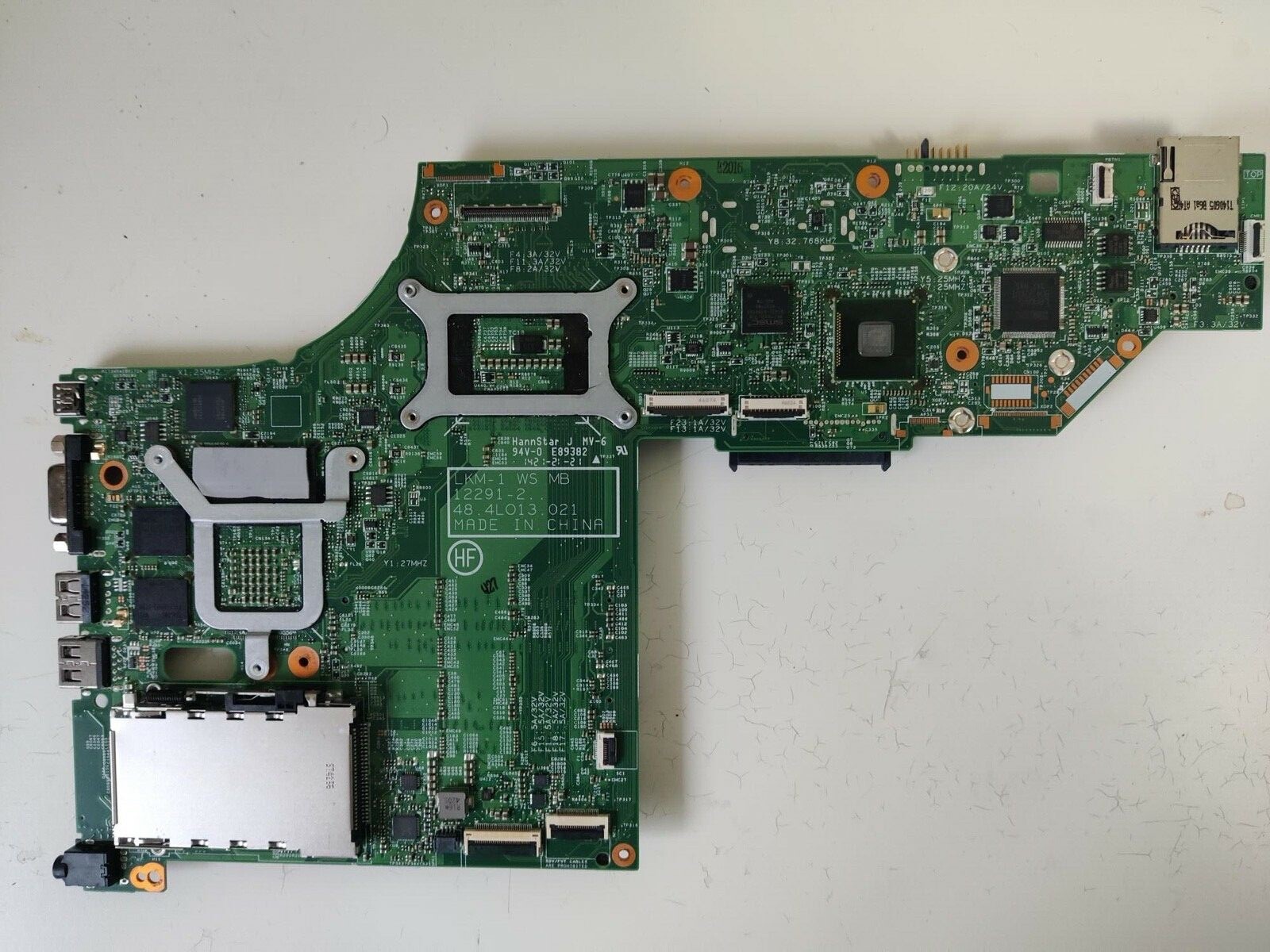
In contrast, on this W540 system board, there's only the main battery connector on the top side, halfway between center and right.
Ultrabay batteries don't plug into the SATA/IDE connector on the system board; instead, there's a separate connector that looks just like the one for the external battery.
In this reference photo of a Thinkpad T400 system board, the main battery connector is on the northeast corner, at the top side . Below it, on the right side, next to the screw hole, is the Ultrabay battery connector.

In contrast, on this W540 system board, there's only the main battery connector on the top side, halfway between center and right.
Planned Purchase: T480s i5-8350 FHD Touch
Impulse Buy: Thinkpad not named for safety reasons
RIP: X220 4291-C91 X61 7676-A24 760XD-U9E
Impulse Buy: Thinkpad not named for safety reasons
RIP: X220 4291-C91 X61 7676-A24 760XD-U9E
-
amaclean04
- Posts: 2
- Joined: Sun Nov 23, 2025 6:48 pm
- Location: Honolulu, Hawaii
Re: w540 UltraBay upgrades
Thank you for the reply and explanation, makes sense how a second battery would be impossible on the w540 board. I am not a fan of optical media and likely wouldn't get much use out of an optical drive so I figured if it was possible to replace the optical drive with even more battery it would be worth it. The 9 cell battery should be more than enough for my use case.
-
- Similar Topics
- Replies
- Views
- Last post
-
-
Possible Upgrades for a T480s ?
by MortacioRatio » Sun Nov 16, 2025 8:24 pm » in ThinkPad T430-T495 / T530-T590 Series - 1 Replies
- 5696 Views
-
Last post by axur-delmeria
Mon Nov 17, 2025 1:18 pm
-
-
-
W510 Windows upgrades fail
by tpribors » Sat Feb 28, 2026 9:55 pm » in ThinkPad W500/W510/W520 and W700/W701 Series - 6 Replies
- 3167 Views
-
Last post by tpribors
Thu Mar 05, 2026 12:51 pm
-
-
- 1 Replies
- 5266 Views
-
Last post by dr_st
Wed Oct 22, 2025 12:01 pm
-
-
FS: Ultrabay Slim HD Drive Adapter FRU 62P4553 w/160GB hard drive
by PiZzA EnGiNeEr » Wed Mar 04, 2026 8:08 pm » in Marketplace - Forum Members only - 1 Replies
- 1873 Views
-
Last post by coolcat37
Sat Mar 21, 2026 5:31 am
-
Who is online
Users browsing this forum: No registered users and 43 guests