


 Homepage
 Forum
Forum Drivers
 HMM-Manuals
 MTM
MTM Feed
Feed
Is there anyone who has an answer for this? My cousin has a computer that is running Windows Vista and for some reason I cannot get the security settings to work right! The computer has only one primary account under her name. It is an administrative account and as I mentioned there are no other accounts on it. I was asked to work on it b/c a black dos box keeps popping up. It pops up for a split second and then disappears. I've managed to see what it is and it is an wuauclt.exe. I've read that it has to do with updates.
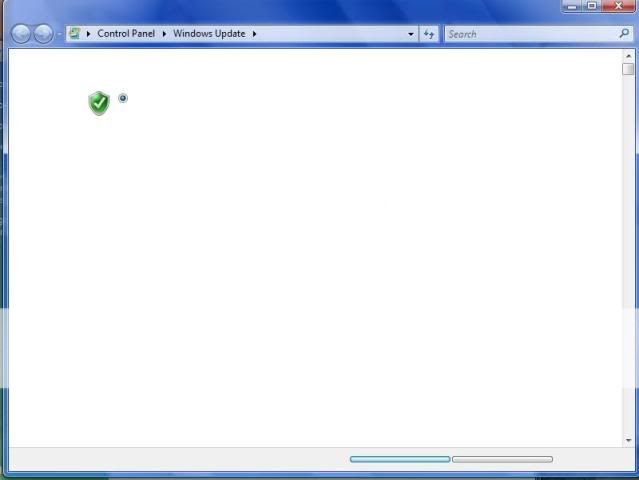
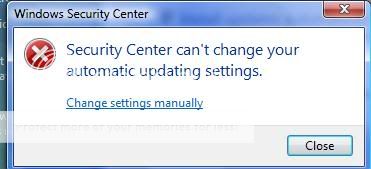
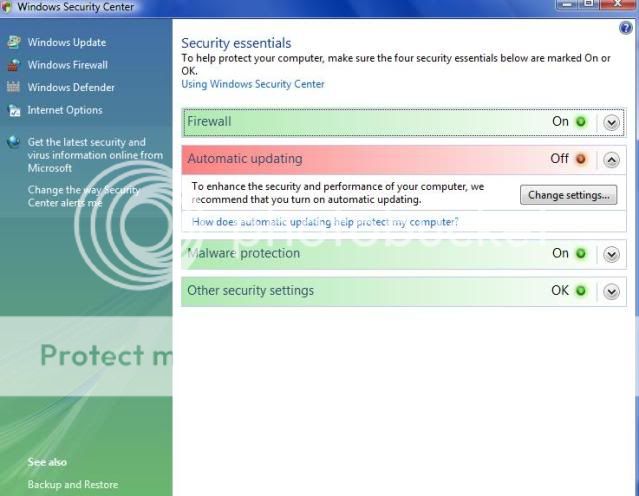
From what I can tell this computer is set with default security settings but somewhere along the way a mishap allowed the security settings to be compromised. I've included three screenshots from the comp (warning for dialup users):
Can't change updates!
Am not able to change settings.
What I see when I check settings.
Any ideas? I really would like to get this fixed w/o factory resetting the OS! I have just done this twice this month (with my laptop) and it's a process I don't care to repeat real soon! I'll be working on her comp again soon so if anyone has any suggestions I'd appreciate it.
Thanks.
Take a look at our
ThinkPads.com HOME PAGE
For those who might want to contribute to the blog, start here: Editors Alley Topic
Then contact Bill with a Private Message
ThinkPads.com HOME PAGE
For those who might want to contribute to the blog, start here: Editors Alley Topic
Then contact Bill with a Private Message
Corrupted Security settings???
-
emeraldgirl08
- ThinkPadder

- Posts: 1762
- Joined: Sun Mar 01, 2009 6:59 pm
- Location: Window Rock, Arizona
Corrupted Security settings???
Thinkpad T470 | iPhone XR | mATX Comet Lake Desktop | Hackintosh Monterey | Lenovo L24q-30 Monitor

-
emeraldgirl08
- ThinkPadder
- Posts: 1762
- Joined: Sun Mar 01, 2009 6:59 pm
- Location: Window Rock, Arizona
Re: Corrupted Security settings???
I forgot to add that this error code was in the windows services <Failed to read description. Error Code 15100>
I should have taken a screenshot of it but was in a rush!
That error was alongside the wuauclt process. When I right clicked on it for properties it took me to the sys32 folder.
I should have taken a screenshot of it but was in a rush!
That error was alongside the wuauclt process. When I right clicked on it for properties it took me to the sys32 folder.
Thinkpad T470 | iPhone XR | mATX Comet Lake Desktop | Hackintosh Monterey | Lenovo L24q-30 Monitor

Re: Corrupted Security settings???
Hi,
sorry to hear about the issue. Here a few points/questions:
1) What computer is that (ThinkPad, another laptop brand, desktop)?
2) What Anti-Virus does it have? From the screenshots and the error messages, it looks to me pretty much like some malware/virus, especially considering the fact that the problem appears under admin account (and probably that is too what caused the problem...), which leads me to:
3) How about user account control (off, on or any suppressing utilities for it)?
4) Is this genuine Vista or some of the "hacked" versions out there?
Marin
sorry to hear about the issue. Here a few points/questions:
1) What computer is that (ThinkPad, another laptop brand, desktop)?
2) What Anti-Virus does it have? From the screenshots and the error messages, it looks to me pretty much like some malware/virus, especially considering the fact that the problem appears under admin account (and probably that is too what caused the problem...), which leads me to:
3) How about user account control (off, on or any suppressing utilities for it)?
4) Is this genuine Vista or some of the "hacked" versions out there?
Marin
IBM Lenovo Z61p | 15.4'' WUXGA | Intel Core 2 Duo T7400 2x 2.16GHz | 4 GB Kingston HyperX | Hitachi 7K500 500 GB + WD 1TB (USB) | ATI Mobility FireGL V5200 | ThinkPad Atheros a/b/g | Analog Devices AD1981HD | Win 7 x86 + ArchLinux 2009.08 x64 (number crunching)
-
emeraldgirl08
- ThinkPadder
- Posts: 1762
- Joined: Sun Mar 01, 2009 6:59 pm
- Location: Window Rock, Arizona
Re: Corrupted Security settings???
@ Marin-
1) The computer is a Dell Inspiron Desktop. I forget the model number but Vista Premium came with the computer.
2) The packaged anti-virus (from what I can tell) was a trial-copy of Norton 360. I remember going to her home one time and noticing the database needed to be updated on the computer. I updated it then and it must have ran out soon after that. Now she has AVG Free-edition on it. All her settings have been default. She wouldn't know a floppy disk if it came up and bit her on the nose! I am thinking that it was a malware or virus that caused this. I've scanned her computer with the AVG and Spybot and they do not detect any undesirable objects in the computer.
3) The UAC was on when I checked it.
4) Her Vista Premium is genuine.
1) The computer is a Dell Inspiron Desktop. I forget the model number but Vista Premium came with the computer.
2) The packaged anti-virus (from what I can tell) was a trial-copy of Norton 360. I remember going to her home one time and noticing the database needed to be updated on the computer. I updated it then and it must have ran out soon after that. Now she has AVG Free-edition on it. All her settings have been default. She wouldn't know a floppy disk if it came up and bit her on the nose! I am thinking that it was a malware or virus that caused this. I've scanned her computer with the AVG and Spybot and they do not detect any undesirable objects in the computer.
3) The UAC was on when I checked it.
4) Her Vista Premium is genuine.
Thinkpad T470 | iPhone XR | mATX Comet Lake Desktop | Hackintosh Monterey | Lenovo L24q-30 Monitor
-
- Similar Topics
- Replies
- Views
- Last post
-
-
t440p: I can't change settings in BIOS
by unirill » Sat Jan 17, 2026 12:13 pm » in ThinkPad T430-T495 / T530-T590 Series - 3 Replies
- 5302 Views
-
Last post by dcfbf
Wed Jan 21, 2026 11:27 am
-
-
-
Thinkpad t420 Linux Mint boot settings
by mannyrd12 » Sun Mar 22, 2026 11:25 am » in ThinkPad T400/T410/T420 and T500/T510/T520 Series - 7 Replies
- 2555 Views
-
Last post by farmall
Fri Mar 27, 2026 2:03 pm
-
-
-
Bios errors on T41 - 0187 EAIA and 0191 system security
by Glaurung-quena » Sun Jan 04, 2026 9:24 am » in ThinkPad T40/T41/T42/T43 Series - 2 Replies
- 4805 Views
-
Last post by Glaurung-quena
Mon Jan 26, 2026 7:07 pm
-
Who is online
Users browsing this forum: No registered users and 29 guests