


 Homepage
 Forum
Forum Drivers
 HMM-Manuals
 MTM
MTM Feed
Feed
Hi all,
As you are all intimately aware, the one Snapdragon Thinkpad sold today which has the specific name "ThinkPad T14s Gen 6 (14″ Snapdragon) Laptop" model 21N1 / 21N2 , is a great computer except for that it has a 2242 form factor M.2 SSD slot, i.e. it's 42mm long only and will not fit normal 80mm length ("2280") M.2 NVMe SSD:s.
Has anyone made a mod whereby they fit in an 80mm SSD in this computer?
M.2 extension coords exist. These coords can also have 90 degree angle etc. I was thinking there may be space under the battery and that this may be a safe place for the 22x80mm SSD to not suffer physical shocks.
Suggestions of exactly which parts should be bought for the mod would be appreciated. If anyone can sell mod kits would be great.
A central feedback to Lenovo for their next generation Thinkpad X1 Carbon Snapdragon or Thinkpad T14s Snapdragon is to not manufacture them technically broken on delivery through too short SSD slot. There is no reason to not have standard SSD size in this laptop.
Thanks.
https://www.lenovo.com/us/en/p/laptops/ ... en101t0099
https://pcsupport.lenovo.com/us/en/prod ... 21n2/21n1/
https://pcsupport.lenovo.com/us/en/prod ... 21n1-21n2/
https://support.lenovo.com/us/en/selfre ... pair-guide
Crosspost with https://forums.lenovo.com/t5/ThinkPad-T ... -p/5363769.
Take a look at our
ThinkPads.com HOME PAGE
For those who might want to contribute to the blog, start here: Editors Alley Topic
Then contact Bill with a Private Message
ThinkPads.com HOME PAGE
For those who might want to contribute to the blog, start here: Editors Alley Topic
Then contact Bill with a Private Message
Did anyone mod Thinkpad T14s Snapdragon with a 22x80mm M.2 SSD?
-
axur-delmeria
- Senior ThinkPadder

- Posts: 4413
- Joined: Mon May 28, 2012 5:49 am
- Location: Metro Manila, Philippines
Re: Did anyone mod Thinkpad T14s Snapdragon with a 22x80mm M.2 SSD?
Based on this SSD replacement video, it looks like there might be enough space on the NVMe slot itself, just find a way to secure the 2280 SSD (with heatspreader) and make sure it's insulated from the metal standoff and the circuit board beneath it.
TBH I don't think anyone's made a mod yet-- this model is far too new for that.
TBH I don't think anyone's made a mod yet-- this model is far too new for that.
Planned Purchase: T480s i5-8350 FHD Touch
Impulse Buy: Thinkpad not named for safety reasons
RIP: X220 4291-C91 X61 7676-A24 760XD-U9E
Impulse Buy: Thinkpad not named for safety reasons
RIP: X220 4291-C91 X61 7676-A24 760XD-U9E

Re: Did anyone mod Thinkpad T14s Snapdragon with a 22x80mm M.2 SSD?
I don't think it's a good idea. This kind of mods could have worked with older models but I'm not so sure they will with the latest hardware. PCIe 4.0 operates with much faster signals than say, SATA, and it's probably very sensitive to signal degradation from trace length. In short: you probably can't just put a longer, unshielded cable and expect it to work the same way.
https://www.notebookcheck.org/fileadmin ... e1ddd2.jpg
SSDs produce a lot of heat, you can't simply tuck it under the battery and expect it to work fine (this is why SSDs died easily on mSATA equipped Thinkpads: they didn't consider cooling into account and they died prematurely). You can see it clearly: it has its own heatsink and gets some ventilation from the main fan.
If you aren't shy of modding your 1000+ USD laptop, I'd try to move the battery around instead as there is clearly enough space for that. It's much safer to try to extend the battery cable, which only serves the purpose of pumping juice in, than to alter data traces. Worst case scenario is that you need to buy a new battery.
Or, if you're determined to make it work at all cost, you could straight cut a window on the cover and install it above the slot...
FORUM warning:
Picture(s) WAY too big, tags removed.
Please read the Forum Rules, especially Section 5: viewtopic.php?f=16&t=14339
https://www.notebookcheck.org/fileadmin ... e1ddd2.jpg
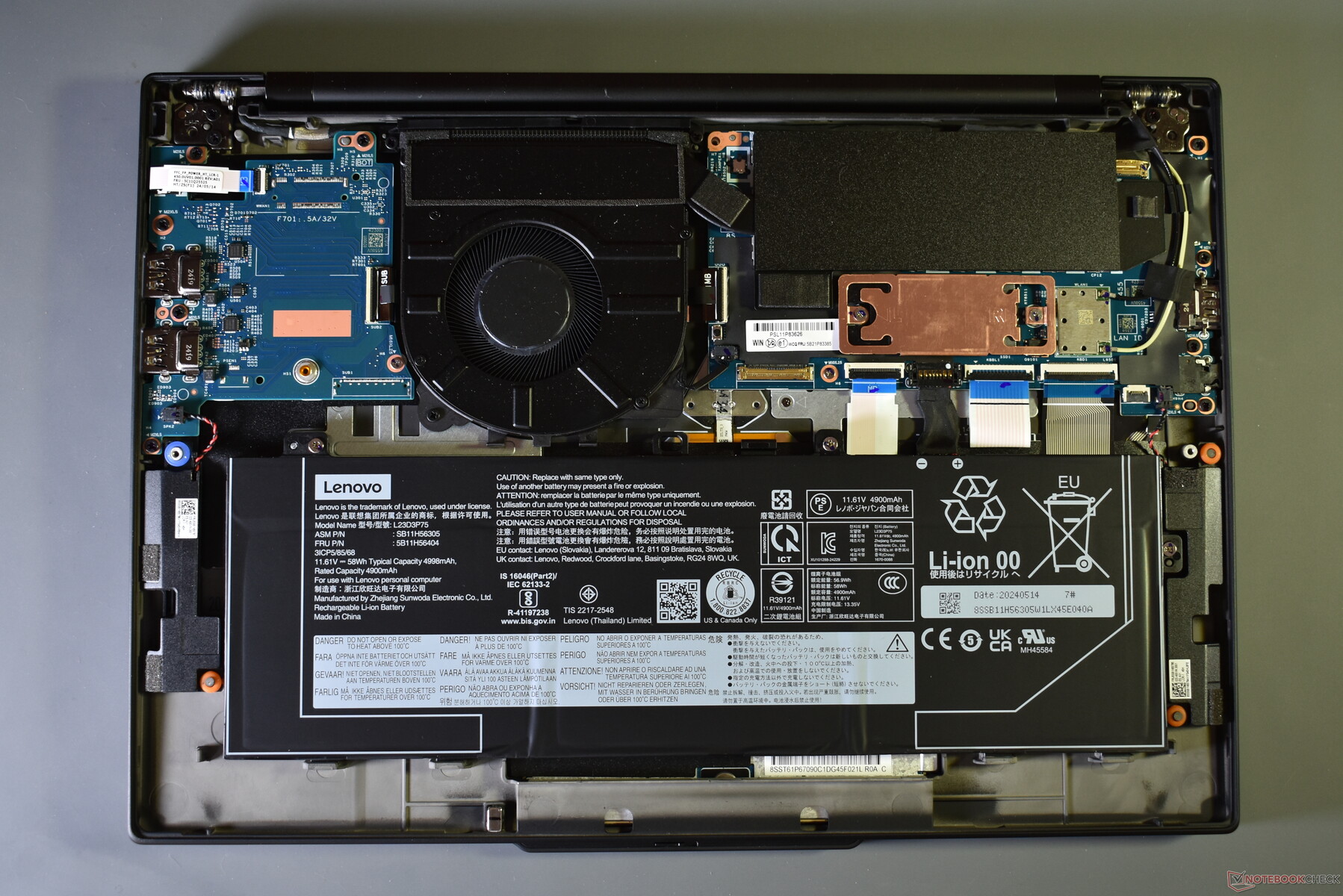
SSDs produce a lot of heat, you can't simply tuck it under the battery and expect it to work fine (this is why SSDs died easily on mSATA equipped Thinkpads: they didn't consider cooling into account and they died prematurely). You can see it clearly: it has its own heatsink and gets some ventilation from the main fan.
If you aren't shy of modding your 1000+ USD laptop, I'd try to move the battery around instead as there is clearly enough space for that. It's much safer to try to extend the battery cable, which only serves the purpose of pumping juice in, than to alter data traces. Worst case scenario is that you need to buy a new battery.
Or, if you're determined to make it work at all cost, you could straight cut a window on the cover and install it above the slot...
FORUM warning:
Picture(s) WAY too big, tags removed.
Please read the Forum Rules, especially Section 5: viewtopic.php?f=16&t=14339
X301: SU9600 | 8GB | 1TB | WXGA+
X1C9: 1185G7 | 32GB | 1TB | WUXGA | WWAN
X1Y8: 1365U | 32GB | 1TB | WUXGA
For the sake of ecology I donated all my classic Thinkpads.
X1C9: 1185G7 | 32GB | 1TB | WUXGA | WWAN
X1Y8: 1365U | 32GB | 1TB | WUXGA
For the sake of ecology I donated all my classic Thinkpads.
-
- Similar Topics
- Replies
- Views
- Last post
-
-
T490, Did I make a good investment in late 2025?
by Twarden » Sat Nov 22, 2025 12:35 pm » in ThinkPad T430-T495 / T530-T590 Series - 3 Replies
- 9948 Views
-
Last post by Twarden
Sun Nov 23, 2025 12:29 pm
-
-
-
T520 vs T420: Did I Choose the Right One?
by londonwhite » Thu Jan 15, 2026 2:21 am » in ThinkPad T400/T410/T420 and T500/T510/T520 Series - 8 Replies
- 10554 Views
-
Last post by deickos
Sat Apr 04, 2026 11:32 am
-
-
-
X32 SXGA+ Bios Mod
by Plunkyy » Wed Dec 03, 2025 3:01 pm » in ThinkPad X20/X30/X40 Series incl. Tablets - 0 Replies
- 4647 Views
-
Last post by Plunkyy
Wed Dec 03, 2025 3:01 pm
-
-
-
Get a dual heatpipe mod for your t480, trust me
by swordslasher » Tue Dec 16, 2025 8:43 am » in ThinkPad T430-T495 / T530-T590 Series - 3 Replies
- 10327 Views
-
Last post by RealBlackStuff
Wed Jan 28, 2026 3:06 am
-
Who is online
Users browsing this forum: No registered users and 29 guests