


 Homepage
 Forum
Forum Drivers
 HMM-Manuals
 MTM
MTM Feed
Feed
I need original IBM software on T23 (Windows XP Pro).
- "Recovery CD.ISO*" I believe ? (I have DVD-reader in it)
*Image of the original CD files.
Take a look at our
ThinkPads.com HOME PAGE
For those who might want to contribute to the blog, start here: Editors Alley Topic
Then contact Bill with a Private Message
ThinkPads.com HOME PAGE
For those who might want to contribute to the blog, start here: Editors Alley Topic
Then contact Bill with a Private Message
T23 original IBM software Windows XP Pro... *PICS*
-
rkawakami
- Admin Emeritus

- Posts: 10327
- Joined: Sun Jun 04, 2006 1:26 am
- Location: San Jose, CA 95120 USA
- Contact:
Re: T23 original IBM software Windows XP Pro...
Check your messages.
Ray Kawakami
X22 X24 X31 X41 X41T X60 X60s X61 X61s X200 X200s X300 X301 Z60m Z61t Z61p 560 560Z 600 600E 600X T21 T22 T23 T41 T60p T410 T420 T520 W500 W520 R50 A21p A22p A31 A31p
NOTE: All links to PC-Doctor software hosted by me are dead. Files removed 8/28/12 by manufacturer's demand.
X22 X24 X31 X41 X41T X60 X60s X61 X61s X200 X200s X300 X301 Z60m Z61t Z61p 560 560Z 600 600E 600X T21 T22 T23 T41 T60p T410 T420 T520 W500 W520 R50 A21p A22p A31 A31p
NOTE: All links to PC-Doctor software hosted by me are dead. Files removed 8/28/12 by manufacturer's demand.
Re: T23 original IBM software Windows XP Pro...
Stupid question:
What format does T23 read exactly ?
It has a Matshita DVD reader don't know if it is original or not.
So to make T23 read the Windows installation disks:
When burning .ISO do I burn programs into CD or DVD and what speed ? (My desktop burner: SAMSUNG Writemaster SH-S203B)
Do these old laptops\readers need a special PC burner program to make the CD\DVD compatible with it ?
Oh and I have the "-8MG" version G=Germany(Don't know what "M" means ?) so can I install USA version of T23 tailored Windows XP Pro to an European version laptop ?
Windows XP Pro
T23 DISK 1 (Don't know what version, USA, PAL, etc... ?)
T23 DISK 2 (Don't know what version, USA, PAL, etc... ?)
Service pack 2
Service pack 3
Is there a anti-piracy function on Matshita reader so that it won't read burned disks ?
What format does T23 read exactly ?
It has a Matshita DVD reader don't know if it is original or not.
So to make T23 read the Windows installation disks:
When burning .ISO do I burn programs into CD or DVD and what speed ? (My desktop burner: SAMSUNG Writemaster SH-S203B)
Do these old laptops\readers need a special PC burner program to make the CD\DVD compatible with it ?
Oh and I have the "-8MG" version G=Germany(Don't know what "M" means ?) so can I install USA version of T23 tailored Windows XP Pro to an European version laptop ?
Windows XP Pro
T23 DISK 1 (Don't know what version, USA, PAL, etc... ?)
T23 DISK 2 (Don't know what version, USA, PAL, etc... ?)
Service pack 2
Service pack 3
Is there a anti-piracy function on Matshita reader so that it won't read burned disks ?
Re: T23 original IBM software Windows XP Pro...
Successfully installed but problem when installing SP3
1st...Disk 1 (T23WinXPP_Disk1.iso)
2nd...Disk 2 (T23WinXPP_Disk2.iso)
3rd...Service Pack 2 (WinXPSP2.iso)
4th But when installing service pack 3 .ISO(SP3) CD:
xpsp3_5512.080413-2113_usa_x86fre_spcd.iso 544 Mt (571 322 368)
http://www.microsoft.com/en-us/download ... x?id=25129
ENGLISH language selected.
=> Computer restarted during early SP3 installation and "System has recovered from a serious error".
[*] How to avoid this happening next time when I'll install SP3 ?
Now trying again. Will empty HDD and start all over again (+download and install SP3 again)...
1st...Disk 1 (T23WinXPP_Disk1.iso)
2nd...Disk 2 (T23WinXPP_Disk2.iso)
3rd...Service Pack 2 (WinXPSP2.iso)
4th But when installing service pack 3 .ISO(SP3) CD:
xpsp3_5512.080413-2113_usa_x86fre_spcd.iso 544 Mt (571 322 368)
http://www.microsoft.com/en-us/download ... x?id=25129
ENGLISH language selected.
=> Computer restarted during early SP3 installation and "System has recovered from a serious error".
[*] How to avoid this happening next time when I'll install SP3 ?
Now trying again. Will empty HDD and start all over again (+download and install SP3 again)...
Re: T23 original IBM software Windows XP Pro...
When installing XP Service Pack 3 (SP3) below error appears...
After it : The HDD "locks itself" and the laptop don't regonize the HDD anymore... BIOS says no HDD...?
All I can do is to format\empty the HDD again and start installing everything again...It is always the SP3 that makes this problem...
http://i1321.photobucket.com/albums/u55 ... 6d38b7.jpg
Admin edit[/i]: Changed inline image (60KB) to link
After it : The HDD "locks itself" and the laptop don't regonize the HDD anymore... BIOS says no HDD...?
All I can do is to format\empty the HDD again and start installing everything again...It is always the SP3 that makes this problem...
http://i1321.photobucket.com/albums/u55 ... 6d38b7.jpg
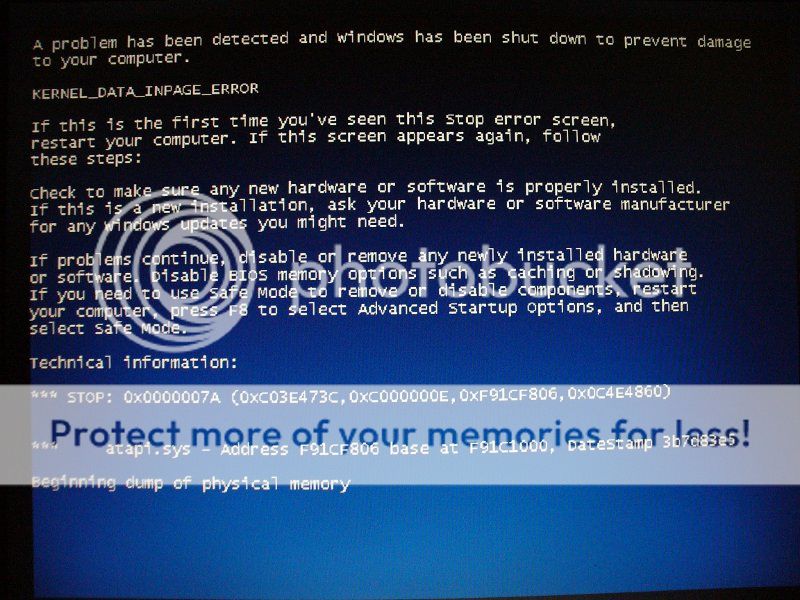
Admin edit[/i]: Changed inline image (60KB) to link
-
rkawakami
- Admin Emeritus
- Posts: 10327
- Joined: Sun Jun 04, 2006 1:26 am
- Location: San Jose, CA 95120 USA
- Contact:
Re: T23 original IBM software Windows XP Pro...
I have not seen that error before (Kernel Data Inpage Error). Google says that it's probably a hard drive or memory problem. At this point I would download a copy of memtest86+ and run it. It's available as a floppy, USB or CD image from here:
http://www.memtest.org/#downiso
Let it run for a least three complete passes. A T23 with 512MB of memory takes around 40 minutes per pass (version 4 of the diagnostics; just noticed that they are up to version 5 so I don't know if the execution time has changed). If memory checks out good, then you need to run CHKDSK on the drive. Given that your T23 doesn't see the drive after the error occurs, I'm betting that the hard drive is the problem. You can either install the drive on another system and run CHKDSK there or stop the OS install after SP2 and run it on the T23.
As to the other questions....
The two English language XP .ISOs provided are for CDs. I don't know what would happen if you tried burning the .ISO onto a blank DVD (or if is even possible to do this with any burning program). I usually burn the disks at the fastest speed that the burning drive can handle for the disks I'm using. If I find that I have problems reading the disk, I'll re-burn them at a slower speed.
You should be able to install them onto an 8MG model as I know of no difference in the hardware. The only problem that I have had when installing XP onto T23s is that a bad modem or modem/WiFi combo card will hang the XP install about 10-15 minutes into the entire process. Since you're getting to SP3, that can't be the issue. The 8MU model was fairly common in the US. It's a 1.13Ghz machine with an XGA screen, non-wireless and WinXP COA.
A problem you may have with older CD and DVD drives is that they were not made to read burned disks. However, I don't think this is the case as it seems like the other disks have been properly read (assuming you are using the same type of blank disk on all .ISOs).
There's no anti-piracy firmware on optical drives that I'm aware of. There can be a problem with a drive not being able to read certain sectors if it is defective.
Any burning program that can handle an .ISO image should be able to burn it onto a blank disk; nothing else "special" is needed, nor does the T23 require any special consideration. Again, if the optical drive you are reading the disks with is defective then you'll have to verify that it's working properly. I use a program called DVDInfoPro. It's a paid program but I believe you can install it as a trial for 2 weeks.
The T23 will "read" whatever format the optical drive can handle. In other words, if the drive was not designed to read or support CD-RW disks, then you can't expect the drive to read them correctly. Exactly what M a t s u s h i t a drive do you have?
I'm assuming that you've used the provided MD5 checksums to verify that the .ISOs were downloaded correctly?
http://www.memtest.org/#downiso
Let it run for a least three complete passes. A T23 with 512MB of memory takes around 40 minutes per pass (version 4 of the diagnostics; just noticed that they are up to version 5 so I don't know if the execution time has changed). If memory checks out good, then you need to run CHKDSK on the drive. Given that your T23 doesn't see the drive after the error occurs, I'm betting that the hard drive is the problem. You can either install the drive on another system and run CHKDSK there or stop the OS install after SP2 and run it on the T23.
As to the other questions....
The two English language XP .ISOs provided are for CDs. I don't know what would happen if you tried burning the .ISO onto a blank DVD (or if is even possible to do this with any burning program). I usually burn the disks at the fastest speed that the burning drive can handle for the disks I'm using. If I find that I have problems reading the disk, I'll re-burn them at a slower speed.
You should be able to install them onto an 8MG model as I know of no difference in the hardware. The only problem that I have had when installing XP onto T23s is that a bad modem or modem/WiFi combo card will hang the XP install about 10-15 minutes into the entire process. Since you're getting to SP3, that can't be the issue. The 8MU model was fairly common in the US. It's a 1.13Ghz machine with an XGA screen, non-wireless and WinXP COA.
A problem you may have with older CD and DVD drives is that they were not made to read burned disks. However, I don't think this is the case as it seems like the other disks have been properly read (assuming you are using the same type of blank disk on all .ISOs).
There's no anti-piracy firmware on optical drives that I'm aware of. There can be a problem with a drive not being able to read certain sectors if it is defective.
Any burning program that can handle an .ISO image should be able to burn it onto a blank disk; nothing else "special" is needed, nor does the T23 require any special consideration. Again, if the optical drive you are reading the disks with is defective then you'll have to verify that it's working properly. I use a program called DVDInfoPro. It's a paid program but I believe you can install it as a trial for 2 weeks.
The T23 will "read" whatever format the optical drive can handle. In other words, if the drive was not designed to read or support CD-RW disks, then you can't expect the drive to read them correctly. Exactly what M a t s u s h i t a drive do you have?
I'm assuming that you've used the provided MD5 checksums to verify that the .ISOs were downloaded correctly?
Ray Kawakami
X22 X24 X31 X41 X41T X60 X60s X61 X61s X200 X200s X300 X301 Z60m Z61t Z61p 560 560Z 600 600E 600X T21 T22 T23 T41 T60p T410 T420 T520 W500 W520 R50 A21p A22p A31 A31p
NOTE: All links to PC-Doctor software hosted by me are dead. Files removed 8/28/12 by manufacturer's demand.
X22 X24 X31 X41 X41T X60 X60s X61 X61s X200 X200s X300 X301 Z60m Z61t Z61p 560 560Z 600 600E 600X T21 T22 T23 T41 T60p T410 T420 T520 W500 W520 R50 A21p A22p A31 A31p
NOTE: All links to PC-Doctor software hosted by me are dead. Files removed 8/28/12 by manufacturer's demand.
Re: T23 original IBM software Windows XP Pro...
I checked the HDD: HDTUNE (Oh those dishonest old computer sellers  )
)
+ Mfg. year: 2005.
+ Usage: 3400days !!! (From the PC-program HDTUNE)
+ "Red spots" found.
I ordered:
+ NEW "mixed reviews" given KingSpec 32GB SSD Pata.
+ NEW 2x512MB memory combs=>max.1024MB.(Original 2x128MB=>256MB)
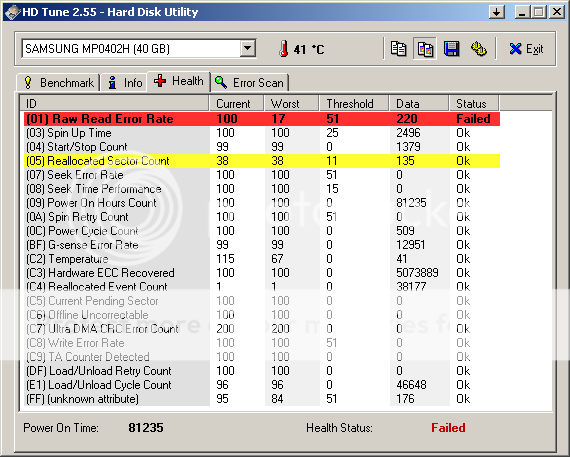
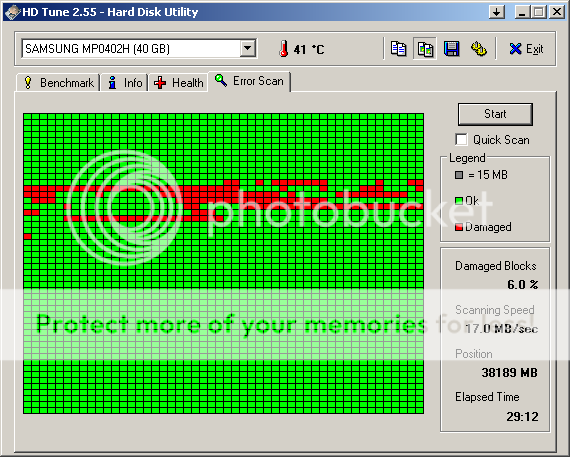
)+ Mfg. year: 2005.
+ Usage: 3400days !!!
(From the PC-program HDTUNE)+ "Red spots" found.
I ordered:
+ NEW "mixed reviews" given KingSpec 32GB SSD Pata.
+ NEW 2x512MB memory combs=>max.1024MB.(Original 2x128MB=>256MB)


-
- Similar Topics
- Replies
- Views
- Last post
-
-
WTB: X1 Original and/or unwanted Thinkpads.
by HalH509 » Wed Nov 19, 2025 12:04 am » in Marketplace - Forum Members only - 0 Replies
- 5481 Views
-
Last post by HalH509
Wed Nov 19, 2025 12:04 am
-
-
-
T420 Lid Sensor Trigger Location? (WARNING: PICS)
by T_B » Fri Jan 16, 2026 11:08 pm » in ThinkPad T400/T410/T420 and T500/T510/T520 Series - 2 Replies
- 6091 Views
-
Last post by T_B
Mon Jan 19, 2026 11:24 pm
-
-
-
ThinkPad 25 replica build log *WARNING: PICS*
by hidde-j » Tue Mar 24, 2026 4:20 pm » in Thinkpad T25 Anniversary/Retro - 3 Replies
- 2043 Views
-
Last post by hidde-j
Thu Mar 26, 2026 4:49 pm
-
-
-
Lenovo Thinkpad L16 AMD Ryzen 7 PRO 250, UEFI and SMTP
by jgpallero » Fri Dec 05, 2025 5:23 am » in Thinkpad AMD-Ryzen - 1 Replies
- 7534 Views
-
Last post by Ibthink
Tue Jan 27, 2026 5:58 pm
-
Who is online
Users browsing this forum: No registered users and 51 guests