


 Homepage
 Forum
Forum Drivers
 HMM-Manuals
 MTM
MTM Feed
Feed
I was tinkering with it over the last few days. I tried replacing the ram but then switched back. I also installed Vantage and set battery threshold. I noticed it wasn't charging so I switched off the threshold again. Then I left it turned on and plugged in. When I returned it was turned off and would not turn back on. Prior to this, the bitlocker screen kept appearing on boot asking for a password every time which I thought was strange. The PSU makes a quiet but audible hum if I hold it to my ear. When I plug in into the Thinkpad socket it noticeably changes to a distinctive clicking sound. This is with the battery removed.
Now there are no lights or any signs of life. I tried removing battery and power cord and holding down power button for a minute. I also tried a different battery and removing and replacing the RAM. Nothing whether on battery or plugged in. The power light and charging light show no activity.
Is there any chance it could be a simple fix like the CMOS? Any other areas I can troubleshoot or should I assume the motherboard has randomly died?
It wasn't an expensive machine but I've put a lot of time into it and my faith in Thinkpad reliability is shaken.
Any advice appreciated. Thanks.
Take a look at our
ThinkPads.com HOME PAGE
For those who might want to contribute to the blog, start here: Editors Alley Topic
Then contact Bill with a Private Message
ThinkPads.com HOME PAGE
For those who might want to contribute to the blog, start here: Editors Alley Topic
Then contact Bill with a Private Message
X230 died and won't turn back on
-
gypsumfantastic_
- Posts: 2
- Joined: Tue Jul 27, 2021 2:01 am
- Location: London, UK
-
RealBlackStuff
- Admin Emeritus

- Posts: 24727
- Joined: Mon Sep 18, 2006 5:17 am
- Location: Loch Garman, Éire
Re: X230 died and won't turn back on
Sound like a bad/dead charger that may have also damaged the charging circuit on the motherboard.
Lovely day for a Guinness! (The Real Black Stuff)
But I actually prefer Murphy's from Cork!
But I actually prefer Murphy's from Cork!
-
gypsumfantastic_
- Posts: 2
- Joined: Tue Jul 27, 2021 2:01 am
- Location: London, UK
Re: X230 died and won't turn back on
Thanks for your reply. Would it be possible to diagnose this with a multimeter? Otherwise if I buy a new mobo the same thing might happen again.RealBlackStuff wrote: ↑Tue Jul 27, 2021 2:16 amSound like a bad/dead charger that may have also damaged the charging circuit on the motherboard.
-
munchausen
- Posts: 18
- Joined: Fri Feb 07, 2020 8:06 am
- Location: Hampshire, United Kingdom
Re: X230 died and won't turn back on
You can certainly diagnose the PSU with a meter, just look at the voltage between the barrel and the pin when plugged in (to the mains, not the laptop)... but try not to short them together or you may fry it!
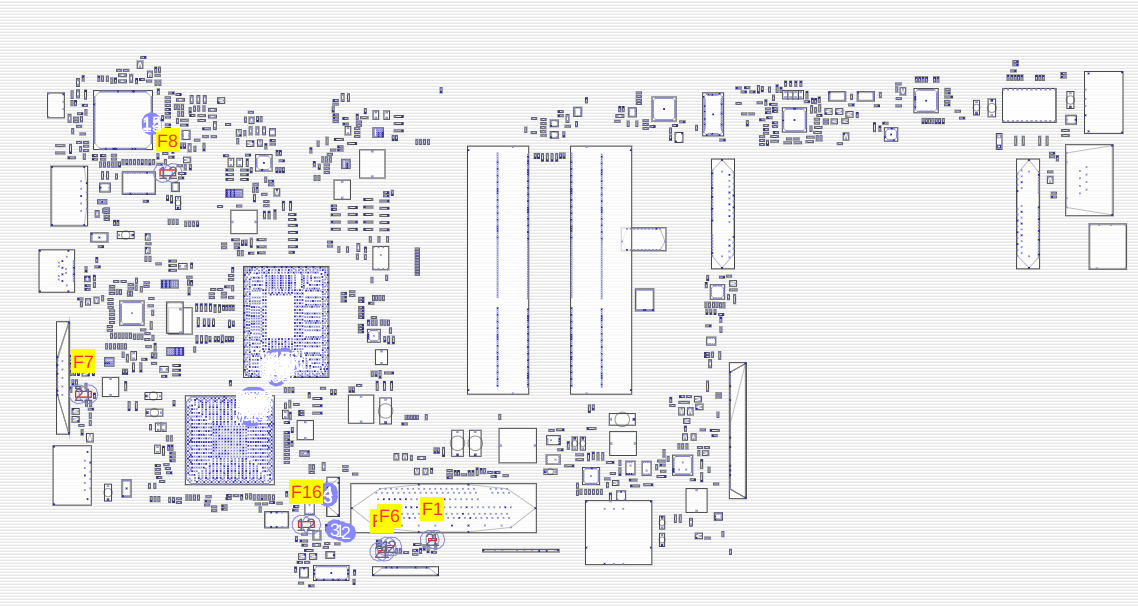
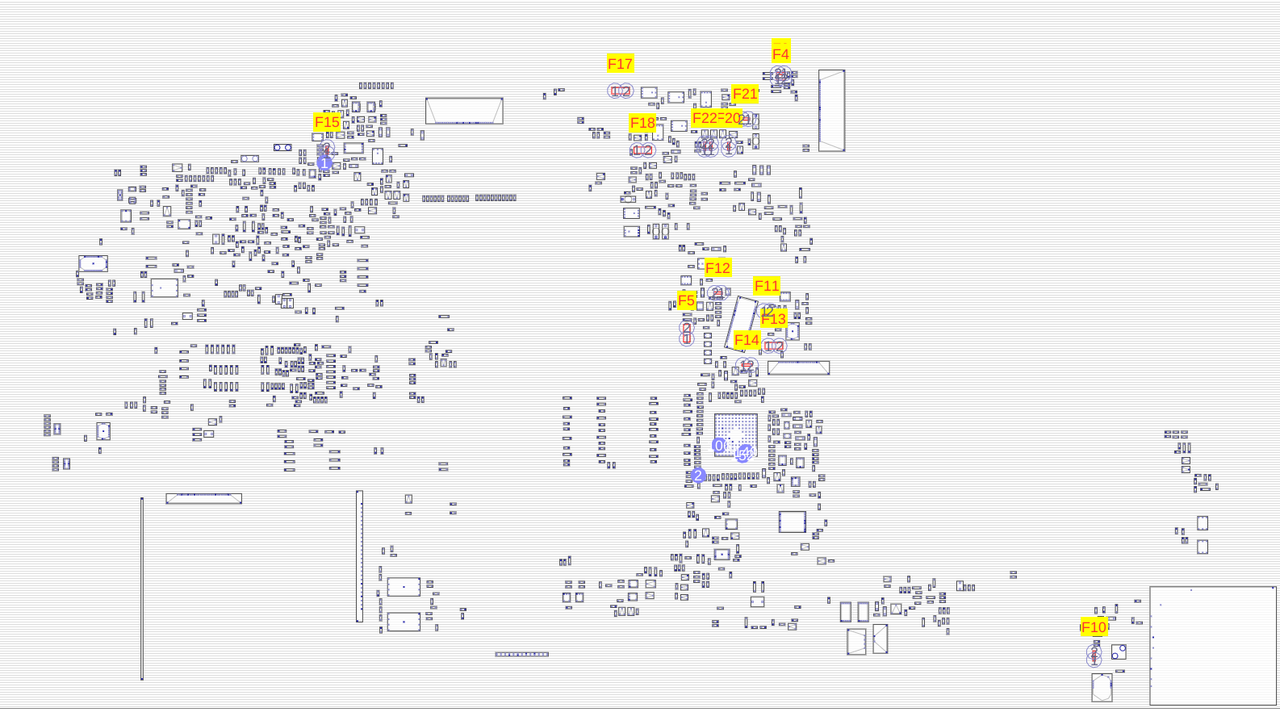
There are multiple fuses on the motherboard. If the PSU is faulty it could have damaged the motherboard but you wont know without another charger. You can look for fuses on the motherboard and check them with a meter, they should of course measure 0 ohm (or beep with the continuity beeper) if they are OK. Fuses are marked e.g. F1, F2, F3 ... The X230 schematics are available here viewtopic.php?p=822767 if you want to check which fuses do what. And there are boardviews also in that zip which show where the fuses are, I've taken some screenshots of the top and bottom fuses for you which may help:
https://i.postimg.cc/MZ494bbj/x230-fuses-bottom.png
https://i.postimg.cc/JzCP7rFr/x230-fuses-top.png
FORUM warning:
picture(s) WAY too big, tags removed. Please read the Forum Rules, especially Section 5: viewtopic.php?f=16&t=14339
There are multiple fuses on the motherboard. If the PSU is faulty it could have damaged the motherboard but you wont know without another charger. You can look for fuses on the motherboard and check them with a meter, they should of course measure 0 ohm (or beep with the continuity beeper) if they are OK. Fuses are marked e.g. F1, F2, F3 ... The X230 schematics are available here viewtopic.php?p=822767 if you want to check which fuses do what. And there are boardviews also in that zip which show where the fuses are, I've taken some screenshots of the top and bottom fuses for you which may help:
https://i.postimg.cc/MZ494bbj/x230-fuses-bottom.png
https://i.postimg.cc/JzCP7rFr/x230-fuses-top.png
FORUM warning:
picture(s) WAY too big, tags removed. Please read the Forum Rules, especially Section 5: viewtopic.php?f=16&t=14339
Re: X230 died and won't turn back on
You actually want to measure it between the outside and the inside of the barrel, not the pin.munchausen wrote: ↑Tue Aug 24, 2021 9:15 amlook at the voltage between the barrel and the pin when plugged in
The pin is for something else: http://www.thinkwiki.org/wiki/Power_Con ... Signal_Pin
-
- Similar Topics
- Replies
- Views
- Last post
-
-
Thinkpad T60 won't turn on
by cynthiacarmichael » Thu Mar 26, 2026 4:40 am » in ThinkPad T60/T61 Series - 1 Replies
- 677 Views
-
Last post by Glaurung-quena
Thu Mar 26, 2026 9:34 am
-
-
-
Restart automatically when power comes back on
by Thinkpad2024 » Tue Mar 31, 2026 6:12 pm » in ThinkPad X1 / X1-Carbon / X1-Extreme and later Series - 2 Replies
- 636 Views
-
Last post by Thinkpad2024
Wed Apr 01, 2026 8:49 am
-
-
-
T470s won't allow me to login into Linux -- only UEFI, boot screens and tty interfaces seem to work
by irock » Wed Mar 18, 2026 3:34 pm » in ThinkPad T430-T495 / T530-T590 Series - 4 Replies
- 2374 Views
-
Last post by farmall
Fri Mar 27, 2026 2:26 pm
-
-
-
can i swap the display + lid from an x220tablet to a x230 tablet chassis?
by rezenee » Wed Jan 21, 2026 8:03 am » in ThinkPad X200/X201/X220 and X300/X301 Series - 0 Replies
- 4528 Views
-
Last post by rezenee
Wed Jan 21, 2026 8:03 am
-
Who is online
Users browsing this forum: No registered users and 31 guests