


 Homepage
 Forum
Forum Drivers
 HMM-Manuals
 MTM
MTM Feed
Feed
Take a look at our
ThinkPads.com HOME PAGE
For those who might want to contribute to the blog, start here: Editors Alley Topic
Then contact Bill with a Private Message
ThinkPads.com HOME PAGE
For those who might want to contribute to the blog, start here: Editors Alley Topic
Then contact Bill with a Private Message
modern laptops with "trackpoint"

modern laptops with "trackpoint"
sorry if this has been asked but is there any laptops with 2nd 3rd or 4th gen i5/i7 that also have "trackpoints"? i'm looking at HP laptops but don't know their model numbers as well as I do Thinkpads but are they the only ones left? what HP is the most like the T430/T440p?
My Collection:
A30 Pentium 3 512MB ram 60GB HDD Win 98SE
T440p 4th gen i7 12GB ram GT 730m 1TB SSD Win 10
X1 Extreme Gen 2 16GB ram 1650 M-Q 1TB SSD Win 10
x260 6th gen i5 8GB ram
P72 8th gen i7 32gb ram p600 linux
T440s 4th gen i5 8GB ram 300GB SSD Win 10
Mums new T14sG1 Ryzen7 16GB ram 500GB SSD
A30 Pentium 3 512MB ram 60GB HDD Win 98SE
T440p 4th gen i7 12GB ram GT 730m 1TB SSD Win 10
X1 Extreme Gen 2 16GB ram 1650 M-Q 1TB SSD Win 10
x260 6th gen i5 8GB ram
P72 8th gen i7 32gb ram p600 linux
T440s 4th gen i5 8GB ram 300GB SSD Win 10
Mums new T14sG1 Ryzen7 16GB ram 500GB SSD

Re: modern laptops with "trackpoint"
HP EliteBooks and Dell's higher-end models should be equipped with their versions of trackpoint. Neither is as good as the real thing IMO.
...Knowledge is a deadly friend when no one sets the rules...(King Crimson)
Cheers,
George (your grouchy retired FlexView farmer)
my music if anyone cares: https://www.youtube.com/@TheWaterMemory
PMs requesting personal tech support will be ignored.
Cheers,
George (your grouchy retired FlexView farmer)
my music if anyone cares: https://www.youtube.com/@TheWaterMemory
PMs requesting personal tech support will be ignored.
Re: modern laptops with "trackpoint"
Can the Thinkpad's Synaptics driver be intalled on those laptops?
sent from my iPhone
Registry Tweak To Enable 2 Finger Scroll On Old Synaptics Touchpads
Registry Tweak To Enable 2 Finger Scroll On Old Synaptics Touchpads
Re: modern laptops with "trackpoint"
Not that I'm aware if.
HP units will take the "real" ThinkPad cap which is a major improvement IMO.
...Knowledge is a deadly friend when no one sets the rules...(King Crimson)
Cheers,
George (your grouchy retired FlexView farmer)
my music if anyone cares: https://www.youtube.com/@TheWaterMemory
PMs requesting personal tech support will be ignored.
Cheers,
George (your grouchy retired FlexView farmer)
my music if anyone cares: https://www.youtube.com/@TheWaterMemory
PMs requesting personal tech support will be ignored.
Re: modern laptops with "trackpoint"
Dell IMO isn't so good both with their products and especially with support... even for their higher end business machines... I do like some of HP's designs for their business machines around the end of the c2d beginning of the core i-series machines though but the current selection doesn't look too good especially the elitebooks
My Collection:
A30 Pentium 3 512MB ram 60GB HDD Win 98SE
T440p 4th gen i7 12GB ram GT 730m 1TB SSD Win 10
X1 Extreme Gen 2 16GB ram 1650 M-Q 1TB SSD Win 10
x260 6th gen i5 8GB ram
P72 8th gen i7 32gb ram p600 linux
T440s 4th gen i5 8GB ram 300GB SSD Win 10
Mums new T14sG1 Ryzen7 16GB ram 500GB SSD
A30 Pentium 3 512MB ram 60GB HDD Win 98SE
T440p 4th gen i7 12GB ram GT 730m 1TB SSD Win 10
X1 Extreme Gen 2 16GB ram 1650 M-Q 1TB SSD Win 10
x260 6th gen i5 8GB ram
P72 8th gen i7 32gb ram p600 linux
T440s 4th gen i5 8GB ram 300GB SSD Win 10
Mums new T14sG1 Ryzen7 16GB ram 500GB SSD
-
Thinkpad4by3
- Senior ThinkPadder

- Posts: 2670
- Joined: Sun Aug 09, 2015 9:25 am
- Location: N. Bellmore, ny
Re: modern laptops with "trackpoint"
Dell just added their 'Trackpoint' back on to their 12" notebooks again.
Thinkpad4by3's Law of the Universe.
The efficiency of two screens equally sized with equal numbers if pixels are equal. The time spent by a 4:3 user complaining about 16:9 is proportional to the inefficiency working with a 16:9 display, therefore the amount of useful work extracted is equal.
The efficiency of two screens equally sized with equal numbers if pixels are equal. The time spent by a 4:3 user complaining about 16:9 is proportional to the inefficiency working with a 16:9 display, therefore the amount of useful work extracted is equal.

Re: modern laptops with "trackpoint"
I believe some Toshiba Tecras offer a stick called AccuPoint.
ThinkPad L14 - 2.1GHz Ryzen 4650U | 16GB | 256GB | 14" FHD | Win11P
ProBook 470 G5 - 1.6GHz Core i5 | 16GB | 2.2TB | 17" FHD | Mint
ProBook 470 G5 - 1.6GHz Core i5 | 16GB | 2.2TB | 17" FHD | Mint
-
Thinkpad4by3
- Senior ThinkPadder
- Posts: 2670
- Joined: Sun Aug 09, 2015 9:25 am
- Location: N. Bellmore, ny
Re: modern laptops with "trackpoint"
Yep, and its awful, from first hand experience. The buttons feel like marshmallows, not buttons.
Thinkpad4by3's Law of the Universe.
The efficiency of two screens equally sized with equal numbers if pixels are equal. The time spent by a 4:3 user complaining about 16:9 is proportional to the inefficiency working with a 16:9 display, therefore the amount of useful work extracted is equal.
The efficiency of two screens equally sized with equal numbers if pixels are equal. The time spent by a 4:3 user complaining about 16:9 is proportional to the inefficiency working with a 16:9 display, therefore the amount of useful work extracted is equal.
Re: modern laptops with "trackpoint"
I switched from ThinkPads after the *30 line to EliteBooks.
Their X series equivalent is the 820, comes in 4 gens: 820 (haswell), G2 (broadwell), G3 (skylake) G4 (kaby lake)
T series equivalent is the 840 and 850 (14" and 15"), also available in G1-G4 variants.
Mobile workstations are the ZBook 14 (ULVs only), ZBook 15 (quad cores, but also offered in Zbook 15U, ULV), ZBook 17 (quad cores).
All of those have eraserheads and 4 dedicated buttons (2 above, 2 below touchpad) with the Zbook 15 and 17 having 6.
Their X series equivalent is the 820, comes in 4 gens: 820 (haswell), G2 (broadwell), G3 (skylake) G4 (kaby lake)
T series equivalent is the 840 and 850 (14" and 15"), also available in G1-G4 variants.
Mobile workstations are the ZBook 14 (ULVs only), ZBook 15 (quad cores, but also offered in Zbook 15U, ULV), ZBook 17 (quad cores).
All of those have eraserheads and 4 dedicated buttons (2 above, 2 below touchpad) with the Zbook 15 and 17 having 6.
Re: modern laptops with "trackpoint"
Of course that's an opinion, though I'd probably tend to agree as I prefer the soft rim, but they seemed to like it over at LaptopMag.Thinkpad4by3 wrote: ↑Sun Oct 29, 2017 3:36 pmYep, and its awful, from first hand experience. The buttons feel like marshmallows, not buttons.
ThinkPad L14 - 2.1GHz Ryzen 4650U | 16GB | 256GB | 14" FHD | Win11P
ProBook 470 G5 - 1.6GHz Core i5 | 16GB | 2.2TB | 17" FHD | Mint
ProBook 470 G5 - 1.6GHz Core i5 | 16GB | 2.2TB | 17" FHD | Mint
Re: modern laptops with "trackpoint"
That's good to know! I think the Probooks are L series ThinkPads? I was thinking of going with an elitebook 8470p or 8470w with 3rd gen i7 but don't know if that's the best choice... I'm wanting a quad core processor with dedicated graphics and a 14" screen... what I'm looking at and don't know is if AMD would be the better choice and give me more performance for around the same price than the GT 730m offered in the T440p... I'm a Nvidia fan at heart but AMD seems to be more supported towards video editing with GPU acceleration then with Nvidia at least with Sony movie studio 13 and this is one reason why I want to get an elitebook other than to try it out and see if I get better performance than what I got nowoeuvre wrote:I switched from ThinkPads after the *30 line to EliteBooks.
Their X series equivalent is the 820, comes in 4 gens: 820 (haswell), G2 (broadwell), G3 (skylake) G4 (kaby lake)
T series equivalent is the 840 and 850 (14" and 15"), also available in G1-G4 variants.
Mobile workstations are the ZBook 14 (ULVs only), ZBook 15 (quad cores, but also offered in Zbook 15U, ULV), ZBook 17 (quad cores).
All of those have eraserheads and 4 dedicated buttons (2 above, 2 below touchpad) with the Zbook 15 and 17 having 6.
I could go with the 840 G1 also but that will limit me to an i5-4300u CPU which wouldn't be good as my T440p with i5-4300m it is already maxed out on performance
The Zbook in 14" screen comes with the same i5-4300u but upgrades me to AMD Firepro M4100 graphics which is better then the radeon 8750m but not by much...
I'm not going with a 15" because I find them too big and the added numb pad makes my OCD go crazy not having the trackpad center of the laptop plus for lap use it would be off center of my lap
My Collection:
A30 Pentium 3 512MB ram 60GB HDD Win 98SE
T440p 4th gen i7 12GB ram GT 730m 1TB SSD Win 10
X1 Extreme Gen 2 16GB ram 1650 M-Q 1TB SSD Win 10
x260 6th gen i5 8GB ram
P72 8th gen i7 32gb ram p600 linux
T440s 4th gen i5 8GB ram 300GB SSD Win 10
Mums new T14sG1 Ryzen7 16GB ram 500GB SSD
A30 Pentium 3 512MB ram 60GB HDD Win 98SE
T440p 4th gen i7 12GB ram GT 730m 1TB SSD Win 10
X1 Extreme Gen 2 16GB ram 1650 M-Q 1TB SSD Win 10
x260 6th gen i5 8GB ram
P72 8th gen i7 32gb ram p600 linux
T440s 4th gen i5 8GB ram 300GB SSD Win 10
Mums new T14sG1 Ryzen7 16GB ram 500GB SSD
Re: modern laptops with "trackpoint"
You could put an i7 3630QM in the 8470p. I've had a few 8470ps, they're solid and have plenty of ports. A little thick, but good keyboard and SOLID input devices. Glass touchpad is very nice. The downside is you're limited to up to 1600x900 but it's better than the T420/T430 1600x900 screens.
Don't consider one with 1366x768. That resolution must die.
Don't consider one with 1366x768. That resolution must die.
Re: modern laptops with "trackpoint"
Is the 8470p's HD+ LVDS? Then it can be used in T420 and T430.
sent from my iPhone
Registry Tweak To Enable 2 Finger Scroll On Old Synaptics Touchpads
Registry Tweak To Enable 2 Finger Scroll On Old Synaptics Touchpads
Re: modern laptops with "trackpoint"
I have a 1366x768 in my T440p and it is good for playing games but the 1600x900 or 1920x1080 would drop my framerate to unusable and scaling the res down would look weird but since i'm not using this for anything more than game play and same facebook and stuff it should be ok for that machine...oeuvre wrote: ↑Mon Oct 30, 2017 7:32 amYou could put an i7 3630QM in the 8470p. I've had a few 8470ps, they're solid and have plenty of ports. A little thick, but good keyboard and SOLID input devices. Glass touchpad is very nice. The downside is you're limited to up to 1600x900 but it's better than the T420/T430 1600x900 screens.
Don't consider one with 1366x768. That resolution must die.
i'm just concerned that with sony movie studio 13 it won't use the Radeon 7570m graphics since movie studio works best with Radeon 6000 series and Nvidia GTX 500 series best and that would limit me to a second gen i7 in the 8460p since it has a Radeon 6470m
Now does anybody know about firepro graphics cards? where does the AMD FirePro M3900 and FirePro M2000 fall into? is it based on the Radeon 6000 series? i'm hoping not to get stuck with a second gen i7 but i'll take it if the other options don't work out so well
My Collection:
A30 Pentium 3 512MB ram 60GB HDD Win 98SE
T440p 4th gen i7 12GB ram GT 730m 1TB SSD Win 10
X1 Extreme Gen 2 16GB ram 1650 M-Q 1TB SSD Win 10
x260 6th gen i5 8GB ram
P72 8th gen i7 32gb ram p600 linux
T440s 4th gen i5 8GB ram 300GB SSD Win 10
Mums new T14sG1 Ryzen7 16GB ram 500GB SSD
A30 Pentium 3 512MB ram 60GB HDD Win 98SE
T440p 4th gen i7 12GB ram GT 730m 1TB SSD Win 10
X1 Extreme Gen 2 16GB ram 1650 M-Q 1TB SSD Win 10
x260 6th gen i5 8GB ram
P72 8th gen i7 32gb ram p600 linux
T440s 4th gen i5 8GB ram 300GB SSD Win 10
Mums new T14sG1 Ryzen7 16GB ram 500GB SSD
Re: modern laptops with "trackpoint"
Okay, I'm upping this thread as I'm close to biting the bullet and getting the Dell Latitude 7490 (the smaller 7390 would have suited me better, but there's no trackpoint option AFAIK).
My X220 is messed up and the fan was dead for a few months before miraculously reviving tonight (but not after a "fan issue" black screen came up on a previous boot).
I'll try to fix it later, but I can no longer rely on this computer as it is (and these days I need to).
So. According to my quick research, this Dell is the least worst option out there, in terms of keyboard (chicklets and 6-row, but at least the keys are curved) and trackpoint (recessed cap and cramped buttons, but at least there's a middle button).
(Let's not talk about the 16/9 screen...)
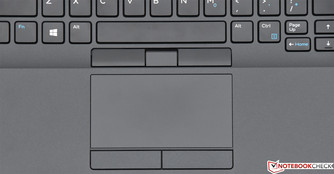
I weep when I compare this bland, cramped setting to my glorious X220's trackpoint
I briefly looked at the HP Elitebook 840 G6, but it's even worse than the Dell (flat keys ! and no middle button)
My X220 is messed up and the fan was dead for a few months before miraculously reviving tonight (but not after a "fan issue" black screen came up on a previous boot).
I'll try to fix it later, but I can no longer rely on this computer as it is (and these days I need to).
So. According to my quick research, this Dell is the least worst option out there, in terms of keyboard (chicklets and 6-row, but at least the keys are curved) and trackpoint (recessed cap and cramped buttons, but at least there's a middle button).
(Let's not talk about the 16/9 screen...)
I weep when I compare this bland, cramped setting to my glorious X220's trackpoint
I briefly looked at the HP Elitebook 840 G6, but it's even worse than the Dell (flat keys ! and no middle button)
Re: modern laptops with "trackpoint"
Okay, I've just ordered the Latitude 5400. I should receive it next week.
It'll be my first Dell and I sure hope it won't suffer from the same coil whine as the XPS series
Because of that potential issue, plus the subpar screen/keyboard/trackpoint, I took the middle range route. Had it been a Modern T60, I'd have maxed it out - but there's no reason to splurge on a computer which isn't a Classic Thinkpad.
Edit : As I was browsing the offerings, I've come to the conclusion that Dell doesn't offer a trackpoint on any of its 13" models. But they're available on 14" and 15" ones.
I don't know what's the logic behind this, but it's completely messed up if you ask me.
It'll be my first Dell and I sure hope it won't suffer from the same coil whine as the XPS series
Because of that potential issue, plus the subpar screen/keyboard/trackpoint, I took the middle range route. Had it been a Modern T60, I'd have maxed it out - but there's no reason to splurge on a computer which isn't a Classic Thinkpad.
Edit : As I was browsing the offerings, I've come to the conclusion that Dell doesn't offer a trackpoint on any of its 13" models. But they're available on 14" and 15" ones.
I don't know what's the logic behind this, but it's completely messed up if you ask me.

Re: modern laptops with "trackpoint"
Everything is messed up. Most people don't really care about keyboard and mouse ergonomics unless it's really subpar. The few that do are not united enough to make the manufacturers care.
Thinkpad 25 (20K7), T16 Gen 3 (21MQ), Yoga 14 (20FY), T430s (IPS FHD + Classic Keyboard), X220 4291-4BG
X61 7673-V2V, T60 2007-QPG, T42 2373-F7G, X32 (IPS Screen), A31p w/ Ultrabay Numpad
X61 7673-V2V, T60 2007-QPG, T42 2373-F7G, X32 (IPS Screen), A31p w/ Ultrabay Numpad
Re: modern laptops with "trackpoint"
So I've just taken hold of the Latitude 5400 which I had ordered a few days ago.
Here are my fresh first impressions from unpacking it and running it for a dozen minutes.
It comes with Win 10, which is annoying as heck. Microsoft is really forcing down a lot of things through your throat.
Their design philosophy with that OS is both very fashionable these days, and very telling. It's a software in which, upon first boot, you need to de-configure instead of configuring. You need to reset it, instead of setting it up. You need to opt-OUT instead of opting-in.
It's completely stupid and backward. Welcome to 2019.
But I won't dwell on the software side, as this subject has been beaten to death and at least I can do something about it (like wiping it clear).
The trackpoint buttons are too small and too close from the keyboard. The edges of the buttons don't always work upon clicking, and the middle button emits a high-pitched noisy sound if not pressed very carefully.
In addition, the trackpoint is more difficult to operate when pushing down (towards the taskbar) than when pushed up.
I don't know if it's a matter of fine-tuning, although as far as I can tell and given the asymmetry of feel, it shouldn't be a matter of sensitivity setting (which'd affect both directions equally).
The keyboard is, as expected, pathetically crappy.
- 6-row, chiclets keys.
- The keys are technically concave, but my fingers can barely detect any curve.
- The "Enter" key is extremely narrow. Everytime I try to press "Enter", I type a star symbol instead.
- The Function keys row. Oh boy. By default these keys are assigned to the media functions (volume, brightness, etc).
Which means that as simple everyday gesture as simple as Alt+F4 does NOT work. You need to press Fn+Esc to activate and "lock" the function keys.
And how do you remember if you've locked the function keys ? You can't. There's no status LED for that. You need use trial and error to discover the current status of that function. How wonderfully ergonomic.
Of course, no status LEDs to be found anywhere besides the (mushy) power button and charger cable male plug. It's 2019.
The only good things I can think of, right now, are the integrated webcam sliding cover, the USB-C charger, and the metal lid. That's about it.
This Dell makes me hate Lenovo even more. If not for their corporate stupidity, I'd be enjoying my brand new laptop. Instead, I loathe what I've been forced to buy, because the beancounters at Lenovo have decided that trashing perfectly fine engineering and following Apple's hipster "function follows form" design decisions was more profitable.
I can't wait for that company to die.
Of course I dislike Dell too, and remember that the Latitude line is (supposedly) meant for productive business purposes, but in that case it's a simple annoyance. For I can't nourish genuine hate at a company which I never held in high esteem and from which I never expected much.
Dell is like a mentally challenged child. You can be annoyed at his disability, but you can't hate him for something he isn't responsible for.
Lenovo, on the other hand, was that high-achieving kid who became an unrecognisable wreck after going through an bizarre mental breakdown and destroying himself through drug and alcohol ever since. One feels both pity and anger at such a waste.
Here are my fresh first impressions from unpacking it and running it for a dozen minutes.
It comes with Win 10, which is annoying as heck. Microsoft is really forcing down a lot of things through your throat.
Their design philosophy with that OS is both very fashionable these days, and very telling. It's a software in which, upon first boot, you need to de-configure instead of configuring. You need to reset it, instead of setting it up. You need to opt-OUT instead of opting-in.
It's completely stupid and backward. Welcome to 2019.
But I won't dwell on the software side, as this subject has been beaten to death and at least I can do something about it (like wiping it clear).
The trackpoint buttons are too small and too close from the keyboard. The edges of the buttons don't always work upon clicking, and the middle button emits a high-pitched noisy sound if not pressed very carefully.
In addition, the trackpoint is more difficult to operate when pushing down (towards the taskbar) than when pushed up.
I don't know if it's a matter of fine-tuning, although as far as I can tell and given the asymmetry of feel, it shouldn't be a matter of sensitivity setting (which'd affect both directions equally).
The keyboard is, as expected, pathetically crappy.
- 6-row, chiclets keys.
- The keys are technically concave, but my fingers can barely detect any curve.
- The "Enter" key is extremely narrow. Everytime I try to press "Enter", I type a star symbol instead.
- The Function keys row. Oh boy. By default these keys are assigned to the media functions (volume, brightness, etc).
Which means that as simple everyday gesture as simple as Alt+F4 does NOT work. You need to press Fn+Esc to activate and "lock" the function keys.
And how do you remember if you've locked the function keys ? You can't. There's no status LED for that. You need use trial and error to discover the current status of that function. How wonderfully ergonomic.
Of course, no status LEDs to be found anywhere besides the (mushy) power button and charger cable male plug. It's 2019.
The only good things I can think of, right now, are the integrated webcam sliding cover, the USB-C charger, and the metal lid. That's about it.
This Dell makes me hate Lenovo even more. If not for their corporate stupidity, I'd be enjoying my brand new laptop. Instead, I loathe what I've been forced to buy, because the beancounters at Lenovo have decided that trashing perfectly fine engineering and following Apple's hipster "function follows form" design decisions was more profitable.
I can't wait for that company to die.
Of course I dislike Dell too, and remember that the Latitude line is (supposedly) meant for productive business purposes, but in that case it's a simple annoyance. For I can't nourish genuine hate at a company which I never held in high esteem and from which I never expected much.
Dell is like a mentally challenged child. You can be annoyed at his disability, but you can't hate him for something he isn't responsible for.
Lenovo, on the other hand, was that high-achieving kid who became an unrecognisable wreck after going through an bizarre mental breakdown and destroying himself through drug and alcohol ever since. One feels both pity and anger at such a waste.
-
Omineca
- Sophomore Member
- Posts: 216
- Joined: Fri Aug 10, 2012 9:40 pm
- Location: British Columbia, Canada
Re: modern laptops with "trackpoint"
I wish I would have read this thread earlier.
I have a Latitude 5480 at work. I don't mind the feel of the keyboard, but it misses keypresses on a regular basis. I had to review and edit everything (emails, forms, documents, you name it), which was time-consuming but necessary in order to maintain professional standards.
I don't use the trackpoint, but our tech does, and he didn't like the trackpoint buttons either. The other thing that irritated the heck out of me was the standard fn-ctrl placement. I'm too accustomed to Lenovo's backward setup to do anything else.
In any case, I ended up using my tech allowance to buy a replacement (talk about unnecessary purchasing duplication and waste of resources) -- a Lenovo ThinkPad Yoga 260. I really like it. It has a solid keyboard, a nice (but cramped) IPS screen, and I enjoy using it occasionally in tablet mode. When I'm at my desk, it gets plugged into a widescreen monitor.
I truly hope that your Dell experience works out better than mine did, but it's not sounding that promising.
I have a Latitude 5480 at work. I don't mind the feel of the keyboard, but it misses keypresses on a regular basis. I had to review and edit everything (emails, forms, documents, you name it), which was time-consuming but necessary in order to maintain professional standards.
I don't use the trackpoint, but our tech does, and he didn't like the trackpoint buttons either. The other thing that irritated the heck out of me was the standard fn-ctrl placement. I'm too accustomed to Lenovo's backward setup to do anything else.
In any case, I ended up using my tech allowance to buy a replacement (talk about unnecessary purchasing duplication and waste of resources) -- a Lenovo ThinkPad Yoga 260. I really like it. It has a solid keyboard, a nice (but cramped) IPS screen, and I enjoy using it occasionally in tablet mode. When I'm at my desk, it gets plugged into a widescreen monitor.
I truly hope that your Dell experience works out better than mine did, but it's not sounding that promising.
Home: ThinkPad Yoga 260 | L440 | R500 | X120e Server
Work: ThinkPad X13 Yoga Gen 3 | ThinkPad L13 Yoga Gen 4
Work: ThinkPad X13 Yoga Gen 3 | ThinkPad L13 Yoga Gen 4

Re: modern laptops with "trackpoint"
I don't think anyone forced you to buy anything, unless someone was holding a gun to your head and made you buy a laptop. Its your own choice which device you buy and you chose to buy a worse device because of your own hatred. It is self-imposed suffering.
IBM ThinkPad R50e | lenovo ThinkPad X301 | lenovo ThinkPad Z61t
Re: modern laptops with "trackpoint"
Cheers. It's predictably bad. But I wouldn't have been really happier with a Lenovo anyway. (Good for you if it improved your experience at work, that's certainly important. Though I suspect a desktop would have been a better choice, unless you have to take your computer on the road).
I had the prescience to buy Thinkpad USB keyboards before they were killed by Lenovo.
A few years down the line, I'll unearth them and get a 3:2 tablet, to have a makeshift Thinkpad. It'll be clumsy and cumbersome, but at least it'll make mobile computing more bearable for me.
Re: modern laptops with "trackpoint"
I had to buy a worse device because of Lenovo's hatred for sensible engineering.
Now you might argue that the rubbish Dell I bought is worse than a rubbish Lenovo. And you could well be right. But that's beside the point. Both are rubbish compared to my X220, and I blame Lenovo for that.
No one forced Lenovo to copy Apple. Or did Steve Jobs hold an iGun against the head of Lenovo's CEO ?
My view is thus that Lenovo's sinful stupidity is causing suffering to us Thinkpadders, and I hope they will pay dearly for that.
Re: modern laptops with "trackpoint"
They won't as long as no one else is selling laptops that are better in that specific regard. The percentage of users that care about excellent keyboards/pointing devices is rather small. Among those the number that care specifically about keyboard layout is even smaller.
Thinkpad 25 (20K7), T16 Gen 3 (21MQ), Yoga 14 (20FY), T430s (IPS FHD + Classic Keyboard), X220 4291-4BG
X61 7673-V2V, T60 2007-QPG, T42 2373-F7G, X32 (IPS Screen), A31p w/ Ultrabay Numpad
X61 7673-V2V, T60 2007-QPG, T42 2373-F7G, X32 (IPS Screen), A31p w/ Ultrabay Numpad
-
Omineca
- Sophomore Member
- Posts: 216
- Joined: Fri Aug 10, 2012 9:40 pm
- Location: British Columbia, Canada
Re: modern laptops with "trackpoint"
I travel for work every week and make presentations on the road regularly, so I really need the portability.
Home: ThinkPad Yoga 260 | L440 | R500 | X120e Server
Work: ThinkPad X13 Yoga Gen 3 | ThinkPad L13 Yoga Gen 4
Work: ThinkPad X13 Yoga Gen 3 | ThinkPad L13 Yoga Gen 4
Re: modern laptops with "trackpoint"
+ 1.dr_st wrote: ↑Thu Aug 01, 2019 5:20 amThey won't as long as no one else is selling laptops that are better in that specific regard. The percentage of users that care about excellent keyboards/pointing devices is rather small. Among those the number that care specifically about keyboard layout is even smaller.
We've lost the war.
...Knowledge is a deadly friend when no one sets the rules...(King Crimson)
Cheers,
George (your grouchy retired FlexView farmer)
my music if anyone cares: https://www.youtube.com/@TheWaterMemory
PMs requesting personal tech support will be ignored.
Cheers,
George (your grouchy retired FlexView farmer)
my music if anyone cares: https://www.youtube.com/@TheWaterMemory
PMs requesting personal tech support will be ignored.
-
GunslingerThink
- Posts: 44
- Joined: Mon Apr 16, 2018 6:17 am
- Location: Siberia, Russia
Re: modern laptops with "trackpoint"
How come touchpads won the market if they're worse than trackpoints in every single thing? Are they that cheaper?

- T61 NVIDIA Quadro NVS 140M SXGA+
- T61 Intel GMA X3100 XGA
- T40
- 600E
-
RealBlackStuff
- Admin Emeritus

- Posts: 24727
- Joined: Mon Sep 18, 2006 5:17 am
- Location: Loch Garman, Éire
Re: modern laptops with "trackpoint"
Fruit (pronounced: froowit) apparently makes the best (glass) touchpads by far, but those are useless on any Thinkpad.
But the trackpoint still beats the touchpad, if you ask me. YMMV
But the trackpoint still beats the touchpad, if you ask me. YMMV
Lovely day for a Guinness! (The Real Black Stuff)
But I actually prefer Murphy's from Cork!
But I actually prefer Murphy's from Cork!
-
- Similar Topics
- Replies
- Views
- Last post
-
-
TrackPoint and Bluetooth problems on T61
by giovanazzi » Mon Nov 03, 2025 7:43 am » in ThinkPad T60/T61 Series - 2 Replies
- 11834 Views
-
Last post by giovanazzi
Mon Nov 03, 2025 10:37 am
-
-
- 1 Replies
- 9710 Views
-
Last post by dcfbf
Wed Nov 12, 2025 2:24 pm
-
-
Enabling trackpad cannibalizes the trackpoint
by dcfbf » Tue Nov 25, 2025 4:59 pm » in ThinkPad T60/T61 Series - 3 Replies
- 8538 Views
-
Last post by dcfbf
Thu Nov 27, 2025 8:51 pm
-
-
-
Keyboard and trackpoint, X1C13 vs. X1 Nano G1
by pgoelz » Mon Mar 09, 2026 5:37 am » in ThinkPad X1 / X1-Carbon / X1-Extreme and later Series - 0 Replies
- 1415 Views
-
Last post by pgoelz
Mon Mar 09, 2026 5:37 am
-
Who is online
Users browsing this forum: No registered users and 244 guests