


 Homepage
 Forum
Forum Drivers
 HMM-Manuals
 MTM
MTM Feed
Feed

Hi
I've got a T20 and T22 and both are working. The T20 XGA was complete and fully working, but slightly rough case and the T22 SXGA+ was without a working LCD and I decided to use the two to test a load of spare parts to know for sure what was good and what wasn't. I have 5 XGA ribbons, 4 inverters, at least 3 good working XGA screens (tested recently all good) and I was working towards making them both as basic XGA machibes (and keeping the SXGA+ ribbon back for when an LCD becomes available.
It was all going ok but the T22 would only ever display a white screen.
The T20 was working fine with all the LCDs and then started only showing a white screen.
A white screen as far as I know means the inverter is good, CCFL are powered but the video signal is not present. So I swapped between all 4 (tested previously good) ribbons on both machines and... ALL WHITE.
I tried different inverters, I tried different ribbons, I tried DE-OXIT on the motherboard connector (and a brush), I tried everything. All I get on both machines now on ANY LCD panel, on ANY LCD ribbon cable is a white screen!
The machine is booting fine (external display is working fine). What am I missing??!!
Thanks
Take a look at our
ThinkPads.com HOME PAGE
For those who might want to contribute to the blog, start here: Editors Alley Topic
Then contact Bill with a Private Message
ThinkPads.com HOME PAGE
For those who might want to contribute to the blog, start here: Editors Alley Topic
Then contact Bill with a Private Message
Tearing hair out - T2x white screens...

Re: Tearing hair out - T2x white screens...
Check the fuses sitting near the lcd connector. As I recall it, there should be 3.
Re: Tearing hair out - T2x white screens...
Fuses!?? I see 2 small things that look a bit like a fuse one looks like it has 1 X 1 stamped on it and one 7 x 7 (one of the 7 is upside down)....? Is that what you mean?
Re: Tearing hair out - T2x white screens...
I found 3 fuses all check out for continuity. The only thing I can think of is that all the ribbons are brittle and get damaged easily. However they're really sturdy - they're not soft and flexible because they're coated in some kind of tough, but bendy fabric which does seem to protect them very well. I cleaned all the connectors and inspected them with a magnifier to see if anything was out of line. I just can't work it out...
-
RealBlackStuff
- Admin Emeritus

- Posts: 24727
- Joined: Mon Sep 18, 2006 5:17 am
- Location: Loch Garman, Éire
Re: Tearing hair out - T2x white screens...
Have you got another T2x machine with a working LCD?
If so try the LCDs in there.
Methinks that the LCD-cables are guilty.
If so try the LCDs in there.
Methinks that the LCD-cables are guilty.
Lovely day for a Guinness! (The Real Black Stuff)
But I actually prefer Murphy's from Cork!
But I actually prefer Murphy's from Cork!
Re: Tearing hair out - T2x white screens...
I do have a pile of T2x machines which work, I'm just hesitant to take another working T2x machine and end up with another one with a white screen due to something I am doing. That was, coincedentally exactly the place I had ended up with, but I've parked it for later today.
I know the LCDs work, and I'm almost certain the motherboards are OK but I guess taking a working screen and ribbon from another machine is the only way to isolate the motherboard or the ribbon...
I know the LCDs work, and I'm almost certain the motherboards are OK but I guess taking a working screen and ribbon from another machine is the only way to isolate the motherboard or the ribbon...
Re: Tearing hair out - T2x white screens...
I just went through some notes from 2008.
It reads:
T22 with white screen.
Fuse F4 blown.
Fuse F4 replaced.
XGA LCD now ok.
F4 is located at the bottom side of the board.
It is a tiny black component, looks mostly like a resistor.
It has the mark 'N' on it.
It reads:
T22 with white screen.
Fuse F4 blown.
Fuse F4 replaced.
XGA LCD now ok.
F4 is located at the bottom side of the board.
It is a tiny black component, looks mostly like a resistor.
It has the mark 'N' on it.
Re: Tearing hair out - T2x white screens...
Wow - found it! 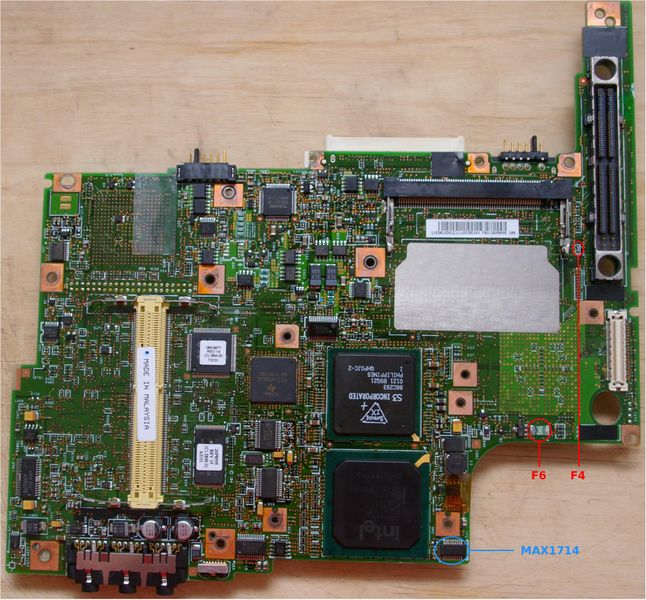
And bingo - no continuity on it..... It's t-i-n-y though.... how important is it, could I just bridge it with solder?
And bingo - no continuity on it..... It's t-i-n-y though.... how important is it, could I just bridge it with solder?
Re: Tearing hair out - T2x white screens...
I cannot recommend to bridge it.
The reason why it blew might well be caused by one of the cables or lcd's you have had hook up to the mb.
If you happen to have a board that is beyond repair, then you might be able to get one from there.
The reason why it blew might well be caused by one of the cables or lcd's you have had hook up to the mb.
If you happen to have a board that is beyond repair, then you might be able to get one from there.
Re: Tearing hair out - T2x white screens...
Hi
I bridged it because I didn't have the capability to replace it and the screen worked fine. I totally agree with never replacing a fuze with a piece of metal as the outcome could be deadly, but in this case, where the fuze it literally 2mm wide, it was either throw the thing in the pin or bridge it. The cause was very likely not removing the power and battery when switching a LCD over, so as long as that doesn't happen i guess it's the less of two evils.
Thanks for the clue that got me past the white screen though!
cheers
I bridged it because I didn't have the capability to replace it and the screen worked fine. I totally agree with never replacing a fuze with a piece of metal as the outcome could be deadly, but in this case, where the fuze it literally 2mm wide, it was either throw the thing in the pin or bridge it. The cause was very likely not removing the power and battery when switching a LCD over, so as long as that doesn't happen i guess it's the less of two evils.
Thanks for the clue that got me past the white screen though!
cheers
-
RealBlackStuff
- Admin Emeritus
- Posts: 24727
- Joined: Mon Sep 18, 2006 5:17 am
- Location: Loch Garman, Éire
Re: Tearing hair out - T2x white screens...
Fuse F4: originally Littelfuse 434002, now replaced by: 0467002 (other brands available).
Size 0603, Fast/2A/32V, sometimes marked N
Fix by piggy-back soldering a new fuse (even larger size 0805 or 1206) on top of it.
Size 0603, Fast/2A/32V, sometimes marked N
Fix by piggy-back soldering a new fuse (even larger size 0805 or 1206) on top of it.
Lovely day for a Guinness! (The Real Black Stuff)
But I actually prefer Murphy's from Cork!
But I actually prefer Murphy's from Cork!
-
- Similar Topics
- Replies
- Views
- Last post
-
-
T470s won't allow me to login into Linux -- only UEFI, boot screens and tty interfaces seem to work
by irock » Wed Mar 18, 2026 3:34 pm » in ThinkPad T430-T495 / T530-T590 Series - 4 Replies
- 2374 Views
-
Last post by farmall
Fri Mar 27, 2026 2:26 pm
-
-
- 3 Replies
- 7245 Views
-
Last post by astral
Mon Nov 03, 2025 5:42 pm
-
-
Dug my x60s out of storage, it needs a lot of love
by kythri » Sat Feb 07, 2026 7:57 pm » in Thinkpad X60/X61 Series incl. Tablets - 3 Replies
- 3043 Views
-
Last post by Medessec
Mon Mar 02, 2026 1:34 pm
-
Who is online
Users browsing this forum: No registered users and 27 guests