Take a look at our
ThinkPads.com HOME PAGE
For those who might want to contribute to the blog, start here: Editors Alley Topic
Then contact Bill with a Private Message

Comparing the G41 and G50

R30/R40, A30/A31, G40/G50 and Z60/Z61 Series. NOT for AMD-Ryzen.
Post Reply
Message
Author
solidpro
Senior Member
Senior Member
Posts: 905
Joined: Thu Jun 11, 2020 11:46 am
Location: Milton Keynes, GB

Comparing the G41 and G50

#1 Post by solidpro » Wed Apr 24, 2024 8:55 am

Hi Everyone

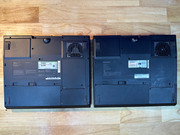
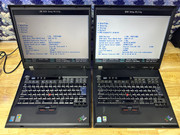
I've managed to get a G41 and G50 side-by side. The two main external differences is simply that the G50 has a 'regular' Thinkpad power connector (the larger one) and the LCD is much brighter. The G41 is entirely IBM-branded, whereas the G50 is lid-branded IBM Thinkpad whilst the LCD bezel and base is branded Lenovo. The G50 BIOS has also list the 'IBM' name as well as a few less options...

The biggest difference is that the G41 has a Pentium 4 CPU rated at 3.06Ghz, whilst the G50 has a Celeron M running at 1.6Ghz. Is this the performance hit that it seems like on the surface? I mean maybe a Core 2 Duo at 1.6Mhz, with the right OS might somehow compare to a P4, but a Celeron!? Seems like a massive downgrade. But I don't really know much about comparing the two.. Any comments? I do wonder if I could upgrade the CPU to a Core 2....

I think perhaps both of these machines were actually manufactured by Acer or something like that? Funny how that worked with the transition of IBM IP to Lenovo.
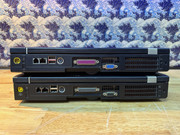
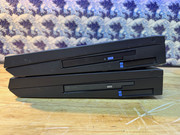
Image Image

Image Image

Image Image

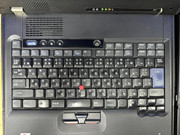
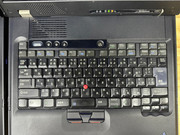
Ideally, I'd like to replace both keyboards with less -shiny ones but they're not exactly common now. Does anyone know if the keys themselves would swap with another similar era keyboard?

Bye Bye!

TPFanatic
Senior ThinkPadder
Senior ThinkPadder
Posts: 2824
Joined: Thu Jul 30, 2015 11:29 pm

Re: Comparing the G41 and G50

#2 Post by TPFanatic » Wed Apr 24, 2024 9:14 am

T2300 comes back as a core duo, so at least you have 2 cores. According to this thread the best cpu you can install is t2700 2.33ghz core duo. viewtopic.php?t=126344

I’ve never seen a G50. This is incredible. Thanks for sharing.

RealBlackStuff
Admin Emeritus
Admin Emeritus
Posts: 24727
Joined: Mon Sep 18, 2006 5:17 am
Location: Loch Garman, Éire

Re: Comparing the G41 and G50

#3 Post by RealBlackStuff » Wed Apr 24, 2024 11:00 am

If you got money to spare: UK layout keyboards here: https://www.pcupgrade.co.uk/laptop-part ... -keyboard/
NMB: FRU P/N 91P8150/91P8151
CHICONY: 91P8094/91P8095
Lovely day for a Guinness! (The Real Black Stuff)
But I actually prefer Murphy's from Cork!

astral
Junior Member
Junior Member
Posts: 391
Joined: Mon Apr 25, 2022 4:51 pm
Location: Ohio, USA

Re: Comparing the G41 and G50

#4 Post by astral » Wed Apr 24, 2024 12:50 pm

I'll never quite understand why Lenovo released the G50 at all - that body only made any sense when a heat pounding P4 was crammed in there. What went in the heatsink space on the G50? Is the giant heatsink still there to cool the Core Duo, or is it just empty space? Why release that thing at all when the R60 existed?
Also worth noting - my G40 says "Manufactured FOR IBM", not "by IBM", so it's not an in-house system... Could reasonably be Acer, not sure.
Operator of www.macdat.net - documenting your vintage laptops before they all crumble to dust!
Owns: X210Ai, T480, W541, Yoga S1, E545, W530, "T430p", X201, R60e, T43, G40, T30, T23, A22p, T21, i1482, i1260, 600X, 770ED, 385XD, 760XL, 560, 701C, 755C, 500, PS/Note 425

dr_st
Admin
Admin
Posts: 10032
Joined: Sat Oct 29, 2005 6:20 am
Location: Israel

Re: Comparing the G41 and G50

#5 Post by dr_st » Wed Apr 24, 2024 2:15 pm

Ah, finally a side-by-side of these two unique and awkward models. G50 is a true transitional design. Basically identical chassis to G4x, full IBM style, yet features Core Duo CPUs and the 20V power plug.
Thinkpad 25 (20K7), T16 Gen 3 (21MQ), Yoga 14 (20FY), T430s (IPS FHD + Classic Keyboard), X220 4291-4BG
X61 7673-V2V, T60 2007-QPG, T42 2373-F7G, X32 (IPS Screen), A31p w/ Ultrabay Numpad

solidpro
Senior Member
Senior Member
Posts: 905
Joined: Thu Jun 11, 2020 11:46 am
Location: Milton Keynes, GB

Re: Comparing the G41 and G50

#6 Post by solidpro » Thu Apr 25, 2024 4:57 am

T2300 comes back as a core duo, so at least you have 2 cores. According to this thread the best cpu you can install is t2700 2.33ghz core duo. viewtopic.php?t=126344
Maybe someone previously did a switch then. I did end up finding that old thread but all that's around on ebay right now is an £84 T2700, which is a bit crazy.

An £80 new keyboard on the other hand....

Glad people have found this comparison interesting. Does anyone care to guess if the different brightness levels is due to different technologies or just a less-used CCFL?

Weirdly this machine does seem to have a very limited release so I'm surprised it happened to pop up and it was only £60 (plus some heavy shipping from Japan to the UK).

Gonzaleitor
Sophomore Member
Posts: 239
Joined: Thu Nov 10, 2022 4:01 pm
Location: Buenos Aires, Argentina

Re: Comparing the G41 and G50

#7 Post by Gonzaleitor » Thu Apr 25, 2024 1:39 pm

Does that Celeron have the same socket and chipset as the Core 2 Duos from the era? If it does is quite possible that you can get one in. They must be cheap as hell, also.

Gonzaleitor
Sophomore Member
Posts: 239
Joined: Thu Nov 10, 2022 4:01 pm
Location: Buenos Aires, Argentina

Re: Comparing the G41 and G50

#8 Post by Gonzaleitor » Thu Apr 25, 2024 1:41 pm

Sorry, I didn't read the post of TPFanatical, you already have one.

astral
Junior Member
Junior Member
Posts: 391
Joined: Mon Apr 25, 2022 4:51 pm
Location: Ohio, USA

Re: Comparing the G41 and G50

#9 Post by astral » Thu Apr 25, 2024 2:44 pm

My G40’s LCD doesn’t look great either. Best way to tell if it’s wear or just how they are is to get the part numbers of both and look them up on panelook.
Operator of www.macdat.net - documenting your vintage laptops before they all crumble to dust!
Owns: X210Ai, T480, W541, Yoga S1, E545, W530, "T430p", X201, R60e, T43, G40, T30, T23, A22p, T21, i1482, i1260, 600X, 770ED, 385XD, 760XL, 560, 701C, 755C, 500, PS/Note 425

TPFanatic
Senior ThinkPadder
Senior ThinkPadder
Posts: 2824
Joined: Thu Jul 30, 2015 11:29 pm

Re: Comparing the G41 and G50

#10 Post by TPFanatic » Thu Apr 25, 2024 2:55 pm

If they use EDID you can install the MonInfoView software by entechtaiwan and it will try to tell you the LCD model.

ZaZ
Moderator
Moderator
Posts: 4858
Joined: Fri May 13, 2005 1:33 pm
Location: Minnesota

Re: Comparing the G41 and G50

#11 Post by ZaZ » Thu Apr 25, 2024 4:54 pm

I can't recall, but has anyone installed a FlexView into a G series? If possible it would make for one of the rarest FrankenPads and would solve the color problem, though the brightest would be mediocre by modern standards. If I remember correctly, which is a coin flip at best, they use a T60 based board. That makes me it's possible, but there's always a reason it won't I've forgotten or never knew.
ThinkPad L14 - 2.1GHz Ryzen 4650U | 16GB | 256GB | 14" FHD | Win11P
ProBook 470 G5 - 1.6GHz Core i5 | 16GB | 2.2TB | 17" FHD | Mint

RealBlackStuff
Admin Emeritus
Admin Emeritus
Posts: 24727
Joined: Mon Sep 18, 2006 5:17 am
Location: Loch Garman, Éire

Re: Comparing the G41 and G50

#12 Post by RealBlackStuff » Thu Apr 25, 2024 11:39 pm

G40 was indeed built by Acer.
Apparently FlexView can be done, see viewtopic.php?p=523847#p523847
And assuming that inverter is "moddable", then you can even go a step further and put a LED-backlit UXGA in it!
Lovely day for a Guinness! (The Real Black Stuff)
But I actually prefer Murphy's from Cork!

solidpro
Senior Member
Senior Member
Posts: 905
Joined: Thu Jun 11, 2020 11:46 am
Location: Milton Keynes, GB

Re: Comparing the G41 and G50

#13 Post by solidpro » Fri Apr 26, 2024 7:22 am

I'd be willing to try and put an IPS panel in, but have no idea where to start.

astral
Junior Member
Junior Member
Posts: 391
Joined: Mon Apr 25, 2022 4:51 pm
Location: Ohio, USA

Re: Comparing the G41 and G50

#14 Post by astral » Fri Apr 26, 2024 10:58 am

RBS, what's your source on Acer manufacturing the G40? Not that I don't believe you, I'm just curious.
FlexView upgrade in one of these would be absolutely hilarious. I'd do it if only the SXGA+ cable wasn't Grade-A unobtainium.
Operator of www.macdat.net - documenting your vintage laptops before they all crumble to dust!
Owns: X210Ai, T480, W541, Yoga S1, E545, W530, "T430p", X201, R60e, T43, G40, T30, T23, A22p, T21, i1482, i1260, 600X, 770ED, 385XD, 760XL, 560, 701C, 755C, 500, PS/Note 425

RealBlackStuff
Admin Emeritus
Admin Emeritus
Posts: 24727
Joined: Mon Sep 18, 2006 5:17 am
Location: Loch Garman, Éire

Re: Comparing the G41 and G50

#15 Post by RealBlackStuff » Fri Apr 26, 2024 11:27 am

My 'source' was the link I gave in that post.
Lovely day for a Guinness! (The Real Black Stuff)
But I actually prefer Murphy's from Cork!

astral
Junior Member
Junior Member
Posts: 391
Joined: Mon Apr 25, 2022 4:51 pm
Location: Ohio, USA

Re: Comparing the G41 and G50

#16 Post by astral » Fri Apr 26, 2024 2:34 pm

Ah, I see now. I had only read below in the thread from the post it sent me to.
Operator of www.macdat.net - documenting your vintage laptops before they all crumble to dust!
Owns: X210Ai, T480, W541, Yoga S1, E545, W530, "T430p", X201, R60e, T43, G40, T30, T23, A22p, T21, i1482, i1260, 600X, 770ED, 385XD, 760XL, 560, 701C, 755C, 500, PS/Note 425

Saucey
ThinkPadder
ThinkPadder
Posts: 1001
Joined: Tue Nov 06, 2012 9:22 pm
Location: San Diego, California
Contact:

Re: Comparing the G41 and G50

#17 Post by Saucey » Fri May 03, 2024 4:31 pm

What I found nuts about the G4x series was that it never had a docking port!
You had the desktop replacement, but couldn't get the full suite from T4x or A3x machines.
Arguably those with the advanced dock that had GPU support, would surpass the G4x machines.
Yes I tried gaming on a G40 and G41. That nVidia chip on select G41's made a massive difference.
I find it wild that IBM never had a dGPU as standard. Along with not applying a modern graphics card on the X32.
Coffee, F1, ThinkPads & Nikon.

Daily: PixelBook, W550s, MSI Raider GE78
Old Faves: A31p, 2521, 755CV, S31, 380Z.

wujstefan
ThinkPadder
ThinkPadder
Posts: 1426
Joined: Fri Mar 04, 2011 8:38 am
Location: Tarnow, Poland

Re: Comparing the G41 and G50

#18 Post by wujstefan » Tue May 07, 2024 3:44 am

I'm restoring and modding mine G40, G41 and G50 - will try to make some pics one to another once they're done. G50 already sports a SXGA+ IPS panel but still needs some love ;) The worst of all are the hinges; they do tend to wobble, are inaccessible and irreperable :/

@solidpro if you succeed to find any kind of parts for these models please let me know. These are, by far, the hardest to get so far (especially G50).
Too many thinkpads not enough time!
(stable under reduction)

solidpro
Senior Member
Senior Member
Posts: 905
Joined: Thu Jun 11, 2020 11:46 am
Location: Milton Keynes, GB

Re: Comparing the G41 and G50

#19 Post by solidpro » Mon May 13, 2024 4:34 am

Right now, the only spare I have is a spare working keyboard. It's either japanese or US configuration.

I also have a couple of spare 15" screens - one has a single green vertical line and the other backlight comes on and nothing is displayed. If anyone wants these for free (+ postage) then let me know.

I've noticed that the CPU heatsink on the G50 is hideous. It uses a triangular shape over the CPU and you screw them down in a particular order. However, 1 is a screw, which screws directly into the motherboard and the other two are more like bolts which screw into 'floating' upside down screws built-in to the motherboard - however the floating screws are so shallow, their threads rarely catch the heatsink so it's almost impossible to screw on. Really bad design.

Finally, does anyone have model numbers for upgraded LCDs which will work on the 14" or 15" models and whether or not they need a specific ribbon/inverter? All of mine are running at XGA which is just a bit lame on a 15" panel.

At some point I've acquired a Samsung LTN150P3 panel which supposedly does work with the G40/G41 but shows all white. This is a 1400x1050 panel so I suspect it requires it's own special ribbon cable.... maybe from a different machine?

Thanks

wujstefan
ThinkPadder
ThinkPadder
Posts: 1426
Joined: Fri Mar 04, 2011 8:38 am
Location: Tarnow, Poland

Re: Comparing the G41 and G50

#20 Post by wujstefan » Mon May 13, 2024 7:56 am

solidpro wrote:
Mon May 13, 2024 4:34 am
Right now, the only spare I have is a spare working keyboard. It's either japanese or US configuration.

I also have a couple of spare 15" screens - one has a single green vertical line and the other backlight comes on and nothing is displayed. If anyone wants these for free (+ postage) then let me know.

I've noticed that the CPU heatsink on the G50 is hideous. It uses a triangular shape over the CPU and you screw them down in a particular order. However, 1 is a screw, which screws directly into the motherboard and the other two are more like bolts which screw into 'floating' upside down screws built-in to the motherboard - however the floating screws are so shallow, their threads rarely catch the heatsink so it's almost impossible to screw on. Really bad design.

Finally, does anyone have model numbers for upgraded LCDs which will work on the 14" or 15" models and whether or not they need a specific ribbon/inverter? All of mine are running at XGA which is just a bit lame on a 15" panel.

At some point I've acquired a Samsung LTN150P3 panel which supposedly does work with the G40/G41 but shows all white. This is a 1400x1050 panel so I suspect it requires it's own special ribbon cable.... maybe from a different machine?
I never actually put a notice on the lid. Are they just the same for G50 and G40/41.
I was planning to make some testing on a G40 I have spare (I have exactly one G41 and G50, but 2pcs of G40, one of which is extremely beat) with 4:3 panels available from thinkpads or for thinkpads (I should have all options available). I do NOT expect SXGA+ to work on XGA cable set, but I DO expect that UXGA will work with SXGA+ cable. Inverter seems to be universal. Thingy is, I do not have any proper cables :( will need to hunt for that.

FRUs for 15" SXGA+ cables you need:
91P6797, 91P6822, 91P6866
Too many thinkpads not enough time!
(stable under reduction)

pianowizard
Senior ThinkPadder
Senior ThinkPadder
Posts: 8556
Joined: Tue Jun 28, 2005 5:07 am
Location: Ann Arbor, MI
Contact:

Re: Comparing the G41 and G50

#21 Post by pianowizard » Mon May 27, 2024 2:35 pm

Nice side-by-side comparisons! For about 10 years I collected almost 50 Thinkpads, and two models that I really wanted but never owned were the G50 and the 770Z with 13.7" 1280x1024. I did have a G41 2886-79U with 3.3GHz Pentium 4, 15.0" 1400x1050 and 1GB PC2700 RAM, weighing 8.43 lb. It was a near-mint unit that cost me $350 in July 2008. I loved its unique design, solid construction, and performance -- it was my very first computer on which Vista ran smoothly. I didn't use it much though, as I had already migrated to desktops and when I needed mobility I had a T43p with 15.0" QXGA, so I sold it in Sep 2008 without losing a single penny.
Dell Latitude 7370 (QHD+, 2.84lb); HP Pavilion x2 12-b096ms (FHD+, 3.14lb); Microsoft Surface 3 (FHD+, 2.00lb);
HP Z440 (Xeon E5-1630 v3); Dell OptiPlex 5040 SFF (Core i5-6600), OptiPlex XE2 (Core i7-4770S)
Acer ET322QK, T272HUL; Crossover 404K; QNIX QHD2410R; Seiki Pro SM40UNP

Post Reply
  • Similar Topics
    Replies
    Views
    Last post

Return to “ThinkPad R, A, G and Z Series”

Who is online

Users browsing this forum: No registered users and 58 guests