


 Homepage
 Forum
Forum Drivers
 HMM-Manuals
 MTM
MTM Feed
Feed
I found two listings on eBay, one is the X40 and the other is X61s.
The X40 has been upgraded to 1GB of RAM and runs Windows XP. It has a small scratch on the screen.
The X61s has been upgraded to a 64GB SSD, has 3GB of RAM, and runs Ubuntu Linux.
I'm mainly concerned about ease of repair and the longevity of the devices. Which one would you recommend?
Take a look at our
ThinkPads.com HOME PAGE
For those who might want to contribute to the blog, start here: Editors Alley Topic
Then contact Bill with a Private Message
ThinkPads.com HOME PAGE
For those who might want to contribute to the blog, start here: Editors Alley Topic
Then contact Bill with a Private Message
X40 or X61s?
-
guythingit12396
- Posts: 24
- Joined: Mon Jul 29, 2024 9:24 pm
- Location: Melbourne, Australia
-
RealBlackStuff
- Admin Emeritus

- Posts: 24727
- Joined: Mon Sep 18, 2006 5:17 am
- Location: Loch Garman, Éire
Re: X40 or X61s?
Welcome to the Forum.
X61s every day of the week!
The X61s can use a standard 2.5" SATA HDD or SSD (X40 has an odd 1.8" IDE/PATA drive).
X61s can have up to 8GB RAM PC2-5300 or PC2-6400.
X61s can be BIOS-upgraded to SATA-II, wifi whitelist removed (check Middleton BIOS).
Both are easy to repair, using the manual from the HMM link above.
X61s every day of the week!
The X61s can use a standard 2.5" SATA HDD or SSD (X40 has an odd 1.8" IDE/PATA drive).
X61s can have up to 8GB RAM PC2-5300 or PC2-6400.
X61s can be BIOS-upgraded to SATA-II, wifi whitelist removed (check Middleton BIOS).
Both are easy to repair, using the manual from the HMM link above.
Lovely day for a Guinness! (The Real Black Stuff)
But I actually prefer Murphy's from Cork!
But I actually prefer Murphy's from Cork!
Re: X40 or X61s?
Are going to use your new-old Thinkpad for something productive?
If this is the case then the X61s all the way. Easier to live with and much faster.
- Standard 2.5" SATA drive
- MAX 8GB ram - although the 4GB DDR2 sticks can be a bit pricy (the X40 has a MAX of 1.25/1.5GB RAM)
- WiFi should work with WPA2 out of the box for the X61s
- Whatever Core2 is in the X61s should crush whatever Pentium-M is in the X40 in terms of performance.
For repair I would say neither are particularly difficult to work with.
That being said, as a hobbyist, I probably love my X41 more than my X61s - I just find it to be such a quirky little machine.
And that is probably the point. Getting an X40 will inevitably lead to "projects", and the fun is more in the hardware itself.
the 1.8" IDE drive is the key issue. They were not very reliable even when new, and very slow. They are also rare today, so an IDE -> mSata upgrade would likely be on your ToDO.
That upgrade can be an infuriating experience depending how you look at it (and your luck in getting compatible parts). If you're still thinking about the X40 at this point, you should research this before deciding.
If this is the case then the X61s all the way. Easier to live with and much faster.
- Standard 2.5" SATA drive
- MAX 8GB ram - although the 4GB DDR2 sticks can be a bit pricy (the X40 has a MAX of 1.25/1.5GB RAM)
- WiFi should work with WPA2 out of the box for the X61s
- Whatever Core2 is in the X61s should crush whatever Pentium-M is in the X40 in terms of performance.
For repair I would say neither are particularly difficult to work with.
That being said, as a hobbyist, I probably love my X41 more than my X61s - I just find it to be such a quirky little machine.
And that is probably the point. Getting an X40 will inevitably lead to "projects", and the fun is more in the hardware itself.
the 1.8" IDE drive is the key issue. They were not very reliable even when new, and very slow. They are also rare today, so an IDE -> mSata upgrade would likely be on your ToDO.
That upgrade can be an infuriating experience depending how you look at it (and your luck in getting compatible parts). If you're still thinking about the X40 at this point, you should research this before deciding.
Thinkpads: Too many. Currently playing with an IBM 535
-
guythingit12396
- Posts: 24
- Joined: Mon Jul 29, 2024 9:24 pm
- Location: Melbourne, Australia
Re: X40 or X61s?
Hello guys, thank you for the answers!
I decided to remove the X40 from my consideration list, however, when I was going to buy the X61s, I saw another listing of the X60s that was going for slightly cheaper and comes with the dock. Additionally, the listing is from someone near me so I don't have to pay for any postage. Both the X61s and the X60s are in similar conditions, should I grab the X60s to save some money then if they are identical performance and longevity wise?
I decided to remove the X40 from my consideration list, however, when I was going to buy the X61s, I saw another listing of the X60s that was going for slightly cheaper and comes with the dock. Additionally, the listing is from someone near me so I don't have to pay for any postage. Both the X61s and the X60s are in similar conditions, should I grab the X60s to save some money then if they are identical performance and longevity wise?

Re: X40 or X61s?
Depending on specific configurations, An X60s and X61s may be very similar or quite different in out-of-the-box performance.
However, due to some differences between the platforms, the potential of an X61s is much higher:
8GB RAM support versus 3GB, SATA2 speed support for the main storage drive (if Middleton BIOS is installed), a bit more capable GPU for desktop acceleration, maybe a few other points.
Also, the majority of X60s were released with 32-bit Core Duo CPUs.
However, due to some differences between the platforms, the potential of an X61s is much higher:
8GB RAM support versus 3GB, SATA2 speed support for the main storage drive (if Middleton BIOS is installed), a bit more capable GPU for desktop acceleration, maybe a few other points.
Also, the majority of X60s were released with 32-bit Core Duo CPUs.
Thinkpad 25 (20K7), T16 Gen 3 (21MQ), Yoga 14 (20FY), T430s (IPS FHD + Classic Keyboard), X220 4291-4BG
X61 7673-V2V, T60 2007-QPG, T42 2373-F7G, X32 (IPS Screen), A31p w/ Ultrabay Numpad
X61 7673-V2V, T60 2007-QPG, T42 2373-F7G, X32 (IPS Screen), A31p w/ Ultrabay Numpad
-
guythingit12396
- Posts: 24
- Joined: Mon Jul 29, 2024 9:24 pm
- Location: Melbourne, Australia
Re: X40 or X61s?
Thank you for your reply! Just a moment ago, I asked the person who listed the X61s if they ship overseas (they didn't specify shipping yet on the listing so I have to asked) and they blocked me, so that's a bummer. I should specify my use case too if it helps in deciding: I plan on running Windows XP and will be using the optical drive to run some old CDs that I have, maybe browse the web sometimes (although there's another concern with security regarding connecting to the web on Windows XP). Now that I think about it, the better hardware in X61s won't probably be that useful since I'm going to run 32-bit XP.dr_st wrote: ↑Tue Jul 30, 2024 8:22 amDepending on specific configurations, An X60s and X61s may be very similar or quite different in out-of-the-box performance.
However, due to some differences between the platforms, the potential of an X61s is much higher:
8GB RAM support versus 3GB, SATA2 speed support for the main storage drive (if Middleton BIOS is installed), a bit more capable GPU for desktop acceleration, maybe a few other points.
Also, the majority of X60s were released with 32-bit Core Duo CPUs.

Re: X40 or X61s?
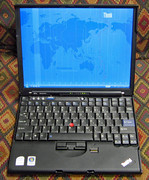
Some X61s, though not all, come with the optional UltraLight screen that increased the brightness to 180 nits over the standard screen that was 150 nits or positively dreadful by todays standards. I would expect the X40 to offer a subpar display similar to the standard X61 LCD, though I don't have the numbers in front of me. Here's a pic of the X61s with the UltraLight screen:
ThinkPad L14 - 2.1GHz Ryzen 4650U | 16GB | 256GB | 14" FHD | Win11P
ProBook 470 G5 - 1.6GHz Core i5 | 16GB | 2.2TB | 17" FHD | Mint
ProBook 470 G5 - 1.6GHz Core i5 | 16GB | 2.2TB | 17" FHD | Mint
-
- Similar Topics
- Replies
- Views
- Last post
-
-
X61s screen backlight doesn't work. Faulty mobo?
by huohuo » Tue Mar 03, 2026 6:35 pm » in Thinkpad X60/X61 Series incl. Tablets - 4 Replies
- 2629 Views
-
Last post by huohuo
Sat Apr 04, 2026 3:43 pm
-
-
-
IBM Badged X61s Rarity
by GordonFreeman98 » Tue Mar 17, 2026 4:30 pm » in Thinkpad X60/X61 Series incl. Tablets - 1 Replies
- 1024 Views
-
Last post by dr_st
Tue Mar 17, 2026 4:55 pm
-
Who is online
Users browsing this forum: No registered users and 39 guests