


 Homepage
 Forum
Forum Drivers
 HMM-Manuals
 MTM
MTM Feed
Feed
Hi guys,
looking for a way to have my backlit keyboard automatically turn on when starting my T470 (Model 20jns04t00) . I found that there should be a config-entry in my BIOS to achieve this but there is not. I run Windows 11, created by a Rufus stick, and all the devices are configured ok in device managers.
Any idea on what I can do to not always have to turn on backlit keyboard every startup?
Cheers from Germany,
Terry
Take a look at our
ThinkPads.com HOME PAGE
For those who might want to contribute to the blog, start here: Editors Alley Topic
Then contact Bill with a Private Message
ThinkPads.com HOME PAGE
For those who might want to contribute to the blog, start here: Editors Alley Topic
Then contact Bill with a Private Message
T470 Backlit Keyboard always on?
-
terry_mccann
- Posts: 45
- Joined: Mon Oct 09, 2006 9:27 am
- Location: Wiehl, Germany
Re: T470 Backlit Keyboard always on?
I believe that all of the 'backlit' OE keyboards that I've had required a 'turn on' after start. Nearly all (maybe all) have 2 levels of brightness. You had the functionality in previous Windows? I'd think default to 'off' would be the desired.
T60 2007-GCU T7200 2.0GHZ/2.0G 3945ABG XP (Bluetooth & ATI FireGL V5250 by "Brad")
600 2645-A2U used only for "data logging" my 1990 Corvette ZR-1
600 2645-A2U used only for "data logging" my 1990 Corvette ZR-1
-
terry_mccann
- Posts: 45
- Joined: Mon Oct 09, 2006 9:27 am
- Location: Wiehl, Germany
Re: T470 Backlit Keyboard always on?
Dunno for sure.
But my new Yoga Gen6 at work keeps the backlight always on. Would love to have that on my T470 as well....
But my new Yoga Gen6 at work keeps the backlight always on. Would love to have that on my T470 as well....
-
Jake.Werecat
- Junior Member

- Posts: 284
- Joined: Thu May 09, 2019 6:46 pm
- Location: Europe
Re: T470 Backlit Keyboard always on?
Keyboard backlight IS NOT handled by OS, it's done by EC/BIOS, so Windows version has nothing to do with it.
I've never heard of option of keeping keyboard lit ALL the time.... Why so? You don't need it during a day, and it's just a a click away when you need it.
I've never heard of option of keeping keyboard lit ALL the time.... Why so? You don't need it during a day, and it's just a a click away when you need it.
T14 1st gen
-
terry_mccann
- Posts: 45
- Joined: Mon Oct 09, 2006 9:27 am
- Location: Wiehl, Germany
Re: T470 Backlit Keyboard always on?
Reply to that is easy: I need it more often than I dont. And options you need more often than not make sense to turn on all the time if there are no other disadvantages, which there arent.
I found a screenshot from a BIOS of a T470 showing Backlit always on under keyboard settings, but I cant find it anymore. And it works on my Yoga Gen 6 at work, there the backlight always pops on at boot.
I found a screenshot from a BIOS of a T470 showing Backlit always on under keyboard settings, but I cant find it anymore. And it works on my Yoga Gen 6 at work, there the backlight always pops on at boot.
-
Jake.Werecat
- Junior Member
- Posts: 284
- Joined: Thu May 09, 2019 6:46 pm
- Location: Europe
Re: T470 Backlit Keyboard always on?
Understood... Though there is one obvious side-effect - decreased battery life.
I just went through T470 BIOS again, but to no avail, no such function there.
AutHotKey also is not an option, as Fn key strokes are filtered out by EC and they don't quite reach OS.
Hard to figure it out.
I just went through T470 BIOS again, but to no avail, no such function there.
AutHotKey also is not an option, as Fn key strokes are filtered out by EC and they don't quite reach OS.
Hard to figure it out.
T14 1st gen
-
terry_mccann
- Posts: 45
- Joined: Mon Oct 09, 2006 9:27 am
- Location: Wiehl, Germany
Re: T470 Backlit Keyboard always on?
Yeah well, batterie life ok, but I guess that is not that big of a deal. But I really cant find any setting as well....shame.
But thanks for helping....
But thanks for helping....
-
terry_mccann
- Posts: 45
- Joined: Mon Oct 09, 2006 9:27 am
- Location: Wiehl, Germany
Re: T470 Backlit Keyboard always on?
Hmm....problem remains. Sold my T470 and bought myself a nice T480s for Win 11 compatibility, but it also switches off the backlit keyboard on bootup. Would still love to have it always on....
Re: T470 Backlit Keyboard always on?
Lenovo doesn't allow users to set the keyboard to turn on automatically, however you can use an external controller
If you want your keyboard to stay lit even after a restart or a wakeup you can try DimScreenSaver for lenovo t470 (will probably work for other models too)
https://github.com/pioter1234567/DimScr ... _keyboard/
It allowes you to control the keyboard backlight based on your settings. the keyboard backlight turns off when the user is inactive and turn back when active again
screen shot:
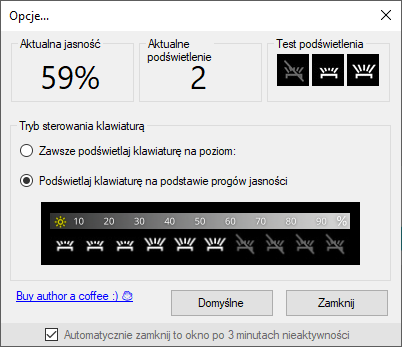
screen shot:

If you want your keyboard to stay lit even after a restart or a wakeup you can try DimScreenSaver for lenovo t470 (will probably work for other models too)
https://github.com/pioter1234567/DimScr ... _keyboard/
It allowes you to control the keyboard backlight based on your settings. the keyboard backlight turns off when the user is inactive and turn back when active again
screen shot:
screen shot:
-
- Similar Topics
- Replies
- Views
- Last post
-
- 4 Replies
- 3489 Views
-
Last post by jruschme
Tue Dec 23, 2025 11:51 am
-
-
X1 Carbon 4th Gen -- Wonky Keyboard
by Scorpion8 » Thu Oct 23, 2025 9:40 pm » in ThinkPad X1 / X1-Carbon / X1-Extreme and later Series - 9 Replies
- 14048 Views
-
Last post by Scorpion8
Wed Nov 19, 2025 4:42 pm
-
-
-
WTB: T60/T60p 15” palm rest and keyboard bezel
by stanleylieber » Fri Oct 31, 2025 4:32 pm » in Marketplace - Forum Members only - 3 Replies
- 6612 Views
-
Last post by KAQSP
Thu Nov 20, 2025 6:33 pm
-
-
-
ThinkPad T25 ANSI US Keyboard from Amazon
by vermaden » Sun Nov 09, 2025 6:26 pm » in Thinkpad T25 Anniversary/Retro - 1 Replies
- 8305 Views
-
Last post by David C
Tue Jan 27, 2026 9:30 pm
-
Who is online
Users browsing this forum: No registered users and 79 guests