


 Homepage
 Forum
Forum Drivers
 HMM-Manuals
 MTM
MTM Feed
Feed
This is an issue on both my T400 and the new-to-me T510. There are 16 available brightness levels on both panels, which are gracefully switched through in order when pressing Fn+Home/Fn+End in the BIOS or Windows 7 . In Windows 10, however, i'm only getting 11 brightness options in total, shown on the built in OSD, and switching to some of them doesn't even do anything. This wasn't as much of an issue on the T400 as it is on the T510 because on the latter the lowest level is too low to be usable but the next step up is too high when working in a dark area. Is there perhaps a way to set custom brightness levels or, better yet, completely disable Windows 10's handling of brightness events and let the EC handle them?
I swear Windows 10 has been nothing but madness on the vast majority of machines I've installed it on. Can't imagine what a pain 11 is to deal with...
Take a look at our
ThinkPads.com HOME PAGE
For those who might want to contribute to the blog, start here: Editors Alley Topic
Then contact Bill with a Private Message
ThinkPads.com HOME PAGE
For those who might want to contribute to the blog, start here: Editors Alley Topic
Then contact Bill with a Private Message
Setting custom display brightness levels in Windows 10
Setting custom display brightness levels in Windows 10
ThinkPads are nice, y'know?
The collection: ThinkPad 310, A31, T40p, T43, T43p, T400, T510, T430
The collection: ThinkPad 310, A31, T40p, T43, T43p, T400, T510, T430

Re: Setting custom display brightness levels in Windows 10
The Mobility Center gives you an alternate slider to control the brightness.
key combo Win+X, then key B, opens Mobility Center on Win 10. It looks like this on my P71. Display brightness slider is in the upper left corner. Press key Tab to put focus on the slider then you can adjust it 0-100 with the arrow keys, alternatively use the cursor to drag the slider.
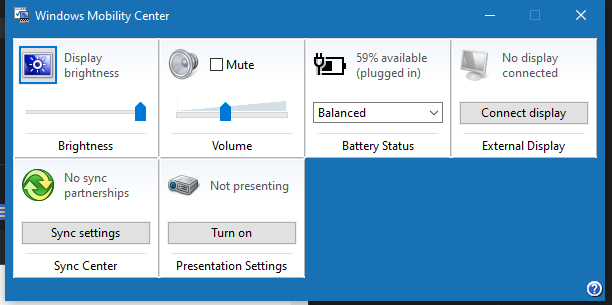
key combo Win+X, then key B, opens Mobility Center on Win 10. It looks like this on my P71. Display brightness slider is in the upper left corner. Press key Tab to put focus on the slider then you can adjust it 0-100 with the arrow keys, alternatively use the cursor to drag the slider.
sent from my iPhone
Registry Tweak To Enable 2 Finger Scroll On Old Synaptics Touchpads
Registry Tweak To Enable 2 Finger Scroll On Old Synaptics Touchpads

Re: Setting custom display brightness levels in Windows 10
You're not supposed to install Win10 on T400/T510 any more than you are supposed to install Win7 on T470/T580.
I mean, you can, of course, but as these OSes have never been tested with these systems, expected a variety of issues. Most of which can be resolved, but maybe not all.
For example, the Mobility Center trick TPFanatic just shared is a cool one. Works just as well on my T430s.
I mean, you can, of course, but as these OSes have never been tested with these systems, expected a variety of issues. Most of which can be resolved, but maybe not all.
For example, the Mobility Center trick TPFanatic just shared is a cool one. Works just as well on my T430s.
Thinkpad 25 (20K7), T16 Gen 3 (21MQ), Yoga 14 (20FY), T430s (IPS FHD + Classic Keyboard), X220 4291-4BG
X61 7673-V2V, T60 2007-QPG, T42 2373-F7G, X32 (IPS Screen), A31p w/ Ultrabay Numpad
X61 7673-V2V, T60 2007-QPG, T42 2373-F7G, X32 (IPS Screen), A31p w/ Ultrabay Numpad
Re: Setting custom display brightness levels in Windows 10
The hardware is fully supported, even the graphics driver works perfectly fine with Windows 10. All (software) quirks I've ever had with ThinkPads have been related to having Windows 10 installed on them, the brightness is only one example. I can't disable the built in OSD without having to use 3rd party software, sound options can be finnicky on all systems, not just old ThinkPads, and of course let's not forget the absolutely idiotic block on Power Manager's installation. The software is fully functional under 10 Micro$oft, what's the point of blocking its installation without giving users an easy way around it? If I screw up my system it's my own fault. They're treating their users as kindergarteners.dr_st wrote: ↑Sat Apr 19, 2025 6:22 amYou're not supposed to install Win10 on T400/T510 any more than you are supposed to install Win7 on T470/T580.
I mean, you can, of course, but as these OSes have never been tested with these systems, expected a variety of issues. Most of which can be resolved, but maybe not all.
Literally every problem I've had with Windows 10 could've been solved, nay, wouldn't even have been a problem in the first place had M$ given the end users a bloody on/off slider or a checkbox. The only reason i'm using it is because Syncthing doesn't support 7 anymore, and I need it to have the latest KeePass 2 database on all of my devices. I'm thinking of switching to Linux again, but the buttery smooth TrackPoint movement with the official Windows Synaptics driver isn't something I can easily part with.
Also thanks TPFanatic.
ThinkPads are nice, y'know?
The collection: ThinkPad 310, A31, T40p, T43, T43p, T400, T510, T430
The collection: ThinkPad 310, A31, T40p, T43, T43p, T400, T510, T430
Re: Setting custom display brightness levels in Windows 10
i also install 10 for compatibility purposes. aside from paywalled customization it works even without a license. whereas classical windows throws hissy fits if not licensed, 7 is at worst annoying, XP just stops working if not licensed. i cba with linux
sent from my iPhone
Registry Tweak To Enable 2 Finger Scroll On Old Synaptics Touchpads
Registry Tweak To Enable 2 Finger Scroll On Old Synaptics Touchpads
Re: Setting custom display brightness levels in Windows 10
XP is really easy to activate, Micro$oft's phone activation system still works. Or you can use xp_activate32.exe, a nifty little program that magically activates the system by pressing 2 buttons. Vista and 7 get a bit tougher but there's no-fuss software around for it as well. For 10 just use massgrave.dev. BTW I'm not sure if the Vista and 7 activation servers are still up.
But yeah Linux can be a pain to get started with and I got bored with it some time ago.
ThinkPads are nice, y'know?
The collection: ThinkPad 310, A31, T40p, T43, T43p, T400, T510, T430
The collection: ThinkPad 310, A31, T40p, T43, T43p, T400, T510, T430
Re: Setting custom display brightness levels in Windows 10
im in america, i drive the speed limit 
sent from my iPhone
Registry Tweak To Enable 2 Finger Scroll On Old Synaptics Touchpads
Registry Tweak To Enable 2 Finger Scroll On Old Synaptics Touchpads
Re: Setting custom display brightness levels in Windows 10
Rules are meant to be broken  Kidding ofc lol, but I doubt M$ cares for people activating their software without buying it. The majority of their revenue comes from, and always will come from OEM preinstalls, but let's not forget the many advertisements, telemetry and overall rubbish that comes pre-baked into every non LTSC Windows 11 installation ever.
There's tonnes of software I will happily pay a given price for, but Microsoft's doesn't fall under that category.
Kidding ofc lol, but I doubt M$ cares for people activating their software without buying it. The majority of their revenue comes from, and always will come from OEM preinstalls, but let's not forget the many advertisements, telemetry and overall rubbish that comes pre-baked into every non LTSC Windows 11 installation ever.There's tonnes of software I will happily pay a given price for, but Microsoft's doesn't fall under that category.
ThinkPads are nice, y'know?
The collection: ThinkPad 310, A31, T40p, T43, T43p, T400, T510, T430
The collection: ThinkPad 310, A31, T40p, T43, T43p, T400, T510, T430
-
- Similar Topics
- Replies
- Views
- Last post
-
-
Display brightness issue with Win 10 on W520
by jdwis » Tue Nov 04, 2025 2:22 pm » in ThinkPad W500/W510/W520 and W700/W701 Series - 4 Replies
- 11373 Views
-
Last post by jdwis
Thu Nov 13, 2025 8:05 am
-
-
-
Looking for custom mechanical keyboard similar to thinkpad t60/t61
by ZImperator » Mon Jan 26, 2026 2:58 am » in ThinkPad T60/T61 Series - 1 Replies
- 3090 Views
-
Last post by axur-delmeria
Mon Jan 26, 2026 9:44 am
-
-
-
T14 Gen 3 compatible 40-pin 4-lane display cables
by LimesKey » Fri Oct 24, 2025 3:22 pm » in Thinkpad T14/T15/T16 - 3 Replies
- 8213 Views
-
Last post by RealBlackStuff
Sun Oct 26, 2025 12:57 am
-
-
-
FS: IBM T60p 15“ UXGA Display, T2500, 4GB RAM 400GB HDD
by Huma0815 » Wed Nov 26, 2025 5:23 pm » in Marketplace - Forum Members only - 4 Replies
- 8273 Views
-
Last post by Huma0815
Sun Feb 22, 2026 12:57 pm
-
Who is online
Users browsing this forum: No registered users and 39 guests