


 Homepage
 Forum
Forum Drivers
 HMM-Manuals
 MTM
MTM Feed
Feed
I recently picked up an X1 Carbon, 3rd Generation and love it. Very good, light, thin laptop to use with my stable of T490's.
In my excitement I also bid and won an X1 Carbon 4th Generation (parts unit which I got back working, some people....), but egads, it is NOT simply an update-improvement of the 3rd generation. Different palmrest layout, processor is actually slower than my 3rd Gen if I recall. Different option ports, away from the simple integrated power-OneLink connector to separate power and OneLink connectors that now need a different docking station. Changed the locations of power button, fingerprint reader .... all un-necessary changes. Sheesh. And trying to find a "micro-Ethernet-extension" to use that port seems unobtanium. I can find the OneLink-to-Ethernet adapters, but then why have two different ones?
Actually the 4th Gen seems a step backwards from the 3rd Gen.
What is the better of the mid-range Generation models of the X1 Carbon? Not at all happy with non-upgradeable RAM but I realize that was a factor in "thin" ability.
Take a look at our
ThinkPads.com HOME PAGE
For those who might want to contribute to the blog, start here: Editors Alley Topic
Then contact Bill with a Private Message
ThinkPads.com HOME PAGE
For those who might want to contribute to the blog, start here: Editors Alley Topic
Then contact Bill with a Private Message
X1 Carbon "Generations"
X1 Carbon "Generations"
T490/495/E14 and X1 Carbon user.
Pain heals, chicks dig scars, glory .... lasts forever.
Pain heals, chicks dig scars, glory .... lasts forever.

Re: X1 Carbon "Generations"
5th gen is when they got considerably smaller and lighter. This marks the transition for me.
6th gen is the same as 5th gen but gets quad core CPUs. This may be the sweet spot.
After that they gradually lost keyboard travel depth.
6th gen is the same as 5th gen but gets quad core CPUs. This may be the sweet spot.
After that they gradually lost keyboard travel depth.
Thinkpad 25 (20K7), T16 Gen 3 (21MQ), Yoga 14 (20FY), T430s (IPS FHD + Classic Keyboard), X220 4291-4BG
X61 7673-V2V, T60 2007-QPG, T42 2373-F7G, X32 (IPS Screen), A31p w/ Ultrabay Numpad
X61 7673-V2V, T60 2007-QPG, T42 2373-F7G, X32 (IPS Screen), A31p w/ Ultrabay Numpad
Re: X1 Carbon "Generations"
Thanks for the info. I guess "considerably smaller and lighter" than a 3rd Gen isn't really in my swim lane. There's a balance between size and useability. When it's too small, too light it's hard to keep on your lap while typing for instance. But great info to consider.
T490/495/E14 and X1 Carbon user.
Pain heals, chicks dig scars, glory .... lasts forever.
Pain heals, chicks dig scars, glory .... lasts forever.

Re: X1 Carbon "Generations"
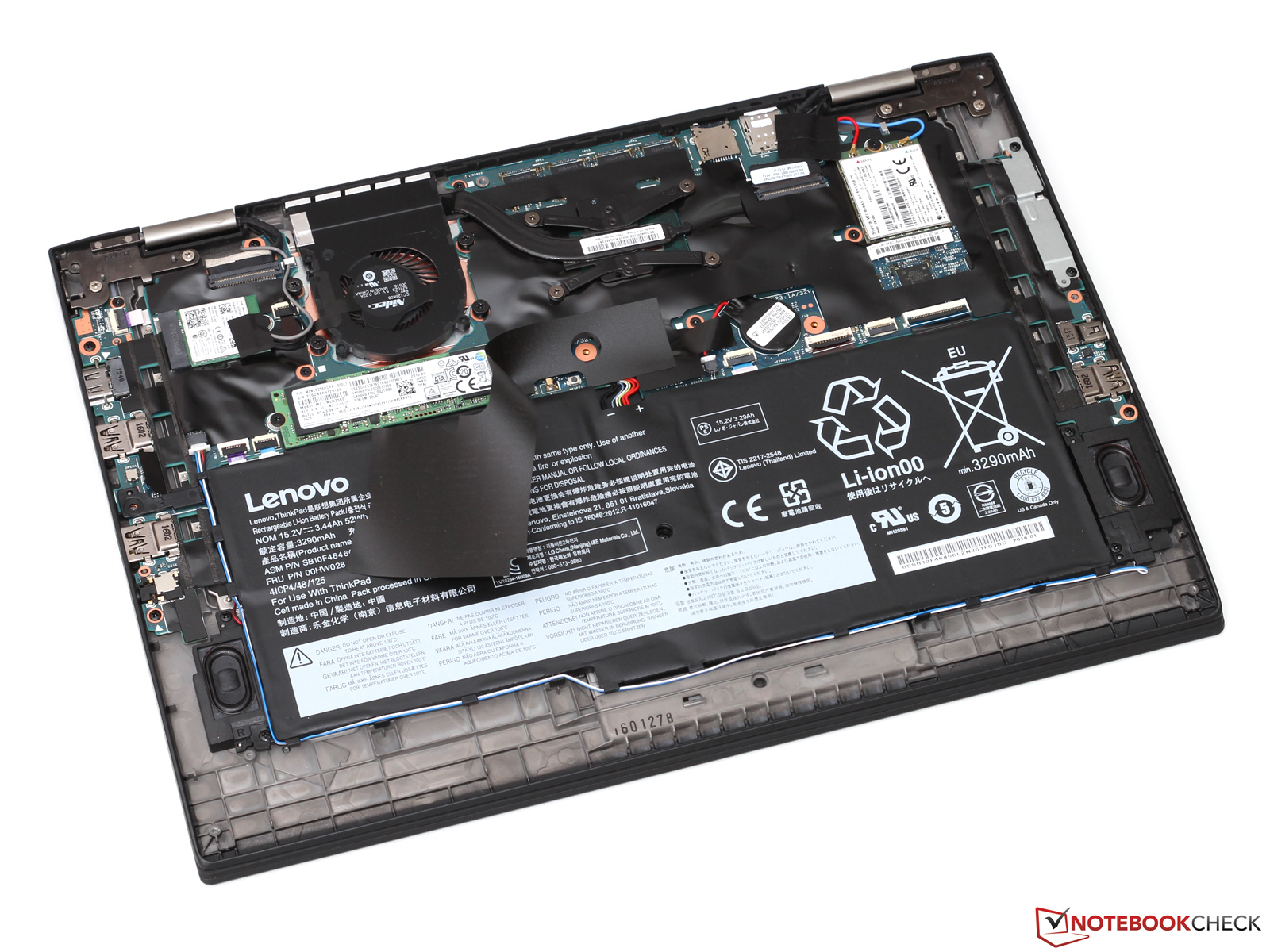
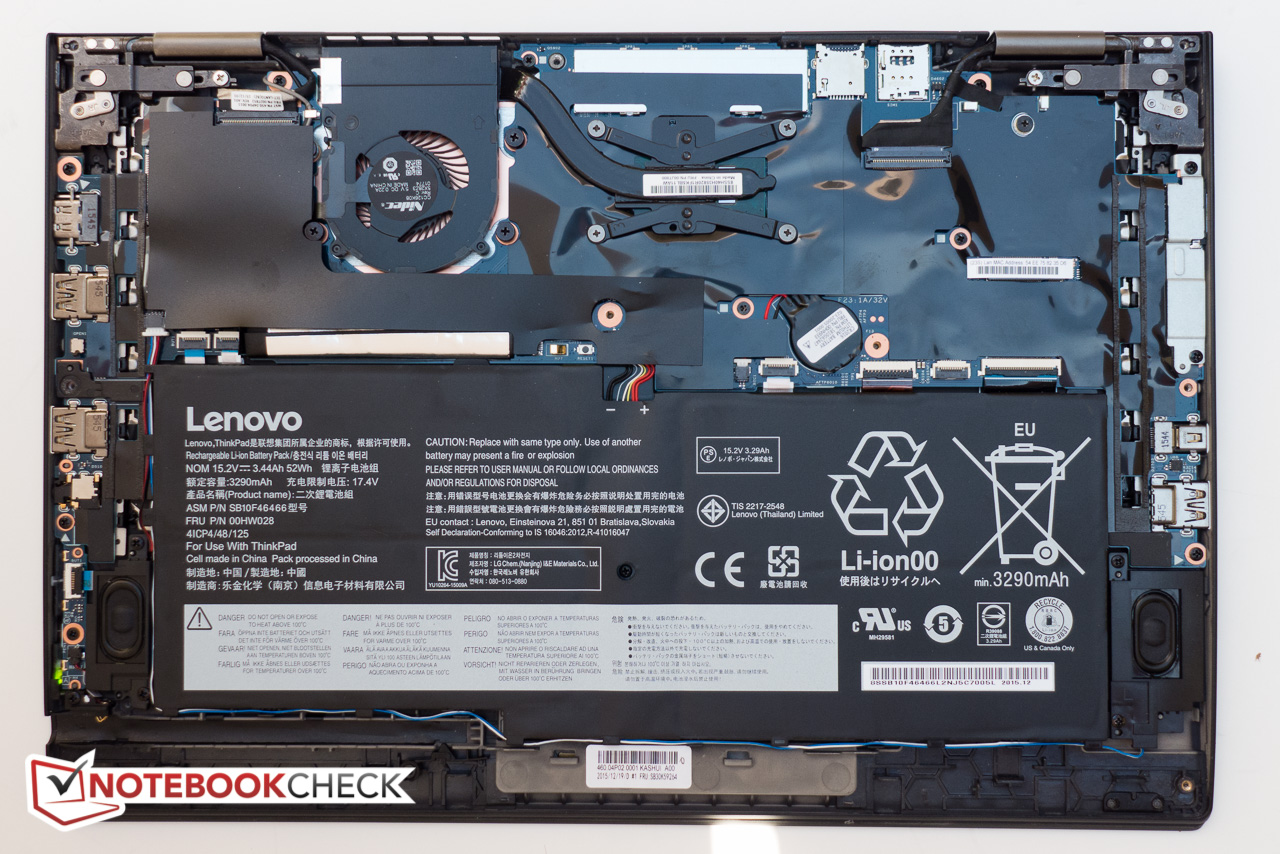
what makes X1 Carbon Gen 4 so odd is that it is actually a X1 Yoga Gen 1 convertible just with a regular hinge sold as a laptop. Compare the two reviews on Notebookcheck, you see they're actually the same.
Inside X1 C G4:
https://www.notebookcheck.net/fileadmin ... RGE/g1.jpg
Full review: https://www.notebookcheck.net/Lenovo-Th ... 631.0.html
Inside X1 Y G1:
https://www.notebookcheck.net/fileadmin ... 090072.jpg
Full review: https://www.notebookcheck.net/Lenovo-Th ... 271.0.html
Inside X1 C G4:
https://www.notebookcheck.net/fileadmin ... RGE/g1.jpg
Full review: https://www.notebookcheck.net/Lenovo-Th ... 631.0.html
Inside X1 Y G1:
https://www.notebookcheck.net/fileadmin ... 090072.jpg
Full review: https://www.notebookcheck.net/Lenovo-Th ... 271.0.html
sent from my iPhone
Registry Tweak To Enable 2 Finger Scroll On Old Synaptics Touchpads
Registry Tweak To Enable 2 Finger Scroll On Old Synaptics Touchpads

Re: X1 Carbon "Generations"
Yes, the X1 Carbon Gen 4 is the odd one out. It is indeed based on the X1 Yoga Gen 1, which is why it has this very un-typical hinge design for an X1 Carbon. It is also the X only generation where X1 Yoga and X1 Carbon would essentially share a chassis, although they would start sharing the mainboard again after the X1 Carbon Gen 7.
I think Lenovo just did this because the big X1 Carbon redesign (Gen 5) was still in the works, but not ready yet. So the X1 Carbon Gen 4 was done as a stop-gap to bridge the time between the X1 Carbon Gen 3 (which was still based on the cursed X1 Carbon Gen 2) and Gen 5.
I think Lenovo just did this because the big X1 Carbon redesign (Gen 5) was still in the works, but not ready yet. So the X1 Carbon Gen 4 was done as a stop-gap to bridge the time between the X1 Carbon Gen 3 (which was still based on the cursed X1 Carbon Gen 2) and Gen 5.
IBM ThinkPad R50e | lenovo ThinkPad X301 | lenovo ThinkPad Z61t
Re: X1 Carbon "Generations"
Is the X1 Carbon series curated by the same team that does/did X series in general?
X series chassis redesigns have traditionally been lagging behind their T series counterparts.
X3x vs T4x.
X61 vs T61.
X201 vs T/Wx10.
X270 vs T470.
What's interesting here is that they actually took the Yoga design instead of simply continuing with the previous generation chassis.
X series chassis redesigns have traditionally been lagging behind their T series counterparts.
X3x vs T4x.
X61 vs T61.
X201 vs T/Wx10.
X270 vs T470.
What's interesting here is that they actually took the Yoga design instead of simply continuing with the previous generation chassis.
Thinkpad 25 (20K7), T16 Gen 3 (21MQ), Yoga 14 (20FY), T430s (IPS FHD + Classic Keyboard), X220 4291-4BG
X61 7673-V2V, T60 2007-QPG, T42 2373-F7G, X32 (IPS Screen), A31p w/ Ultrabay Numpad
X61 7673-V2V, T60 2007-QPG, T42 2373-F7G, X32 (IPS Screen), A31p w/ Ultrabay Numpad
Re: X1 Carbon "Generations"
I think the X1 was originally part of the X series family, but this changed after the X1 Carbon Gen 6, when the it became its own "X1" series.
BTW X series chassis design used to lag behind the T series, but interestingly, this has reversed in recent years:
- X13 Gen 2 introduced an updated design language that would come to the T series with T14 Gen 3
- X13 Gen 4 introduced an updated design language that would come to the T series with T14 Gen 5
- X13 Gen 6 introduced an updated design language...
I imagine this was not quite ideal to keep the old design for longer, so Lenovo probably wanted to move away from this design ASAP.
BTW X series chassis design used to lag behind the T series, but interestingly, this has reversed in recent years:
- X13 Gen 2 introduced an updated design language that would come to the T series with T14 Gen 3
- X13 Gen 4 introduced an updated design language that would come to the T series with T14 Gen 5
- X13 Gen 6 introduced an updated design language...
Well, the X1 Carbon G3 was kinda a frankenstein design. You can see this in the weird way the 6th keyboard row is separated from the rest of the keyboard, due to Lenovo frantically fixing the X1 Carbon Gen 2 with its horrible failure of an input device design. It also has those weirdly inverted TrackPoint buttons of the Tx50 generation models, plus the Graphite Black color which Lenovo moved away from back to black with the CS16 redesign (X1 Carbon G4, X1 Yoga G1, T460s, P50/P70, Yoga 260/Yoga 460).
I imagine this was not quite ideal to keep the old design for longer, so Lenovo probably wanted to move away from this design ASAP.
IBM ThinkPad R50e | lenovo ThinkPad X301 | lenovo ThinkPad Z61t
Re: X1 Carbon "Generations"
15”-16.9” has been the more popular screen size in laptops market overall. So it makes sense that this has been the segment to lead engineering. https://www.news.market.us/laptop-statistics/
Maybe Lenovo knows something else if they’re putting the smaller footprint ahead. Or they’ve figured a way to economize the development. Some 15” thinkpads are already just 14” thinkpads with longer connectors between daughterboards. Eg. L530 is just a wider L430. And Isn’t T490s actually a blown up X390?
Maybe Lenovo knows something else if they’re putting the smaller footprint ahead. Or they’ve figured a way to economize the development. Some 15” thinkpads are already just 14” thinkpads with longer connectors between daughterboards. Eg. L530 is just a wider L430. And Isn’t T490s actually a blown up X390?
sent from my iPhone
Registry Tweak To Enable 2 Finger Scroll On Old Synaptics Touchpads
Registry Tweak To Enable 2 Finger Scroll On Old Synaptics Touchpads
-
- Similar Topics
- Replies
- Views
- Last post
-
-
X1 Carbon 4th Gen -- Wonky Keyboard
by Scorpion8 » Thu Oct 23, 2025 9:40 pm » in ThinkPad X1 / X1-Carbon / X1-Extreme and later Series - 9 Replies
- 14099 Views
-
Last post by Scorpion8
Wed Nov 19, 2025 4:42 pm
-
-
-
X1 carbon gen 5 and 6 keyboard and power button assembly interchangeability
by dcfbf » Mon Dec 15, 2025 4:15 pm » in ThinkPad X1 / X1-Carbon / X1-Extreme and later Series - 3 Replies
- 11309 Views
-
Last post by dcfbf
Wed Jan 21, 2026 2:32 pm
-
Who is online
Users browsing this forum: No registered users and 32 guests