Take a look at our
ThinkPads.com HOME PAGE
For those who might want to contribute to the blog, start here: Editors Alley Topic
Then contact Bill with a Private Message

T470 : SSD in WWAN slot experience

T430-T495, T530-T590 Series
Post Reply
Message
Author
Jeannot
Posts: 9
Joined: Sat Dec 23, 2023 1:34 am
Location: Nice, France

T470 : SSD in WWAN slot experience

#1 Post by Jeannot » Sat Nov 30, 2024 8:11 am

Hello people there :-)

Well, I am a proud user of a very nice T470, model 20JN, and I would like to add a 2 To SSD plugged in the WWAN slot.

Before buying a 2 To SSD I tried to check the ability of this ThinkPad to use a SSD in this WWAN socket, so I tried to plug in a low coast 128 Go drive. This is a HYVD128 from Huadisk (less than $10 on AliExpress). This drive is not a SATA but a NVMe model (M.2 NVMe 2242).

This SSD plugged in, the T470 didn't start (!!!). No beeps, but also no light on the side of the power switch, and no display activity. There was no light (green or yellow) on the indicator placed near the AC power adapter plug too...

I was in trouble... I removed the SSD and tried to restart the T470 but it didn't... I was more in trouble...

So I removed the plug of the BIOS battery and the plug of the internal battery (I didn't check if there was a real battery but in the doubt...). The plugs reinstalled, the ThinkPad started and booted correctly. The only trace if this experience was a message from the BIOS to check time and date values... I was no more in trouble...

So, here are my questions :

- Do I need to place a SATA SSD instead of a NVMe SSD (M.2 2242 SATA SSD instead of M.2 2242 NVMe SSD) ?

- I have read on this forum that the 20JN model can't accept a SSD into the WWAN slot, just a 4G/LTE-A in this slot : can you confirm this ?

- And in this case, I agree to change the main SSD (an Intel SSDPEKKF256G7L) by the 2 To SSD I will buy (NVMe I think...) but is the T470 is able to boot on a 2 To SSD ?

I thank you very much for your help !!!

Best wishes to all readers and contributors :-)

axur-delmeria
Senior ThinkPadder
Senior ThinkPadder
Posts: 4413
Joined: Mon May 28, 2012 5:49 am
Location: Metro Manila, Philippines

Re: T470 : SSD in WWAN slot experience

#2 Post by axur-delmeria » Sat Nov 30, 2024 12:14 pm

Can you post photos (or even a link) of the HYVD128 SSD?

Edit: is it this one? https://www.aliexpress.com/item/1005005919667229.html

If yes, and you installed that SSD with the label side down, then you may have damaged the T470 system board.

The T470 supports M.2 SATA SSDs on the WWAN slot. That's the safe option

According to this comment on the Thinkpad subreddit, NVMe SSDs do work on the T470 WWAN slot.

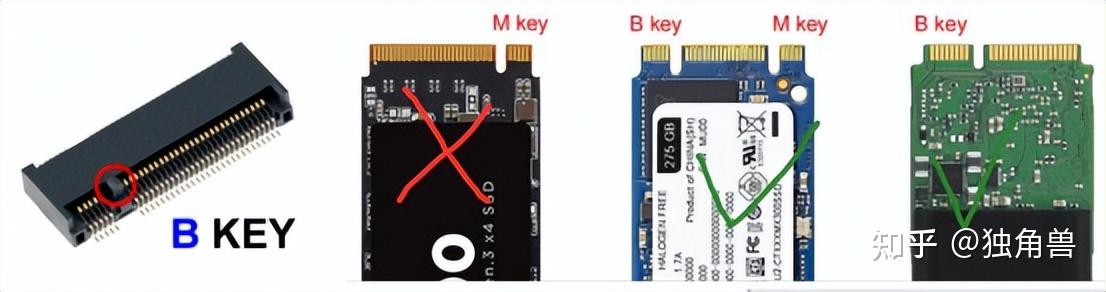
Now, why did the9 HYVD128 (possibly) wreck your T470 even though it's an NVMe SSD? Because it's an M.2 card that's M-keyed, while the T470 WWAN slot is B-keyed.

Image
Planned Purchase: T480s i5-8350 FHD Touch
Impulse Buy: Thinkpad not named for safety reasons :lol:
RIP: X220 4291-C91 X61 7676-A24 760XD-U9E :cry:

Jeannot
Posts: 9
Joined: Sat Dec 23, 2023 1:34 am
Location: Nice, France

Re: T470 : SSD in WWAN slot experience

#3 Post by Jeannot » Sat Nov 30, 2024 7:34 pm

Hello Axur-Delmeria,

First thank you very much for your precious help and the fine details you provided.

Yep : this is the right Huadisk SSD.

Well, in fact the error I made is to insert this M-keyed card into the T470 slot which is B-keyed... I must admit one thing : the insertion was not really easy. I didn't have to force but something was not natural for me. I checked but both connectors seemed to work together...

I think the T470 motherboard hasn't been damaged : an instruction to forbid future boot has been loaded in the BIOS, so the ThinkPad refused to start even the Huadisk SSD removed, but after cleared the BIOS memory by removing battery, the T470 booted fine and all seem to work fine. But I will perform hardware test to be sure.

Thanks again and best wishes

axur-delmeria
Senior ThinkPadder
Senior ThinkPadder
Posts: 4413
Joined: Mon May 28, 2012 5:49 am
Location: Metro Manila, Philippines

Re: T470 : SSD in WWAN slot experience

#4 Post by axur-delmeria » Sat Nov 30, 2024 9:20 pm

One more thing:

IIRC NVMe SSDs on the WWAN slot are only supported on T470 models with 7th gen processors (i5-7300U, i7-7600U, i3-7020U, etc.)-- there are T470 variants with the older 6th gen processors (i5-6200U, i7-6600U, etc.). So an M.2 SATA 2242 SSD is indeed the safe option.

But if you really want an NVMe SSD, it might be better to get the smaller 2230 size (it's getting popular because of the Steam Deck and similar devices like the ROG Ally), then use B-key to M-key adapter. There's a post on the Thinkpad subreddit about it specfically for the T480, but there's reason to believe that it will work for the T470 as well. https://old.reddit.com/r/thinkpad/comme ... atibility/
Planned Purchase: T480s i5-8350 FHD Touch
Impulse Buy: Thinkpad not named for safety reasons :lol:
RIP: X220 4291-C91 X61 7676-A24 760XD-U9E :cry:

Jeannot
Posts: 9
Joined: Sat Dec 23, 2023 1:34 am
Location: Nice, France

Re: T470 : SSD in WWAN slot experience

#5 Post by Jeannot » Sun Dec 01, 2024 2:18 am

Hello :-)

Well, I ran the hardware test procedure on the T470 and all components passed fine, including the motherboard. That's a good point !

Since this T470's CPU is a one of 6th generation (i5-6300u) I'll choose a SATA SSD.

The speeds differences between SATA and NVMe are very discutables when standard use of the SSD...

I trust only Western Digital and Seagate SSDs and they seem to no offer ones in SATA interface so I'll have to take a chinese one, but I used WalRAM, ExRAM and KingSpec SSDs in my other ThinkPad (ThinkPad R61) and they work fine and seem reliable. Just the ExRAM ones figure to be SATA 2 (in the 512 Go size) and the others are SATA 3. As the R61's interface (the one for the CD burner in the Ultrabay) is... an IDE (PATA), the "slower" SATA 2 keeps fine !

I thank you again, your help is precious and you know what you talk about !

Best regards from friendly France

axur-delmeria
Senior ThinkPadder
Senior ThinkPadder
Posts: 4413
Joined: Mon May 28, 2012 5:49 am
Location: Metro Manila, Philippines

Re: T470 : SSD in WWAN slot experience

#6 Post by axur-delmeria » Sun Dec 01, 2024 5:32 am

My trust in Western Digital SSDs was eroded with reports of SA510 SATA SSDs dying within months. I don't know if they fixed that. My SN570 NVMe is holding up well though.

The choices of M.2 SATA 2242 SSDs are much smaller, TBH Transcend is the only one I've found that has enough reputation to be trusted.

I could probably take the risk if it were for myself, but the 2242's SSDs I bought were for friends who needed help upgrading their Thinkpads, so having a cheap, no-name brand was out of the question.
Planned Purchase: T480s i5-8350 FHD Touch
Impulse Buy: Thinkpad not named for safety reasons :lol:
RIP: X220 4291-C91 X61 7676-A24 760XD-U9E :cry:

Jeannot
Posts: 9
Joined: Sat Dec 23, 2023 1:34 am
Location: Nice, France

Re: T470 : SSD in WWAN slot experience

#7 Post by Jeannot » Mon Dec 02, 2024 1:49 am

Hello :-)

Yes, Transcend is fine. At the time of FM, MFM and RLL drives (remember 1980's : Boeing noises, 20 Mo of space and 2 A on the 12 V line, 3 A on the 5 V line...), there were brands like Matrox who provided very reliable drives. Other standards like SCSI "Caviar" was a reference. I also meet strange disks with ESDI interface : IBM proprietary on the ThinkPad 700 series. Very fast and already 300 Mo of capacity. The 700C was even loaded with a color DSTN display...

Good week !

Post Reply
  • Similar Topics
    Replies
    Views
    Last post

Return to “ThinkPad T430-T495 / T530-T590 Series”

Who is online

Users browsing this forum: No registered users and 48 guests