Homepage
 Forum
Forum Drivers
 HMM-Manuals
 MTM
MTM Feed
Feed

Well, I am a proud user of a very nice T470, model 20JN, and I would like to add a 2 To SSD plugged in the WWAN slot.
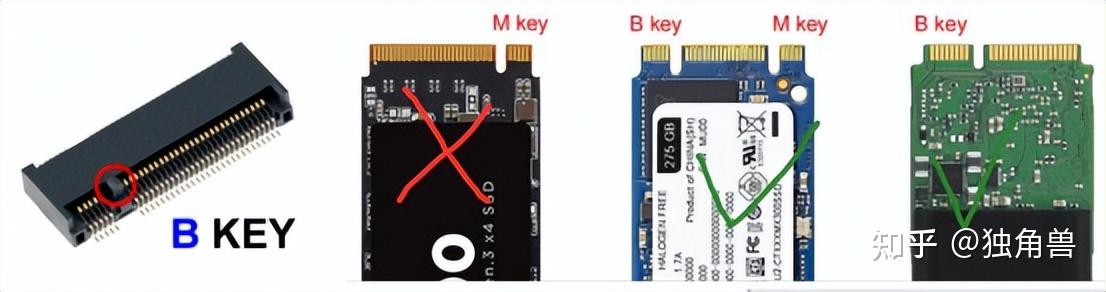
Before buying a 2 To SSD I tried to check the ability of this ThinkPad to use a SSD in this WWAN socket, so I tried to plug in a low coast 128 Go drive. This is a HYVD128 from Huadisk (less than $10 on AliExpress). This drive is not a SATA but a NVMe model (M.2 NVMe 2242).
This SSD plugged in, the T470 didn't start (!!!). No beeps, but also no light on the side of the power switch, and no display activity. There was no light (green or yellow) on the indicator placed near the AC power adapter plug too...
I was in trouble... I removed the SSD and tried to restart the T470 but it didn't... I was more in trouble...
So I removed the plug of the BIOS battery and the plug of the internal battery (I didn't check if there was a real battery but in the doubt...). The plugs reinstalled, the ThinkPad started and booted correctly. The only trace if this experience was a message from the BIOS to check time and date values... I was no more in trouble...
So, here are my questions :
- Do I need to place a SATA SSD instead of a NVMe SSD (M.2 2242 SATA SSD instead of M.2 2242 NVMe SSD) ?
- I have read on this forum that the 20JN model can't accept a SSD into the WWAN slot, just a 4G/LTE-A in this slot : can you confirm this ?
- And in this case, I agree to change the main SSD (an Intel SSDPEKKF256G7L) by the 2 To SSD I will buy (NVMe I think...) but is the T470 is able to boot on a 2 To SSD ?
I thank you very much for your help !!!
Best wishes to all readers and contributors